Is it Worth Buying a T-Shirt Printer?
by Marcus Bell · April 03, 2022
The custom apparel market generates more than $6 billion in global revenue annually, and small businesses and independent creators are fueling a growing share of that demand. If you've been weighing whether to invest in your own machine, you're already thinking like a print entrepreneur. Finding the best t-shirt printing method for your workflow is the first real decision you'll make — and it shapes everything from your startup costs to your finished product quality. Getting it right means understanding what each technology actually does, not just what the spec sheet promises.

There are five major printing technologies in active use today: direct-to-garment (DTG), sublimation, heat transfer vinyl (HTV), screen printing, and direct-to-film (DTF). Each carries a different cost structure, learning curve, and ideal use case. The method that works beautifully for a crafter making twenty shirts a month is not the same method a small merch brand printing two hundred units needs. Context matters more than any individual machine feature.
This guide covers practical examples, common myths, honest trade-offs, and fast wins — so you can make a decision grounded in how you actually plan to work, not how a vendor pitch says you should. Whether you're exploring t-shirt printing for the first time or reconsidering a setup you've outgrown, the framework here applies.
Contents
- T-Shirt Printing in the Real World
- How to Identify the Best T-Shirt Printing Method for Your Needs
- Myths About T-Shirt Printing You Should Stop Believing
- When Buying a Printer Makes Sense — and When It Doesn't
- Solving Common T-Shirt Printing Problems
- The Honest Pros and Cons of Owning a T-Shirt Printer
- Quick Wins: Getting Great Results Faster
- Frequently Asked Questions
- Key Takeaways
T-Shirt Printing in the Real World
The gap between what printing looks like on YouTube and what it looks like in your actual workspace is wider than most guides acknowledge. Understanding how different makers use these machines day-to-day protects you from buying into an idealized setup that doesn't match your reality.
DTG in Action
Direct-to-garment printing is closest to what you'd call a true "printer" experience. You design on screen, send the file, and the machine applies ink directly onto fabric. For short runs of full-color designs on 100% cotton, it's genuinely hard to beat. But DTG machines require pre-treatment on dark garments, regular print-head maintenance, and consistent humidity control. The prep time alone surprises most new operators — it's rarely as simple as press-and-print.
- Best for: photographic or detailed designs, runs of 1–20 units
- Fabric: works best on 100% cotton or high-cotton blends
- Upfront cost: $5,000–$30,000+ for commercial-grade hardware
- Hidden costs: pre-treatment fluid, maintenance ink, replacement print heads
HTV and Sublimation Scenarios
Heat transfer vinyl is where many makers start, and for good reason. You cut your design with a Cricut or similar cutter, weed the excess, and press it onto fabric with a heat press. The barrier to entry is low and results are durable when executed correctly. Check out our guide on how to use T-shirt transfer paper if you're exploring iron-on alternatives alongside HTV — the two methods overlap more than you might expect.
Sublimation printing requires polyester fabric (or poly-coated substrates) and produces vibrant, wash-resistant prints because the ink permanently dyes the fibers rather than sitting on top. The tradeoff: it doesn't work on dark fabrics or natural fibers without a white polyester base layer. Knowing this constraint upfront prevents a lot of wasted blanks early on.
How to Identify the Best T-Shirt Printing Method for Your Needs
The most common mistake new printers make is choosing equipment based on capability rather than workflow. A machine that can do everything is often optimized for nothing you specifically need. Start with three honest questions: How many shirts will you print per month? What fabrics will you use? And what's your real all-in budget — including consumables, not just the purchase price?
Comparing Methods Side by Side
Use this table to benchmark the major methods against each other before you commit to anything:
| Method | Startup Cost | Best Fabric | Min. Viable Run | Wash Durability | Color Range |
|---|---|---|---|---|---|
| DTG | $5,000–$30,000+ | 100% Cotton | 1 unit | Good (with pretreat) | Full color |
| Sublimation | $300–$1,500 | 100% Polyester | 1 unit | Excellent | Full color |
| Heat Transfer Vinyl | $200–$600 | Cotton or Poly | 1 unit | Very Good | Solid / limited gradient |
| Screen Printing | $1,000–$5,000+ | Most fabrics | 12–24 units | Excellent | Spot colors |
| DTF (Direct-to-Film) | $1,500–$8,000 | Most fabrics | 1 unit | Very Good | Full color |
The best t-shirt printing method is the one that fits your actual order volume and fabric mix — not the one with the most impressive feature list. According to Wikipedia's overview of screen printing, the technique has been refined over centuries and remains dominant at scale precisely because of its durability and per-unit economics. Modern digital methods haven't replaced it — they've expanded what's viable for smaller operators.
Myths About T-Shirt Printing You Should Stop Believing
Misinformation moves fast in the printing community. These are the misconceptions that consistently lead new buyers to the wrong equipment — or to frustration when reality diverges from the pitch.
Quality Myths
- Myth: DTG always produces the best quality. Reality: DTG output degrades on synthetic blends and dark garments without proper pre-treatment. HTV and sublimation produce sharper, more consistent results on their ideal substrates.
- Myth: A more expensive machine means better prints. Reality: Technique and ink quality matter as much as hardware. A well-calibrated mid-range setup regularly outperforms a neglected premium one.
- Myth: You can print on any fabric with any method. Reality: Fabric compatibility is non-negotiable. Sublimation won't bond to cotton. DTG struggles on polyester. Matching method to material is the foundation, not an afterthought.
Cost Myths
The purchase price is just the beginning — factor in ink, maintenance kits, pre-treatment, and replacement parts before you calculate your true cost per shirt.
- Myth: Buying a printer is always cheaper than outsourcing. Reality: At low volumes — under 50 shirts per month — outsourcing frequently costs less once you account for ink, consumables, equipment wear, and your own labor hours.
- Myth: Entry-level machines are good enough to launch a business. Reality: Consumer-grade printers lack the throughput, registration accuracy, and durability for reliable commercial use. They're fine for personal projects; they're not income tools.
When Buying a Printer Makes Sense — and When It Doesn't
Most guides hedge on this question. Here's a direct answer based on practical thresholds that experienced operators actually use.
When You Should Buy
- You're printing 50 or more shirts per month on a consistent basis
- You need fast turnaround — same-day or next-day fulfillment
- You want full control over color accuracy and quality consistency
- You have dedicated workspace with stable temperature and humidity
- You're building a scalable operation — our guide on how to start a t-shirt printing business lays out the full cost structure and equipment decisions involved
When You Should Wait
- You're still testing demand and haven't validated a market
- Your monthly volume sits below 30 shirts
- You lack dedicated space for equipment and proper ventilation
- You need a wide variety of fabric types from day one — no single method covers all substrates
- Your priority is variety over repeatability
There's no shame in starting with a print-on-demand service or a local print shop while you build volume. Many successful print businesses outsourced every order until the numbers justified ownership. Patience at this stage is a business strategy, not a compromise.
Solving Common T-Shirt Printing Problems
Even experienced operators encounter recurring issues. Knowing the root causes — and how to prevent them — separates professionals from hobbyists faster than any equipment upgrade.
Fading and Peeling
Premature fading is almost always a curing or washing issue, not a hardware defect. For HTV prints, insufficient heat press time or temperature leaves the adhesive under-bonded. For DTG, under-cured ink washes out within a few cycles. Always verify your cure settings against the manufacturer's specifications and run a test-wash on a sample print before committing to a full batch. Color shift in sublimation prints after washing almost always points to a fabric blend issue — the polyester content must be high enough for proper dye absorption.
Alignment and Registration Errors
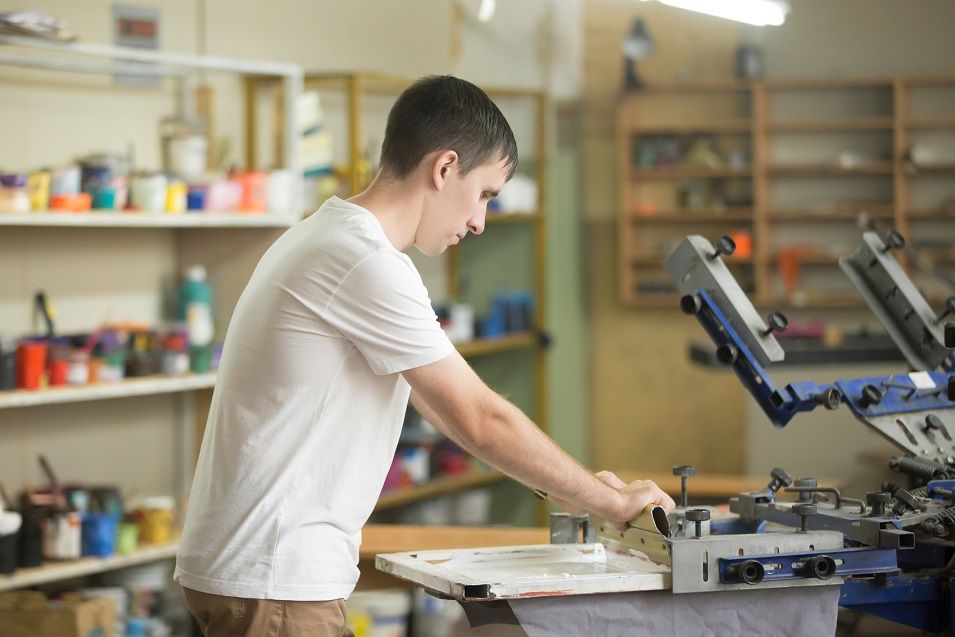
Misaligned prints cost you materials, time, and reputation. For HTV, a laser level or T-square establishes consistent positioning across every garment. For DTG and DTF, a quality platen system holds the shirt flat without stretching the fabric. Screen printers encounter registration drift when screens shift between passes — regular tensioning checks and proper clamping prevent most of those issues. Build a pre-production checklist and run it before every print session, no matter how routine the job feels.
The Honest Pros and Cons of Owning a T-Shirt Printer
Owning your equipment gives you independence. It also gives you responsibility. Here's an unvarnished look at both sides so you can calibrate your expectations before you buy.
Advantages
- Creative control: You set the color profiles, manage curing, and own every variable that affects output quality. No relying on a third party's standards.
- Faster turnaround: Small orders ship the same day you print them. That responsiveness is a genuine competitive advantage for custom and personalized products.
- Lower per-unit cost at scale: Once volume justifies the hardware investment, your cost-per-shirt drops significantly versus outsourcing.
- On-demand flexibility: You can profitably print single units, which opens up personalized product lines that print-on-demand services often can't match on margin.
Disadvantages
- High upfront capital: Even a modest DTF or sublimation setup runs $1,500–$3,000 all-in before you buy blanks or ink stock.
- Maintenance overhead: Inkjet heads clog. Heat press platens warp. Screens need re-coating. Equipment care is an ongoing time and cost commitment.
- Real learning curve: Professional output takes time to develop. Budget for a meaningful number of wasted shirts and materials during your learning period.
- Space requirements: A heat press, curing station, and organized work surface add up quickly. This is not a laptop-on-the-kitchen-table operation.
Quick Wins: Getting Great Results Faster
You don't need to master every variable before you start producing quality work. A handful of high-leverage habits make a measurable difference from your very first session and compound over time.
High-Leverage Habits
- Calibrate your heat press temperature with an infrared thermometer — manufacturer-listed temps are often off by 10–20°F, which is enough to ruin a transfer.
- Pre-press every shirt for 3–5 seconds before applying any transfer to eliminate moisture and wrinkles that cause adhesion failures.
- Use a Teflon sheet or parchment cover sheet on every press — it protects both the platen and your design from scorching.
- Run a test print on a scrap piece of comparable fabric before committing ink or vinyl to a finished blank.
- Keep a print log: record temperature, pressure, dwell time, and results for every new material combination. It eliminates guesswork on repeat orders.
If you're working with vinyl, clean weeding technique is non-negotiable for professional-looking results. Our guide on how to weed vinyl covers the right tools and approach for getting every detail out cleanly. Small process improvements compound quickly — the difference between a 90% and 99% success rate is enormous once you're running consistent volume.
Frequently Asked Questions
What is the best t-shirt printing method for someone just starting out?
Heat transfer vinyl with a heat press is the most accessible entry point for beginners. Startup costs are low, the learning curve is manageable, and the results are durable and professional when done correctly. Sublimation is a close second for anyone working primarily with polyester garments — the process is relatively straightforward and the prints are wash-resistant from day one.
Is it cheaper to print your own shirts or use a print-on-demand service?
At low volumes — under 30 to 50 shirts per month — print-on-demand services are typically more cost-effective once you account for ink, blanks, equipment maintenance, and your own time. At higher volumes, owning your equipment becomes more economical. Most operators find ownership pays off somewhere between 50 and 100 units per month, depending on the method and their ink costs.
Can you use a standard inkjet printer for t-shirt printing?
You can pair a standard inkjet printer with iron-on transfer paper for basic shirt decoration, but the results are noticeably inferior to dedicated printing methods. Transfer paper prints tend to feel stiff on fabric, crack with repeated washing, and fade faster than DTG, sublimation, or HTV. It's a reasonable option for personal one-off projects, but not a reliable method for anything you plan to sell or gift regularly.
Key Takeaways
- The best t-shirt printing method depends entirely on your volume, fabric preferences, and realistic budget — there is no universal right answer.
- Owning a printer makes financial sense only when your monthly volume consistently justifies both the capital cost and ongoing maintenance demands.
- Most print quality problems trace back to technique and calibration, not hardware — invest time in testing before blaming your machine.
- Start with the simplest method that meets your current needs, then scale your equipment as your volume and skill grow.
 |  |  |  |
About Marcus Bell
Marcus Bell spent six years as a production manager at a small-batch screen printing shop in Austin, Texas, overseeing everything from film output and emulsion coating to press registration, squeegee selection, and garment finishing. He expanded into vinyl cutting and Cricut projects when the shop added a custom apparel decoration line, giving him direct experience with heat transfer vinyl application, weeding techniques, and the real-world differences between Cricut, Silhouette, and Brother cutting machines. At PrintablePress, he covers screen printing, vinyl cutting and Cricut projects, and T-shirt printing and decoration techniques.


Get some FREE Gifts. Or latest free printing books here.
Disable Ad block to reveal all the secret. Once done, hit a button below
| | | |