How Much Does a Screen Printer Cost?
by Karen Jones · March 29, 2022
A screen printer cost ranges from $30 for a basic tabletop single-color press to well over $50,000 for a fully automatic commercial machine. That gap is massive, but it makes sense once you understand what drives pricing — and the right entry point for your situation is clearer than you think. Whether you're exploring screen printing equipment for the first time or upgrading from a starter setup, this breakdown covers every tier so you can make a confident decision.
Screen printing is one of the most durable and cost-effective decorating methods available, but the machine is only part of the investment. Screens, emulsion, squeegees, flash dryers, and inks all add up. Most people budget for the press and forget everything else — that's a mistake we'll address head-on here.
This guide covers the full cost picture: press prices by type, realistic total setup costs, and what experienced printers actually spend on ongoing supplies and maintenance. You'll also find specific strategies to stretch your budget without compromising print quality.
Contents
- Screen Printer Cost at a Glance: Price Tiers and What You Get
- What a Complete Setup Actually Costs
- Buying Mistakes That Will Cost You More Later
- How to Cut Costs Without Cutting Quality
- Solving Common Cost Overruns Before They Happen
- Keeping Your Equipment Running and Your Costs Down
- Frequently Asked Questions
- Next Steps
Screen Printer Cost at a Glance: Price Tiers and What You Get
The screen printing market divides cleanly into three tiers. Each one has a different ceiling for volume, precision, and complexity. Here's where every major press category falls.
| Press Type | Price Range | Colors | Best For |
|---|---|---|---|
| Tabletop Single-Color Manual | $30 – $150 | 1 | Hobbyists, first prints |
| Entry Manual Multi-Station | $200 – $800 | 2–4 | Side hustles, small batches |
| Mid-Range Manual Press | $800 – $2,500 | 4–6 | Serious hobbyists, part-time shops |
| Semi-Automatic Press | $2,500 – $15,000 | 6–8 | Growing businesses, consistent volume |
| Entry Automatic Press | $15,000 – $30,000 | 8–12 | Established shops, commercial runs |
| Full Commercial Automatic | $30,000 – $100,000+ | 12+ | High-volume production facilities |
Entry-Level Manual Presses
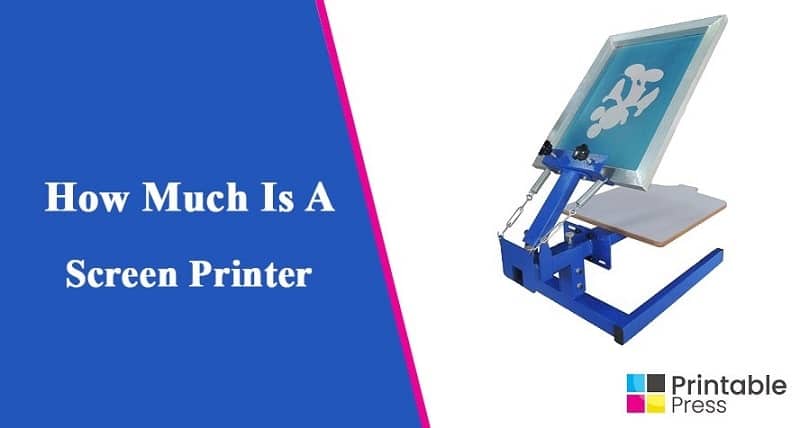
At the bottom of the price range, you're looking at single-color tabletop units like the Speedball Fabric Screen Printing Frame ($30–$80) or entry-level four-color carousel presses in the $200–$500 range. These are functional starting points, but they have real limitations: thin aluminum construction, loose registration, and no micro-adjustments. Expect inconsistency across a run of more than 20 shirts.
Brands like Riley Hopkins and Vastex offer genuine entry-level four-color presses in the $600–$900 range. These are a step up in rigidity and will hold registration reliably if you take your time on setup.
Mid-Range and Semi-Automatic Presses
This is where serious printing starts. A quality six-color manual press from M&R, Anatol, or Workhorse costs $1,500–$2,500 and handles multi-color work with repeatability. Semi-automatics take the physical labor out of the squeegee stroke, which reduces fatigue and standardizes pressure. If you're printing 50+ shirts per day, a semi-auto pays for itself in output consistency alone.
Commercial Automatic Presses
Automatic presses index and print without manual intervention. Machines like the M&R Chameleon or Anatol Volt start around $30,000 and can print hundreds of shirts per hour. The ROI calculation is simple: at $8–$15 per shirt for custom printing, a single large order can cover months of equipment payments. These machines also integrate with conveyor dryers, which adds another $3,000–$15,000 to your total.
What a Complete Setup Actually Costs
The press price is the headline number, but it's rarely the biggest surprise. Here's a realistic breakdown of what each setup tier actually requires to produce your first print.
Hobby and Home Setup
- Single-color or 4-color entry press: $80–$600
- Screens (4–6 count): $60–$150
- Emulsion + scoop coater: $40–$80
- Squeegees: $20–$60
- Plastisol inks (starter set): $80–$150
- Heat gun or flash dryer: $50–$300
- Exposure unit (DIY or basic): $100–$300
Total realistic budget: $430–$1,640. Many people start for under $500 and add equipment as they grow. If you're comparing this to heat press machine costs, you'll find screen printing requires more upfront infrastructure but significantly lower per-shirt costs at volume.
Pro tip: Don't cheap out on your exposure unit — poor exposure is the root cause of at least half of all emulsion and ink adhesion problems beginners face.
Small Business Setup
A working small-batch shop setup typically costs $3,000–$8,000. This includes a quality four- to six-color manual press, a proper flash dryer, a UV exposure unit, a washout booth, and enough screens and inks to handle varying job types. You won't need to replace most of this hardware for years if you maintain it correctly.
High-Volume Shop Setup
At the commercial level, budget $40,000–$150,000 to set up a complete production floor. That covers an automatic press, a conveyor dryer matched to your press's output, an industrial exposure unit, a professional darkroom or screen-reclaiming system, and adequate ventilation. Many shops finance this equipment over 24–60 months to preserve working capital.
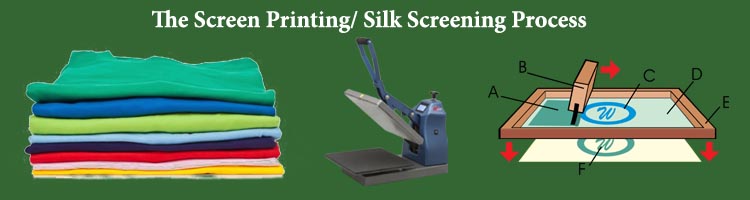
According to Wikipedia's overview of screen printing, the process dates back centuries and remains one of the most versatile printing methods precisely because its core mechanics scale from kitchen-table setups to factory floors.
Buying Mistakes That Will Cost You More Later
Most of the expensive lessons in this craft are preventable. These are the patterns that consistently show up in shops that overspend or underperform.
Underestimating Consumable Costs
Plastisol ink, emulsion, mesh screens, and solvents are recurring expenses. A single quart of quality plastisol runs $15–$30, and a decent shop will go through several quarts per week at moderate volume. Emulsion costs $20–$60 per gallon. Screens need reclaiming chemicals. These costs are predictable once you track them — but most beginners don't track them, so they don't account for them in pricing. Read up on screen printing ink additives and modifiers to understand how extending agents and reducers affect your per-print cost.
Skipping on Screen Tension and Registration
Low-quality screens with inconsistent mesh tension cause ink bleed, misregistration, and premature breakdown. A properly tensioned screen runs at 25–35 Newtons per centimeter. Buying bargain screens saves $10 per screen and costs you $50 in wasted shirts per run. Invest in a mesh tension meter ($80–$150) early — it pays for itself on the third job.
Warning: Never use reclaimed screens for tight-tolerance multicolor work — even minor residual emulsion ghost images shift ink deposit and destroy registration.
How to Cut Costs Without Cutting Quality
Buy Used Equipment Strategically
The used market for screen printing equipment is strong. Presses from M&R, Anatol, and Workhorse are built to last 20+ years with proper maintenance. A used six-color manual press in good condition sells for 40–60% of its new price. Check the platen arms for play, inspect the off-contact adjustment mechanisms, and confirm the registration system holds under load. Avoid used exposure units unless you can test them — lamps degrade and replacement sets can cost $200–$600.
For anyone building a home operation, comparing how to choose your first manual screen printing press against used market options is time well spent before committing.
Start With the Right Number of Colors
Every color station adds cost — more screens, more ink, more setup time, more risk of misregistration. Starting with two- or three-color designs lets you produce professional results without overextending your equipment. As your volume and skill increase, add stations. A six-color press running two-color jobs is still a six-color press when a complex job comes in.
Solving Common Cost Overruns Before They Happen
Ink and Emulsion Going to Waste
Plastisol ink stored properly lasts years. Emulsion, once mixed with sensitizer, has a shelf life of 4–6 weeks in the refrigerator. The two main waste scenarios are: mixing too much emulsion at once, and leaving ink open between print runs. Store plastisol with the lid sealed and the container inverted to keep it from skinning. Buy emulsion in sizes that match your actual coating frequency — not your aspirational one.
Misregistration and Spoiled Shirts
Misregistration on multicolor prints ruins shirts and wastes ink. The fix is almost always in setup, not in the press itself. Take the time to pre-register screens on a registration board before mounting them on the press. Use micro-registration locks on every arm. A 20-minute setup investment eliminates a 2-hour spoilage cleanup. If you're planning to grow beyond your current capacity, read through how to scale your screen printing business from home to shop — registration systems and workflow are covered in detail there.
Keeping Your Equipment Running and Your Costs Down
Daily and Weekly Cleaning
Screen printing equipment rewards consistent maintenance with years of reliable service. After every print session:
- Flood the screens and remove residual ink before it dries
- Wipe down all platen surfaces with press wash and a lint-free cloth
- Check and re-tighten all locking knobs on registration arms
- Inspect squeegee blades for nicks — a damaged blade costs you ink deposit control
Weekly, lubricate pivot points and center shaft bearings with the manufacturer's recommended lubricant. Neglected bearings turn a $2,000 press into a $200 press over two years.
When to Repair vs. Replace
Manual presses are simple mechanical devices. Most repairs — worn bushings, stripped threads, bent pallet arms — cost under $100 in parts and an afternoon of work. Replace the press only when structural integrity is compromised or the design is fundamentally limiting your output. A flash dryer with a failed element is a $40 repair. A conveyor dryer with a failing control board is a different calculation — compare repair quotes against a used unit before committing either way.
Frequently Asked Questions
How much does a screen printer cost for a beginner?
A beginner can get started with a functional single-color or four-color manual press for $80–$600. Add screens, emulsion, ink, and a heat source, and the total startup cost for a home hobby setup runs $430–$1,200. Quality entry-level options from Speedball, Riley Hopkins, and Vastex fall in this range.
Is screen printing cheaper than heat pressing?
Screen printing has higher upfront setup costs per job but dramatically lower per-shirt costs at volume. Heat pressing is cheaper to start and faster for short runs of one or two pieces, but it can't match screen printing's throughput or ink durability on large orders. The break-even point for most shops is around 12–24 shirts per design.
What ongoing costs should I expect with a screen printer?
Your main recurring expenses are plastisol inks ($15–$30 per quart), emulsion ($20–$60 per gallon), screen mesh replacement, and press wash or reclaiming chemicals. A small shop running 100–200 shirts per week typically spends $150–$400 per month on consumables, not counting blank garments.
Next Steps
- Determine your realistic monthly print volume and use the price tier table to identify which press category matches your output needs — don't buy for aspiration, buy for your actual current volume.
- Build a complete startup budget that includes screens, emulsion, inks, exposure, and drying equipment — not just the press price — before you commit to any purchase.
- If you're buying your first manual press, read the full guide on choosing your first manual screen printing press and compare three specific models in your budget range before ordering.
- Set up a basic consumables tracking spreadsheet from day one — log ink usage and screen lifespan per job so you can price your work accurately from the start.
- Establish a post-session cleaning routine and stick to it for every single print run — consistent maintenance is the single highest-ROI habit in screen printing.
 |  |  |  |

About Karen Jones
Karen Jones spent seven years as an office manager at a mid-sized financial services firm in Atlanta, where she was responsible for a fleet of more than forty inkjet and laser printers spread across three floors, managed ink and toner procurement contracts, and handled first-line troubleshooting for connectivity failures, paper jams, and driver conflicts before escalating to IT. That daily exposure to printers from Canon, Epson, HP, and Brother under real office conditions gave her a practical command of setup, maintenance, and common failure modes that spec sheets never capture. At PrintablePress, she covers printer how-to guides, setup and troubleshooting tips, and practical advice for home and office printer users.


Get some FREE Gifts. Or latest free printing books here.
Disable Ad block to reveal all the secret. Once done, hit a button below
| | | |