Direct To Garment Printing Vs. Screen Printing
by Karen Jones · April 24, 2022
The global custom apparel printing industry processes billions of garments every year, and the single most debated decision in that space is direct to garment vs screen printing — two methods that look similar on the surface but work in fundamentally different ways. If you've been trying to figure out which one fits your next project, you're not alone. Picking the wrong method costs you money upfront, compromises print quality, or locks you into a workflow that doesn't scale the way you need it to. This guide cuts through the noise so you can make a confident, informed choice. You can also browse our printer guides for a broader look at printing technologies beyond apparel.
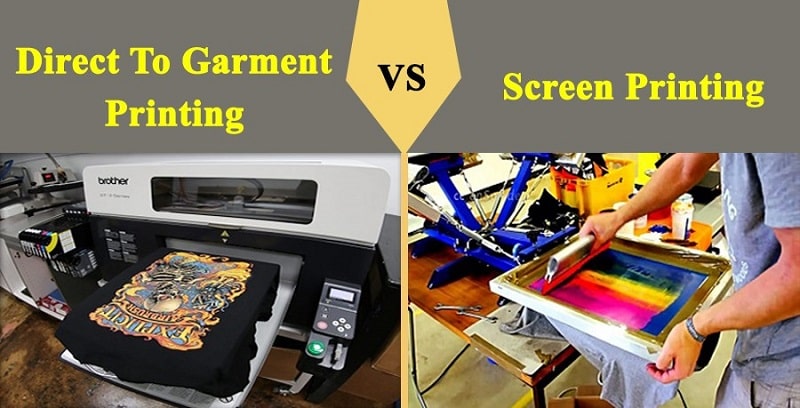
Both methods produce professional, vibrant results. But they use completely different technology, and that shapes everything — your cost per shirt, the level of detail your artwork can carry, how long setup takes, and how the finished print holds up after dozens of washes. Understanding these differences at a practical level means you stop guessing and start making decisions that actually serve your goals.
Whether you're running a print-on-demand Etsy shop, launching branded merch for a local business, printing uniforms for a sports team, or just ordering a custom gift for someone, the right method is out there — and it's probably not the one you defaulted to. Let's go through everything you need to know.
Contents
- The Real Strengths and Weaknesses of Each Method
- Which Projects Each Method Handles Best
- How Each Process Works From Start to Finish
- Getting Better Results With Either Method
- Knowing When to Choose DTG — and When to Stick With Screen Printing
- Clearing Up the Biggest Misconceptions
- Frequently Asked Questions
The Real Strengths and Weaknesses of Each Method
Where DTG Comes Out Ahead
Direct to garment printing works like a sophisticated inkjet printer — instead of paper, it prints onto fabric. Water-based inks jet directly onto the garment surface, layer by layer, allowing for photographic detail and full color gradients without any additional cost per color. You pay one flat rate whether your design has 2 colors or 200. There are no screens to burn, no minimum order quantities, and virtually no setup time beyond loading the file. If you're looking to invest in this technology for your own shop, our guide to the best DTG printers covers the leading machines across different price points.
DTG excels at complex, multicolor artwork — photorealistic portraits, detailed illustrations, gradient-heavy graphics, and anything that would require dozens of color separations to reproduce via traditional methods. The ink soaks into the fabric fibers on light-colored garments, producing a soft hand feel that doesn't crack or peel the way some other transfer methods do.
Where Screen Printing Still Dominates
Screen printing forces plastisol or water-based ink through a mesh stencil directly onto the garment. Each color in your design requires a separate screen, which is why setup costs run higher for multicolor jobs. But once those screens are prepared, the process becomes extremely fast — a professional setup can output hundreds of shirts per hour. According to Wikipedia's overview of screen printing, the technique has centuries of history and remains the dominant commercial apparel printing method for good reason.
Per-unit cost drops sharply as order volume increases, making screen printing the undisputed winner for large runs. The ink sits on top of the fabric rather than soaking in, which produces stronger color vibrancy — especially on dark fabrics — and exceptional durability over time.
Pro tip: If your design has fewer than 4 colors and you're ordering more than 50 pieces, screen printing will almost always beat DTG on both cost and color saturation.
Which Projects Each Method Handles Best
Best Scenarios for DTG Printing
DTG is the right call when your order size is small and your design is complex. One-off custom gifts, print-on-demand fulfillment, sample runs, and prototype testing all benefit from DTG's zero-setup-cost structure. If you sell through platforms that handle individual orders — Printful, Printify, Gooten — DTG is almost certainly powering those prints on the backend.
DTG handles photographic complexity that screen printing simply cannot replicate without a massive cost increase. It also performs best on 100% cotton or high-cotton-blend garments, where the ink absorbs evenly and colors stay accurate. For a broader look at fabric options available for direct printing applications, check out our roundup of the best printable fabric sheets. And if you're weighing whether to print custom shirts yourself versus ordering them finished, the comparison in making your own custom t-shirt vs. buying one online is a useful read.
Best Scenarios for Screen Printing
Screen printing shines with bulk orders, simple designs, and dark-colored fabrics. Athletic jerseys, promotional tees, band merch, corporate event shirts, and uniform runs all fall squarely in screen printing territory. If your design uses spot colors — solid, flat areas of color without gradients — screen printing produces results that look cleaner and more saturated than DTG on most fabric types.
For a complete breakdown of where screen printing fits alongside other apparel methods like heat transfer vinyl, sublimation, and direct embroidery, the types of shirt printing guide covers the full spectrum.
How Each Process Works From Start to Finish
The DTG Process Step by Step
Knowing what happens inside a DTG workflow helps you set realistic expectations for turnaround and quality. The process starts with pretreatment — a chemical solution sprayed onto the garment that helps ink bond to the fabric fibers. This step is non-negotiable for dark fabrics. Skip it, and your colors will come out muted or disappear entirely after the first wash.
After pretreatment dries, the shirt gets loaded onto a flat platen that holds it taut and perfectly positioned. The print head moves across the surface in passes, depositing ink in precise layers. Once printing is complete, the garment goes into a heat press or conveyor dryer to cure the ink at the correct temperature. A single shirt can move through the entire DTG process in under five minutes, making it genuinely practical for on-demand and small-batch workflows. If you work with heat application equipment in other parts of your process, our guide on what you can do with a heat press covers a wide range of applications you may not have considered.
The Screen Printing Process Step by Step
Screen printing involves significantly more upfront preparation. Your artwork gets separated into individual color layers. Each layer gets converted into a film positive, which then exposes photosensitive emulsion on a mesh screen under UV light — creating the stencil for that color. A 6-color design requires 6 screens, each prepared separately.
Once screens are mounted on the press, ink gets pushed across each screen in sequence. Between colors, the shirt may pass through a flash dryer to partially cure each layer. After all colors are applied, the garment runs through a conveyor dryer to fully cure the ink. That setup phase — color separation, film output, screen exposure, press registration — can easily take an hour or more before a single shirt gets printed. The economics only make sense once that setup cost gets spread across a large enough run.
| Factor | Direct to Garment (DTG) | Screen Printing |
|---|---|---|
| Setup Cost | Minimal — no screens needed | Higher — screens per color |
| Minimum Order | 1 piece | Typically 24–50+ pieces |
| Color Complexity | Unlimited colors, no extra cost | Cost increases per color |
| Best Fabric | 100% cotton, light garments | Most fabrics, great on darks |
| Print Speed | Slower per unit | Very fast at volume |
| Durability | Good with proper care | Excellent — outlasts many washes |
| Detail Level | Photographic quality possible | Best for spot colors and bold lines |
| Cost per Unit at Scale | Stays relatively flat | Drops significantly |
Getting Better Results With Either Method
Your file resolution is the single factor most likely to undermine an otherwise perfect print — always supply artwork at 300 DPI minimum, sized to the actual print dimensions.
DTG Tips
File preparation is everything with DTG. Use PNG files with transparent backgrounds rather than flattened JPEGs. Make sure your artwork is sized at actual print dimensions at 300 DPI — not scaled up from a smaller file. A 72 DPI web graphic stretched to fill a shirt front will print visibly pixelated, and no amount of post-processing saves it.
Pretreatment consistency directly determines color consistency. If you're running your own DTG machine, invest in a quality pretreatment sprayer with an even spray pattern, and always test on the specific fabric blend you're printing. Color profiles also matter — work in sRGB and calibrate your RIP software to your ink set for the most accurate output. If you're curious how DTG compares to sublimation-based workflows, our guide to sublimation printing explains how that method works and where it fits differently.
Screen Printing Tips
In screen printing, ink viscosity and squeegee pressure are the variables that separate sharp, clean prints from muddy, bleeding ones. Keep your ink at a consistent working temperature and test squeegee pressure on a sample before running your full order. Too much pressure pushes ink under the stencil edges and destroys fine detail.
Use an underbase — a white ink layer printed first — whenever you're printing on dark garments. The underbase gives subsequent colors an accurate surface to sit on, preventing the dark fabric from absorbing and distorting your colors. For heat press equipment that integrates well into screen printing curing workflows, see our recommendations on the best heat press for sublimation, many of which also handle screen print curing effectively.
Knowing When to Choose DTG — and When to Stick With Screen Printing
Choose DTG When
DTG is your answer when order quantity is low, design complexity is high, or turnaround speed matters more than per-unit cost. Specifically: you're ordering fewer than 25 pieces, your artwork has gradients or photographic elements, you need to print multiple unique designs in the same session, or you're fulfilling individual customer orders without batch processing. DTG removes the economic barrier for small runs entirely — you pay for exactly what you print, nothing more.
DTG also wins when your customer wants to see a sample before committing to a larger order. You can print one shirt at a reasonable cost, get approval, and then decide whether to scale up with DTG or switch to screen printing for the full run.
Choose Screen Printing When
Screen printing becomes the obvious choice once your order exceeds roughly 50 units of the same design. At that scale, setup costs are fully amortized and the per-unit price drops well below what DTG can offer. It's also the right call when your design uses 4 or fewer solid colors, when you're printing on dark or synthetic fabrics, or when long-term durability is a priority — think workwear, athletic uniforms, or items that get washed frequently under tough conditions.
If you're running a small business that regularly produces large branded runs, screen printing is likely your most cost-effective core method. Our guide to the best printers for small business covers supporting equipment for the broader production workflow.
Clearing Up the Biggest Misconceptions
DTG Myths
The most persistent myth about DTG is that the prints don't last. Early DTG machines produced prints that faded quickly, which created a reputation the technology has since outgrown. Modern DTG inks, applied with proper pretreatment and cured at the correct temperature, produce prints that hold up through 50+ wash cycles without significant fading — provided you follow care instructions.
DTG is not universally more expensive than screen printing. On small orders, DTG is dramatically cheaper. The cost inversion only happens at higher quantities. Many people also assume DTG works on all fabrics — it doesn't. Polyester-heavy blends resist the water-based ink and produce dull, inaccurate colors. Cotton is where DTG consistently delivers.
Screen Printing Myths
A common misconception is that screen printing can't handle photographic images. It can — through halftone dot techniques and simulated process printing — but it's technically demanding, requires experienced operators, and still doesn't match DTG for true photographic reproduction. Know the limits before you commit.
People also assume screen printing is always cheaper. For small runs, it's not. The setup cost for a 4-color design at a typical shop runs $50–$100 in screen fees alone before a single shirt is printed. On a 10-piece order, that wipes out any per-unit savings immediately. Volume is the only thing that makes screen printing economically superior — and that threshold matters more than most buyers realize.
Frequently Asked Questions
Is direct to garment printing better than screen printing for photo-realistic designs?
Yes. DTG handles photographic complexity — gradients, shading, subtle color transitions — far better than screen printing. Screen printing can approximate photos through halftone techniques, but the results require expert execution and still fall short of what a well-calibrated DTG machine produces on cotton fabric.
Which method produces more durable prints?
Screen printing generally produces more durable prints, particularly for garments washed frequently or under tough conditions. The plastisol ink sits on top of the fabric and resists fading well. DTG prints are durable with proper pretreatment and curing, but they typically show more wear over time on heavily laundered items.
What is the minimum order quantity for screen printing?
Most professional screen printing shops set a minimum of 24–50 pieces per design. Some shops go lower, but the economics of screen setup costs make very small runs expensive on a per-unit basis. For orders under 25 pieces, DTG almost always makes more financial sense.
Can you use DTG printing on dark-colored shirts?
Yes, but it requires a white underbase layer printed before the design colors. This adds cost and slightly increases production time. The pretreatment step is also more critical on dark fabrics. Done correctly, DTG on dark shirts produces accurate colors — but it's more demanding than printing on white or light-colored garments.
Does screen printing work on polyester fabrics?
Screen printing works on polyester, but it presents challenges. The heat used to cure the ink can cause dye migration — where the fabric's dye bleeds into the ink layer and shifts colors. Low-cure inks and dye-blocking underbases help manage this. DTG also struggles with polyester for different reasons, making sublimation a better alternative for all-polyester garments.
How do setup costs compare between DTG and screen printing?
DTG has virtually no setup cost — you load a file and print. Screen printing carries setup costs tied to the number of colors in your design. A 4-color job typically involves screen fees of $50–$100 or more, depending on the shop. Those costs are fixed regardless of order size, which is why large runs are the only way to make screen printing economically competitive with DTG.
The best printing method isn't the one everyone's using — it's the one that matches your order size, your artwork, and your budget, every single time.
 |  |  |  |

About Karen Jones
Karen Jones spent seven years as an office manager at a mid-sized financial services firm in Atlanta, where she was responsible for a fleet of more than forty inkjet and laser printers spread across three floors, managed ink and toner procurement contracts, and handled first-line troubleshooting for connectivity failures, paper jams, and driver conflicts before escalating to IT. That daily exposure to printers from Canon, Epson, HP, and Brother under real office conditions gave her a practical command of setup, maintenance, and common failure modes that spec sheets never capture. At PrintablePress, she covers printer how-to guides, setup and troubleshooting tips, and practical advice for home and office printer users.


Get some FREE Gifts. Or latest free printing books here.
Disable Ad block to reveal all the secret. Once done, hit a button below
| | | |