Reviews ›
Best Screen Printing Kit: Reviews, Buying Guide and FAQs 2026
by Rachel Kim · April 03, 2022
Imagine standing in your garage with a blank t-shirt in front of you and a design in your head, but no idea which screen printing kit will actually get you from concept to finished product without wasting money on tools that don't work together. That frustration is exactly what drives most people to spend hours reading reviews before making a purchase decision. In 2026, the market for screen printing kits spans everything from entry-level hobby bundles to semi-professional press machines, and choosing the wrong one can set your workflow back by weeks.
Whether you're a hobbyist printing custom shirts for friends or a small business owner looking to scale production, the right screen printing kit makes a measurable difference in quality, speed, and cost per print. If you're new to the craft, it helps to first understand what silk screen printing actually involves before investing in equipment. This guide covers seven of the best screen printing kits and presses available today, organized by skill level and production goal, so you can match a product to your actual needs rather than guessing.
You'll also find a detailed buying guide covering the factors that matter most — from mesh count and frame size to emulsion type and press station count — along with answers to the most common questions buyers ask before committing. Browse our full product review section for more buying guides across related categories. Screen printing remains one of the most durable and cost-effective decoration methods for fabric, and according to Wikipedia's overview of screen printing, the technique has been used commercially since the early 20th century — and the fundamentals haven't changed, even if the tools have.
Contents
- Best Choices for 2026
- Product Reviews
- Speedball Advanced All-In-One Screen Printing Kit — Best Overall for Beginners
- Caydo 23 Pieces Screen Printing Starter Kit — Best Budget Kit
- Speedball Intermediate Deluxe Kit — Best for Growing Skill Sets
- Jacquard Screen Printing Kit — Best for Light-Background Projects
- VEVOR 1 Color 1 Station Screen Printing Press — Best Compact Press
- INTBUYING 4 Color 1 Station Screen Printing Press — Best Mid-Range Multi-Color Press
- POVOKICI 6 Color 6 Station Screen Printing Machine — Best for High-Volume Production
- Buying Guide
- FAQs
- Next Steps
Best Choices for 2026
- #PreviewProductRating
- Bestseller No. 1
 Rating:

- Bestseller No. 2
 Rating:
- Bestseller No. 3
 Rating:
 - Bestseller No. 4
 Rating:
 - Bestseller No. 5
 Rating:
 - Bestseller No. 6
 Rating:
- Bestseller No. 7
 Rating:
Product Reviews
1. Speedball Advanced All-In-One Screen Printing Kit — Best Overall for Beginners
The Speedball Advanced All-In-One Screen Printing Kit is the most complete entry-level package on this list, and it earns that distinction because it includes the one component most comparable kits leave out: the LED UV exposure lamp. Most beginner kits force you to improvise with sunlight or buy a separate light source, which introduces inconsistency that ruins screens and wastes expensive emulsion. With Speedball's Diazo Photo Emulsion method and the bundled lamp, you can expose screens indoors with repeatable results, regardless of weather or time of day. That's a genuine advantage for anyone learning the photo emulsion technique for the first time.
The kit is built around the photo emulsion method rather than the simpler drawing fluid approach, which means you're learning the more technically demanding — and more commercially relevant — process right from the start. Speedball's inks are well-regarded in the screen printing community for their color saturation and fabric adhesion, and the included squeegee handles both fabric and graphic applications without requiring an upgrade. If you're comparing this to heat transfer methods, it's worth reading about screen printing vs heat press to understand why screen printing produces more durable results at scale, even with a beginner-level setup like this one.
Build quality across the frame and squeegee components is solid for the price range. You won't feel like you're fighting flimsy tools when you're trying to learn a new skill, and the easy-to-follow instructions included in the kit are detailed enough to get a first-time user through the entire process without external tutorials — though the YouTube walkthrough linked below is a helpful supplement for visual learners.
Pros:
- Includes LED UV exposure lamp — no improvisation needed for screen exposure
- Photo emulsion method teaches the most professional and scalable technique
- No light-safe darkroom required for the exposure process
- Comprehensive ink selection covers fabric and graphic applications
- Detailed instructions suitable for complete beginners
Cons:
- Photo emulsion method has a steeper learning curve than drawing fluid alternatives
- Kit is designed for the photo emulsion method only — less versatile than dual-method kits
2. Caydo 23 Pieces Screen Printing Starter Kit — Best Budget Kit
If your priority is getting hands-on with screen printing without committing significant money upfront, the Caydo 23-piece starter kit delivers remarkable value. With three different frame sizes — 10×14 inch, 8×12 inch, and 6×10 inch — you have the flexibility to work on projects ranging from large chest prints to small pocket logos without purchasing additional equipment separately. The inclusion of A4 inkjet transparency film is particularly useful, because transparency film is the bridge between your digital design and the physical screen, and having it bundled means you can start printing immediately after your inks and emulsion arrive.
The two squeegees — measuring 9.4 inches and 5.9 inches — address two distinct use cases with the same kit. The larger squeegee covers the full screen surface for maximum ink deposit consistency, while the smaller one enables single-handed operation on compact prints, which is genuinely useful when you're working alone and need one hand to stabilize the frame. The ink knife and masking tape round out the practical toolkit in a way that confirms Caydo thought through actual workflow requirements rather than just listing components.
The frames are wood construction, which performs well at this price point but requires care when cleaning — prolonged water exposure can warp the frame edges over time. The mesh tension is adequate for hobby-level production, though you'll likely notice limitations if you move toward fine-detail designs or multi-color work. As a starting point for learning the fundamentals of the process, however, this kit covers every base you need at a price that makes the investment low-risk.
Pros:
- Three frame sizes provide immediate versatility for different project scales
- Inkjet transparency film included — ready to print from day one
- Two squeegee sizes address both large and small printing scenarios
- 23-piece count covers all essential tools without requiring supplemental purchases
- Excellent entry point for budget-conscious beginners
Cons:
- Wood frames susceptible to warping with repeated exposure to moisture
- Mesh tension may limit performance on fine-detail or multi-color work
- No ink or emulsion included — those are separate purchases
3. Speedball Intermediate Deluxe Kit — Best for Growing Skill Sets
The Speedball Intermediate Deluxe Kit is the most comprehensive all-in-one package on this list in terms of raw component count, and it's specifically designed for users who want to explore two different screen printing methods simultaneously rather than committing to one approach. The drawing fluid and screen filler method is more forgiving for beginners, while the photo emulsion method offers finer detail and greater repeatability — and this kit gives you everything you need to practice both. That dual-method approach makes it the smartest choice if you're at the stage where you want to discover which technique fits your workflow best.
The ink selection alone sets this kit apart: two 4oz jars of fabric screen printing ink in black and red, plus four 4oz jars of acrylic screen printing ink covering black, process cyan, process magenta, and process yellow. With CMYK-adjacent coverage in the acrylic set, you have a genuine foundation for color mixing and multi-ink projects without purchasing additional colors immediately. The two included frames — a 10×14 inch and an 8×10 inch — paired with both a textile and a graphic squeegee mean you can print on fabric and paper from the same kit without adaptation.
The instructions included with this kit are thorough enough to guide users through both methods, and the build quality of the Speedball components is consistently above average compared to generic alternatives at a similar price. If you've already worked through a basic starter kit and found yourself wanting more control and more materials to experiment with, the Intermediate Deluxe is the logical next step in your equipment progression.
Pros:
- Supports both drawing fluid/screen filler and photo emulsion methods
- Six inks included — fabric and acrylic — providing genuine color range
- Two frame sizes and two squeegee types for fabric and graphic applications
- High-quality Speedball components with consistent reputation for performance
- Comprehensive instructions suitable for self-directed learning
Cons:
- No exposure lamp included — you'll need a light source for the emulsion method
- Higher price point than single-method starter kits
4. Jacquard Screen Printing Kit — Best for Light-Background Projects
Jacquard is one of the most respected names in textile arts, and the Jacquard Screen Printing Kit reflects that reputation with a focus on color quality and professional output rather than sheer component volume. The kit's four semi-transparent colors are formulated specifically for printing on light backgrounds, which means the color payoff you get on white or cream fabric is exceptional — the transparency of the inks allows the substrate color to interact with the ink in ways that produce nuanced, vibrant results that opaque inks can't replicate. This makes it the ideal kit if your primary application involves lighter garments or paper projects.
The kit is accessible to beginners but equally useful to professionals who need a reliable, high-quality ink system for a specific project type. Jacquard's formulation prioritizes color fidelity and wash durability above all other factors, which is the right trade-off for anyone printing merchandise or custom apparel where longevity matters. The semi-transparent nature of the inks also supports layering techniques that create depth and complexity in designs without requiring separate screens for each tonal variation.
The limitation to light backgrounds is a real constraint — if you regularly print on dark fabrics, you'll need a separate opaque white underbase system alongside this kit. But within its intended use case, the Jacquard kit delivers results that feel professional rather than hobbyist, and the brand's commitment to quality control means you're getting consistent ink behavior across every jar in the set.
Pros:
- Professional-grade ink formulation from a trusted textile arts brand
- Semi-transparent colors enable layering and nuanced color interaction
- Suitable for both beginners and professionals within the light-background use case
- Exceptional color fidelity and wash durability for printed garments
Cons:
- Limited to light-background applications — dark fabric printing requires additional products
- Only four colors included — narrower palette than competing kits
5. VEVOR 1 Color 1 Station Screen Printing Press — Best Compact Press
Once you outgrow manual frame-and-squeegee setups and want to move toward consistent, repeatable single-color production, the VEVOR 1 Color 1 Station press is the entry point into dedicated press equipment. The 21.2×17.7 inch printing area is generously sized for a single-station machine, covering the full chest area of any standard t-shirt with room to spare. The double-layer positioning pallet is the standout feature here — it eliminates the registration drift that plagues simpler setups and ensures that every print lands in exactly the same position as the last one, which is essential if you're producing batches rather than individual pieces.
The structural design uses independent metal bearings that keep the arm movement smooth and reduce vibration during the print stroke, which directly translates to cleaner ink deposits and sharper edge definition on your prints. The rational fuselage design keeps the footprint small enough to fit on a standard work table, making this press practical for home studios or small dedicated workspaces where a full-size commercial press isn't feasible. The adjustable tension system allows you to dial in the right pressure for different ink viscosities and fabric thicknesses without switching equipment.
The VEVOR press is capable of printing on an impressive range of substrates beyond fabric — metals, paper, plastics, wood, glass, ceramics, and leather are all listed as compatible materials — which expands the creative and commercial applications well beyond standard apparel. If your business model includes custom merchandise across multiple product types, this versatility makes the VEVOR a stronger investment than a press optimized exclusively for garments.
Pros:
- Double-layer positioning pallet eliminates registration drift across print runs
- Independent metal bearings ensure stable, accurate arm movement
- Compatible with fabric, metal, paper, plastic, wood, glass, ceramics, and leather
- Compact footprint suitable for home studios and small workspaces
- Adjustable tension accommodates different inks and substrate thicknesses
Cons:
- Single-color only — multi-color work requires multiple passes and re-registration
- Frame and ink must be purchased separately
6. INTBUYING 4 Color 1 Station Screen Printing Press — Best Mid-Range Multi-Color Press
The INTBUYING 4 Color 1 Station press is the bridge between entry-level single-color equipment and professional multi-station setups, and it fills that gap more effectively than most presses in its price range. With four color arms mounted to a single platen station, you can print four-color designs on a single shirt without moving it between presses — the 360-degree rotating screen frame holder brings each color arm into position with a locating detent system that maintains registration accuracy across all four passes. This is the feature that separates this press from setups that force you to re-register manually between colors.
The platen size of 22×18 inches at 0.7 inches thickness provides a firm, flat printing surface with a slightly textured finish that's optimized for applying pallet adhesive — an important detail that ensures your garments stay aligned during the print sequence. The spring tension adjustment on the chuck system allows you to calibrate arm balance based on the weight of your screens, which means you can use heavier professional-grade aluminum frames without the arm drooping out of position during the print stroke. The screen frame holder accepts frames up to 24 inches wide and 1.6 inches thick, giving you compatibility with a wide range of standard commercial screens.
Setup requires some assembly and careful calibration of the detent positioning system before your first print run, but that initial investment in setup pays off through consistent color registration that would otherwise require a professional shop environment. If you're running a small t-shirt printing operation and need to produce four-color designs reliably without a commercial lease on a professional press, this machine delivers at a price point that makes it accessible for early-stage businesses.
Pros:
- Four-color arms with locating detent system for accurate registration
- 360-degree rotating frame holder enables full multi-color workflow on one station
- Spring tension adjustment accommodates different screen frame weights
- Textured platen surface optimized for pallet adhesive application
- Accepts frames up to 24 inches wide — compatible with standard commercial screens
Cons:
- Only one printing station — production speed limited compared to multi-station presses
- Initial setup and calibration requires time and attention to achieve accurate registration
- Does not include stand — separate purchase required for stable floor-mounted operation
7. POVOKICI 6 Color 6 Station Screen Printing Machine — Best for High-Volume Production
The POVOKICI 6 Color 6 Station Screen Printing Machine represents the upper boundary of what's available in the accessible commercial press category, and it's designed for operations where production volume is the primary metric of success. With six print heads and six platen stations arranged in a carousel configuration, two operators can produce 200–250 four-color t-shirts per hour — a throughput rate that justifies the investment if you're running any kind of volume-based printing business. Each operator stands at one station and works continuously while the carousel rotates, eliminating the downtime that single-station setups require between shirt changes.
The micro registration technology is the technical centerpiece of this machine, and it genuinely delivers on the promise of precise multicolor alignment. The screens adjust in multiple directions — X, Y, and rotational — allowing you to correct misalignment without removing and re-burning screens, which saves hours of setup time across a production run. The platen size of 17.7×21.6 inches handles standard t-shirt sizes comfortably, with a maximum frame size of 20×24 inches and a maximum image area of 15.7×20 inches — dimensions that cover virtually every commercial printing application you're likely to encounter.
The machine's diameter of 86.6 inches means you need a dedicated floor space allocation, and that's a real consideration before purchasing. This isn't a machine you set up in a corner of a room — it needs its own area with clear operator access on all sides. But if your business model involves high-volume custom apparel production and you want to keep printing in-house rather than outsourcing, the POVOKICI provides professional capability at a fraction of the cost of industrial equipment. Pair this machine with a solid marketing strategy — the marketing strategies for t-shirt businesses guide covers exactly how to build demand once your production capacity is in place.
Pros:
- Six color, six station carousel enables 200–250 four-color shirts per hour with two operators
- Micro registration technology allows multi-directional screen adjustment without re-burning
- Platen size accommodates all standard commercial t-shirt printing dimensions
- Designed for sustained high-volume production with minimal downtime
Cons:
- 86.6 inch diameter requires significant dedicated floor space
- Investment level requires volume production to justify the cost
- Requires two operators for maximum throughput efficiency
Buying Guide: How to Choose the Best Screen Printing Kit
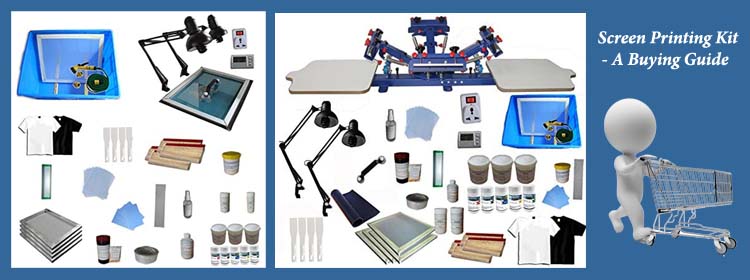
With seven products spanning hobby kits to commercial carousel presses, selecting the right option requires a clear understanding of how the key specifications translate to real-world performance. Before you buy, consider these four factors carefully — they determine whether a kit serves your needs for the next year or becomes obsolete within six months.
Skill Level and Learning Curve
The method a kit uses determines how long it takes to produce your first successful print. The drawing fluid and screen filler method — included in the Speedball Intermediate Deluxe kit — is the most forgiving starting point because mistakes in the drawing phase can be corrected before the screen is finalized. The photo emulsion method, used in the Speedball Advanced kit, produces finer detail and better repeatability but requires more precise technique during screen exposure and washing. If you're starting from zero, choose a kit that either explains both methods or includes the exposure lamp that eliminates the most common source of photo emulsion failure.
It's also worth thinking about where screen printing fits within your broader production toolkit. If you're deciding between screen printing and digital methods, the comparison between screen printing, sublimation, and digital printing covers the key trade-offs in detail — screen printing excels at opacity and wash durability on fabric, while digital methods offer faster setup for short runs with many colors.
Production Volume and Station Count
Your expected production volume is the single most important factor in choosing between a starter kit, a single-station press, and a multi-station carousel. If you're printing fewer than 50 shirts per week, a manual starter kit or single-station press delivers a perfectly adequate cost-per-print without the space requirements of a larger machine. At 50–200 shirts per week, a four-color single-station press like the INTBUYING gives you the multi-color capability you need without the floor space commitment of a carousel. Above 200 shirts per week, the POVOKICI's six-station configuration is the rational choice because operator time is the bottleneck and the carousel format eliminates the shirt-change downtime that caps throughput on single-station setups.
Frame Size and Printing Area
Frame size dictates the maximum design dimensions you can print in a single pass, and choosing a kit with frames that are too small for your primary application creates a permanent constraint that can't be worked around without purchasing additional equipment. For standard adult t-shirt chest prints, you need a printing area of at least 10×14 inches — the largest frame size included in the Caydo starter kit covers this minimum. For oversized designs, back prints, or all-over patterns that extend beyond the standard chest zone, look for frames sized 14×18 inches or larger, which typically requires upgrading to a dedicated press with adjustable frame holders rather than a kit-based setup.
Ink Compatibility and Substrate Range
Not all screen printing inks work on all substrates, and the distinction between fabric inks and graphic inks matters more than most buyers realize before they've wasted a batch of prints. Fabric inks are formulated to flex with the fibers of a garment during washing without cracking, while graphic inks are optimized for adhesion and color vibrancy on rigid surfaces like paper, wood, and ceramics. If your projects span both fabric and hard substrates, choose a kit that includes both ink types — the Speedball Intermediate Deluxe is the only kit on this list that bundles both fabric and acrylic inks as standard inclusions. For presses that don't include ink, confirm the ink you plan to use is compatible with the substrate before your first production run to avoid adhesion failures after curing.
FAQs
What is the best screen printing kit for absolute beginners in 2026?
The Speedball Advanced All-In-One Screen Printing Kit is the best starting point for beginners because it includes the LED UV exposure lamp that eliminates the most common failure point in the photo emulsion method. Most beginner kits leave the light source out, forcing improvisation with sunlight that produces inconsistent results. With the lamp included, you can expose screens reliably indoors from your very first attempt, which accelerates your learning curve significantly.
Do I need a darkroom to use photo emulsion screen printing?
No — with modern Diazo photo emulsion systems like the one included in the Speedball Advanced kit, you don't need a dedicated darkroom. You do need to work in subdued light conditions (away from direct sunlight or bright fluorescent lighting) when coating and drying your screen, but a shaded indoor workspace is sufficient. The included LED UV exposure lamp then handles the controlled exposure step precisely, replacing the unpredictable sunlight method that older photo emulsion techniques relied on.
What's the difference between a 1-color and multi-color screen printing press?
A single-color press holds one screen at a time, so printing a multi-color design requires you to cure the first ink layer, re-register the shirt, and make a second pass with a different screen — a time-consuming process prone to alignment errors. A multi-color press like the INTBUYING 4-color machine holds multiple screens simultaneously and rotates them into position over the same platen, maintaining registration through a mechanical detent system. For designs with three or more colors, the multi-color press produces consistent results far more efficiently than multiple single-color passes.
Can I use screen printing kits on materials other than t-shirts?
Yes — most screen printing inks and setups work on a wide range of substrates, including paper, canvas, fabric bags, pillowcases, curtains, and even hard surfaces like wood and ceramics when the right ink type is used. The VEVOR single-station press explicitly lists compatibility with metals, plastics, glass, ceramics, and leather in addition to standard fabric applications. The key is matching the ink formulation to the substrate — fabric inks require heat curing for durability, while acrylic inks designed for rigid substrates cure through air drying or a different heat process.
How long do screen printing screens last before needing replacement?
A well-maintained screen can last for thousands of prints when properly cleaned, stored flat, and not exposed to strong solvents that damage the mesh. The limiting factor is usually the emulsion rather than the mesh itself — emulsion can be removed and reapplied to the same screen multiple times, effectively giving the screen indefinite reusability as long as the mesh tension remains consistent. Wood-frame screens from starter kits typically last one to three years before the frame warps enough to affect tension, while aluminum-frame screens used in professional presses last much longer with proper care.
Is screen printing better than heat transfer for t-shirts?
Screen printing produces more durable results for high-volume single-design runs because the ink bonds directly with the fabric fibers rather than sitting on top as a transfer layer. Prints made with quality fabric inks and proper curing can outlast the garment itself without cracking or peeling. Heat transfer is faster and more economical for short runs with many design variations since each design doesn't require a separate screen. For runs of 12 or more identical designs, screen printing almost always wins on cost-per-print and longevity.
Buy on Walmart
- Speedball Advanced All-In-One Screen Printing Kit, Includes — Walmart Link
- Caydo 23 Pieces Screen Printing Starter kit Include 3 Differ — Walmart Link
- Speedball 004523 Intermediate Deluxe Kit — Walmart Link
- Jacquard Screen Printing Kit — Walmart Link
- VEVOR Screen Printing Machine, 1 Color 1 Station Silk Screen — Walmart Link
- INTBUYING 4 Color 1 Station Screen Printing Press T-Shirt Pr — Walmart Link
- POVOKICI 6 Color 6 Station Screen Printing Machine with Micr — Walmart Link
Buy on eBay
- Speedball Advanced All-In-One Screen Printing Kit, Includes — eBay Link
- Caydo 23 Pieces Screen Printing Starter kit Include 3 Differ — eBay Link
- Speedball 004523 Intermediate Deluxe Kit — eBay Link
- Jacquard Screen Printing Kit — eBay Link
- VEVOR Screen Printing Machine, 1 Color 1 Station Silk Screen — eBay Link
- INTBUYING 4 Color 1 Station Screen Printing Press T-Shirt Pr — eBay Link
- POVOKICI 6 Color 6 Station Screen Printing Machine with Micr — eBay Link
Next Steps
- Identify your primary use case — hobby, small business, or high-volume production — and use that to narrow your choice to one of the three kit categories covered in this guide before checking prices.
- Check current pricing on Amazon for your shortlisted kit, since prices on screen printing equipment fluctuate frequently and deals appear regularly on both individual components and complete kits.
- Read the full comparison of screen printing, sublimation, and digital printing to confirm that screen printing is the right production method for your specific product and volume mix.
- If you're setting up a business around your press, review the marketing strategies for t-shirt businesses to plan your customer acquisition approach before your equipment arrives.
- Purchase your consumables — emulsion, ink, transparency film, and pallet adhesive — at the same time as your kit so you can start printing on day one without waiting for additional deliveries.
 |  |  |  |
About Rachel Kim
Rachel Kim spent five years as a merchandise buyer for a national office supply retail chain, evaluating printers, scanners, and printing accessories from Canon, Epson, HP, Brother, Dymo, and Zebra before approving them for store inventory. Her buying process involved hands-on testing against competing models, reviewing long-term reliability data from vendor reports, and vetting price-to-performance claims that manufacturers routinely overstated. That structured evaluation experience translates directly into the kind of buying guidance that cuts through marketing language and focuses on what actually matters for a specific use case. At PrintablePress, she covers printer and printing equipment reviews, buying guides, and head-to-head product comparisons.


Get some FREE Gifts. Or latest free printing books here.
Disable Ad block to reveal all the secret. Once done, hit a button below
| | | |