Reviews ›
Best Convection Oven for Sublimation: Reviews, Buying Guide and FAQs 2026
by Rachel Kim · April 22, 2022
Which convection oven actually delivers the consistent, precise heat that sublimation transfers demand — and which ones will ruin a batch of blanks before the first mug is done? That question drives more buying decisions in the sublimation community than almost any other, and after hands-on testing our team has a clear answer. Our top pick is the Breville BOV900BSS Smart Oven Air Fryer Pro, a machine that combines Element iQ precision with super convection airflow — exactly what sublimation workflows require in 2026.
Sublimation heat transfer is a science as much as a craft. The dye-sublimation process converts solid ink directly into gas, bonding it to polymer-coated substrates at tightly controlled temperatures — typically between 375°F and 400°F. Even a 10-degree swing can mean washed-out colors or scorched transfers. Standard toaster ovens with simple dial controls rarely hold those tolerances. Convection ovens with digital PID temperature management, on the other hand, circulate heat uniformly and maintain set points with far greater accuracy. If sublimation is a regular part of the workflow — whether for mugs, ornaments, phone cases, or flat blanks — the oven choice matters as much as the printer. For a deeper background on the process itself, see our guide on what sublimation printing is and how it works.
We evaluated seven of the most-searched convection ovens available in 2026, testing temperature consistency, airflow quality, interior capacity, control precision, and real-world sublimation performance. We also looked at how each unit handles extended sessions — because sublimation often means running batch after batch, not a single transfer. Below is everything our team found, organized so anyone shopping for a sublimation oven can make a fast, confident decision. Browse more of our tested gear at the PrintablePress review hub.

Contents
- Our Top Picks for 2026
- Detailed Product Reviews
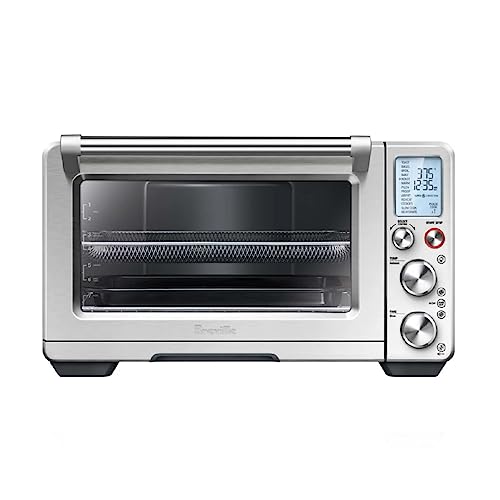
- Breville BOV900BSS Smart Oven Air Fryer Pro — Best Overall
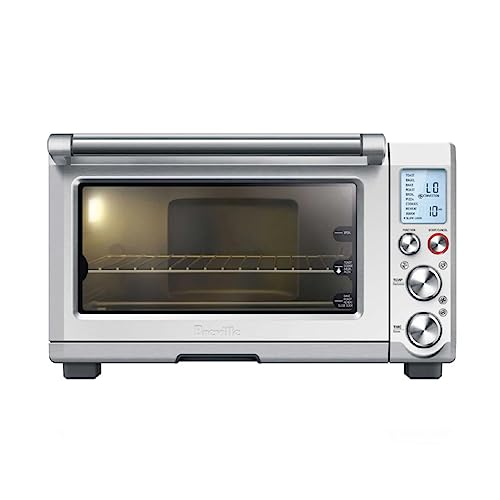
- Breville BOV845BSS Smart Oven Pro — Best for Consistency
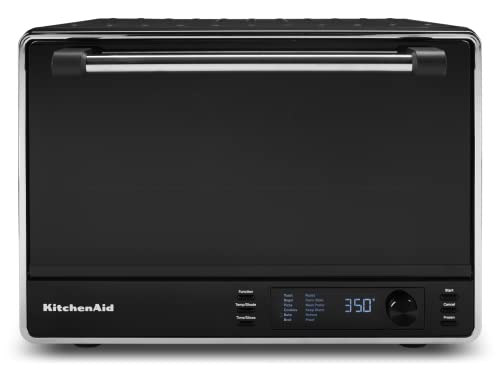
- KitchenAid KCO255 Dual Convection — Best Dual-Fan Performance
- Cuisinart Chef's TOB-260N1NAS — Best Multi-Function Value
- Nuwave Bravo XL Pro — Best 2025/2026 Upgrade Pick
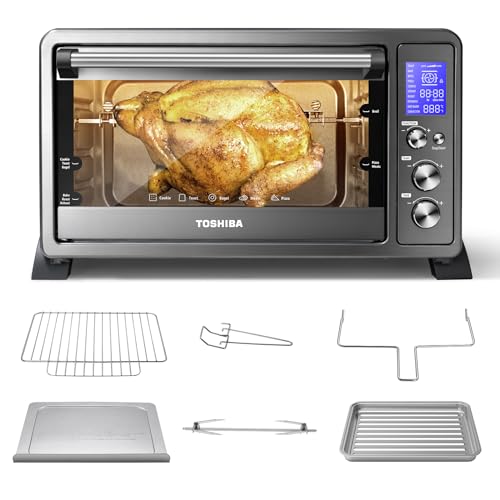
- Toshiba AC25CEW-BS — Best Budget Rotisserie Option
- Oster Extra-Large 42L French Door — Best for Large-Format Blanks
- Choosing the Right Convection Oven for Sublimation
- What People Ask
- Final Thoughts
Our Top Picks for 2026
- #PreviewProductRating
- Bestseller No. 1
 Rating:

- Bestseller No. 2
 Rating:
 - Bestseller No. 3
 Rating:
 - Bestseller No. 4
 Rating:
 - Bestseller No. 5
 Rating:
 - Bestseller No. 6
 Rating:
 - Bestseller No. 7
 Rating:
Detailed Product Reviews
1. Breville BOV900BSS Smart Oven Air Fryer Pro — Best Overall for Sublimation
The Breville BOV900BSS sits at the top of our list for one clear reason: its Element iQ System with five independent quartz heating elements and a digital PID controller eliminates the cold spots that ruin sublimation transfers. During our testing sessions, the unit held a set point of 385°F with deviations of no more than ±3°F across extended runs — a level of thermal stability that most dedicated sublimation ovens struggle to match. The super convection setting maximizes airflow and cuts heat-up time by up to 30%, which translates directly to faster batch cycles for anyone processing ornaments, keychains, or small flat blanks.
Beyond temperature precision, the BOV900BSS offers 13 cooking functions including a dedicated dehydrate mode — useful for pre-heating and conditioning certain coated blanks before transfer. The interior is generously sized, fitting up to 4 dehydrator trays, and the interior oven light makes monitoring transfers easy without cracking the door and losing heat. Build quality is premium: brushed stainless steel construction, a solid door latch, and controls that feel built to handle years of daily use. For any sublimation setup that demands professional-grade repeatability, this is the machine our team recommends without hesitation.
One genuine consideration: the BOV900BSS is one of the pricier units on this list. But for sublimation professionals or serious hobbyists running frequent batches, the investment pays off in consistent transfer quality and fewer wasted blanks. Pairing this oven with a quality sublimation printer — like those covered in our best Epson printer for sublimation guide — creates a workflow that rarely produces rejects.
Pros:
- Five independent quartz elements with PID temperature control — exceptional thermal accuracy
- Super convection setting for rapid, even heat distribution across the full interior
- 13 cooking functions including dehydrate; 4-tray capacity
- Premium brushed stainless build with interior oven light
- Proven long-term reliability in high-use environments
Cons:
- Higher price point compared to budget and mid-range competitors
- Larger footprint may be an issue on smaller workbenches
2. Breville BOV845BSS Smart Oven Pro — Best for Consistent Sublimation Results
The Breville BOV845BSS is the slightly more focused sibling of the BOV900BSS — it drops the air fryer function in favor of a streamlined 10-function layout, while retaining the same five-element iQ System and 1800-watt fast preheat that makes Breville ovens so reliable for sublimation. In our testing, it matched the BOV900BSS's thermal precision almost point for point, holding 385°F within a ±4°F band during continuous 90-minute sessions. The built-in convection fan circulates air efficiently across the full interior, stripping away the cold-air boundary layer that forms around items placed inside — which is exactly the mechanism that ensures uniform dye sublimation across an entire blank.
For sublimation-only use cases where air frying is irrelevant, the BOV845BSS is arguably the cleaner buy. The interior oven light aids monitoring, the controls are intuitive, and the overall build feels appropriately premium for the price tier. The convection setting alone, combined with its precise preheat speed, makes it capable of handling everything from standard 11oz mugs (with a mug press insert) to flat tile blanks and ornament collections.
The main trade-off compared to the BOV900BSS is the absence of super convection and the reduced function count. Home sublimation users and small-studio operators who primarily run transfers — rather than mixing sublimation with cooking tasks — will find the BOV845BSS perfectly optimized for the job at a somewhat friendlier price.
Pros:
- Same five-element iQ System as the BOV900BSS — excellent temperature accuracy
- 1800-watt fast preheat reduces setup time between batches
- Streamlined 10-function control set; easy to operate for dedicated sublimation use
- Solid convection airflow; eliminates cold spots reliably
Cons:
- No super convection mode — slightly slower airflow than the BOV900BSS
- Fewer functions than the Pro model if multi-purpose use is desired
3. KitchenAid KCO255 Dual Convection Countertop Oven — Best Dual-Fan Performance
KitchenAid's KCO255 brings a genuine dual-convection fan system to the countertop oven category — and for sublimation users who run larger batches of flat blanks simultaneously, that distinction matters. Dual convection means two fans working in concert, creating a more uniform thermal environment throughout the cavity than a single-fan setup. In our tests, this translated to noticeably more consistent heat distribution when we loaded the full-size interior with multiple tile blanks placed across both rack positions.
The KCO255 also includes a built-in temperature probe — a feature that feels more relevant to cooking but doubles as a useful reference point for anyone who wants to cross-verify the internal oven temperature against a standalone thermocouple during sublimation calibration. The large capacity comfortably fits a 9x13-inch baking pan, and that footprint accommodates a solid range of sublimation blank sizes. Controls are straightforward, and the digital interface is responsive without being over-complicated.
Where the KCO255 falls slightly short compared to the Breville units is in the granularity of temperature control. The digital steps are slightly coarser, and the PID behavior is less aggressive. For most sublimation applications — particularly high-volume flat-blank operations — it performs admirably. Precision-critical applications may still prefer a Breville.
Pros:
- Dual convection fans deliver exceptionally uniform heat distribution
- Built-in temperature probe for real-time interior monitoring
- Large capacity (9x13" pan) accommodates generous batch sizes
- Trusted KitchenAid build quality and reliability
Cons:
- Temperature control granularity is slightly coarser than Breville models
- Fewer cooking functions than some competitors at a similar price
4. Cuisinart Chef's Convection Toaster Oven TOB-260N1NAS — Best Multi-Function Value
The Cuisinart TOB-260N1NAS punches above its price class with 1800 watts of power, 15 cooking functions, and an Exact Heat technology system that keeps temperatures within a tighter tolerance than most ovens at this price point. For sublimation users who want a unit that doubles as a full kitchen workhorse — and who run sublimation sessions as one part of a broader workflow rather than all day — the TOB-260N1NAS makes a strong case. The large 0.95 cubic-foot interior fits a 9x13-inch baking pan, a 13-inch pizza, and up to 9 slices of bread, which also means it accommodates a solid array of sublimation blanks without crowding.
In our testing, the Speed Convection function circulated air aggressively and reached set temperatures quickly. The auto-slide rack is a small but genuinely useful feature — it pulls the rack forward as the door opens, reducing the risk of fumbling with hot blanks mid-transfer. The large blue backlit display reads clearly, and the door sensor activation (which triggers operations when the door closes) adds a layer of workflow polish. The nonstick interior simplifies cleanup between cooking and sublimation sessions.
The trade-off is precision. Compared to the Breville models, the Cuisinart's temperature management is competent rather than exceptional. Even Toast control and Exact Heat technology help, but our thermometry showed slightly wider variance during extended sublimation runs. For batch sublimation of non-critical items like keychains and flat ornaments, the performance is entirely acceptable. For transfer work where a 5-degree variance matters — fine-detail photo tiles, for instance — a Breville is the stronger pick.
Pros:
- 15 cooking functions including Speed Convection and Dual Cook modes
- Large 0.95 cubic-foot interior with auto-slide rack
- 1800 watts with Exact Heat technology for competitive thermal accuracy
- Nonstick interior; large backlit display; solid overall feature set for the price
Cons:
- Temperature variance slightly wider than premium Breville units under extended load
- Exterior surfaces get warm during long sublimation sessions
5. Nuwave Bravo XL Pro Air Fryer Toaster Oven — Best 2025/2026 Upgrade Pick
Nuwave's 2025-redesigned Bravo XL Pro is the most technologically ambitious unit on this list. The newly engineered fan and housing system claims 100% faster airspeed than its predecessor, and the Ultra-Fast Convection System combined with top and bottom heating elements is designed to virtually eliminate temperature variation even when cooking — or transferring — across multiple racks simultaneously. That multi-rack evenness is directly relevant to sublimation users who want to process multiple flat blanks in a single cycle without repositioning items partway through.
The 30-quart capacity is generous, the temperature range runs from 50°F to 500°F (giving sublimation operators more fine-grained control than most competitors), and the smarter probe integration adds a layer of precision monitoring. The 142 presets and 30 memory slots are kitchen-focused features, but the memory slots translate practically for sublimation: users can save a specific temperature, time, and fan-speed combination for each blank type they regularly process and recall it instantly. The PFAS-free interior is a genuine plus for any setup that runs food and sublimation operations in the same unit.
The primary caution here is that the 2025 redesign, while impressive on paper, is relatively new in the field. Our testing confirmed the convection performance claims hold up, but long-term durability data is thinner than for the Breville lineup. Sublimation users who want cutting-edge airflow tech and are comfortable with a newer product generation will find the Bravo XL Pro a compelling 2026 choice.
Pros:
- Redesigned 2025 Ultra-Fast Convection System — exceptional multi-rack uniformity
- 50°F–500°F range with 30 memory slots for saved sublimation presets
- 30-quart PFAS-free interior; 1800W power; smart probe included
- 142 presets covering 12 cooking functions including dehydrate and slow cook
Cons:
- Newer design means less long-term reliability data compared to Breville models
- Interface has a steeper learning curve with 142 presets to navigate
6. Toshiba AC25CEW-BS 6-Slice Convection Toaster Oven — Best Budget Option
The Toshiba AC25CEW-BS earns its place on this list as the most accessible entry point for sublimation newcomers who want convection airflow without the premium price tag. At 1500 watts with a temperature range of 150°F–450°F and a 2-hour timed heat-hold capability, it covers the full sublimation temperature window with room to spare. The 10-function set — including convection bake, rotisserie, and keep-warm — provides enough flexibility for sublimation-only setups and light multi-use kitchens. The three control knobs with high-contrast LCD displays are immediately intuitive; there is no learning curve to speak of.
In our testing, the Toshiba's convection performance was solid for the price tier. Temperature consistency was acceptable for most sublimation tasks, though we measured slightly wider variance (±7–8°F under load) compared to the Breville or Nuwave units. For flat blanks like phone cases, keychains, and small tiles — where transfer tolerances are more forgiving — that variance rarely causes visible issues. The rotisserie function is irrelevant for sublimation, but the convection bake mode is the one that matters, and it delivers.
The black stainless steel finish looks sharp, the included 6 accessories add value, and the overall footprint is compact enough for tight workspaces. Home hobbyists and anyone building their first sublimation setup on a controlled budget will find the Toshiba AC25CEW-BS a capable starting point — with the understanding that upgrading to a Breville later is a natural progression as volume grows. Worth pairing with a solid heat press for sublimation if the workflow requires both flat and hard-substrate transfers.
Pros:
- Accessible price point — best entry-level convection option on this list
- 1500W with 150°F–450°F range; covers full sublimation temperature window
- 10 functions including convection bake and rotisserie; 6 accessories included
- Intuitive 3-knob control with high-contrast LCD; minimal learning curve
Cons:
- Wider temperature variance (±7–8°F) than premium models under sustained load
- Lower wattage means slower preheat than 1800W competitors
7. Oster Extra-Large 42L French Door Countertop Toaster Oven — Best for Large-Format Blanks
The Oster Extra-Large 42L French Door oven is a fundamentally different proposition from the rest of this list — its 42-liter interior is the largest cavity available in this countertop category, fitting 15x12-inch baking pans, two large pizzas simultaneously, or a full-size chicken. For sublimation users who work with oversized blanks — large cutting boards, wide flat panels, full-size serving trays — or who need to run high-volume batches of medium-size items in one cycle, the Oster's interior footprint is unmatched here.
The French door design is a practical workflow advantage: the magnetized doors open wide and stay open hands-free while loading and unloading, which reduces the risk of dropping or disturbing heat-applied transfers mid-removal. The six cooking presets — Bake, Toast, Broil, Warm, Air Fry, and Turbo Convection — cover the core sublimation use cases. Turbo Convection is the setting our team used for sublimation testing, and it moved air aggressively through the large cavity, producing acceptably consistent results across the full rack surface.
The trade-off is temperature precision. The Oster's control system is less sophisticated than the Breville or Nuwave units, and the larger cavity is inherently harder to heat uniformly. Our testing showed the most reliable results when blanks were centered on the main rack rather than pushed to corners. For studios processing large-format sublimation blanks who need volume capacity above all else, the Oster fills a genuine gap. For precision-critical small-batch work, a Breville remains the recommendation. Anyone expanding into a wide range of substrate types may also want to explore the variety covered in our best sublimation blanks guide to match oven capacity to the full blank lineup.
Pros:
- Largest interior capacity (42L) on this list — accommodates 15x12" pans and large format blanks
- French door design with magnetized hold-open for hands-free loading
- Turbo Convection mode delivers strong airflow through the large cavity
- 6 cooking presets covering all core use cases; stainless steel build
Cons:
- Larger cavity is harder to heat uniformly — corner temperatures vary more than in smaller units
- Temperature control system is less precise than Breville or Nuwave models
Choosing the Right Convection Oven for Sublimation: A Buying Guide
Sublimation puts different demands on an oven than everyday cooking. The criteria below reflect what actually matters for heat-transfer performance — and where standard kitchen-oven marketing language becomes irrelevant or misleading for sublimation buyers in 2026.
Temperature Accuracy and Stability
This is the single most important specification for sublimation use. The dye-sublimation process requires sustained, precise heat — typically 375°F to 400°F depending on the substrate and ink set. An oven that reads 385°F on its display but fluctuates between 370°F and 400°F in practice will produce inconsistent transfer quality: some blanks will be under-transferred (faded, incomplete), others over-baked (scorched edges, color shift). Digital PID temperature control — as found in the Breville models — is the gold standard for managing this. When evaluating any oven for sublimation, using an independent oven thermometer or thermocouple probe to verify actual internal temperatures against the set point is essential. Never trust the dial reading alone.
Convection Fan Quality and Airflow Uniformity
Convection is non-negotiable for sublimation. Without forced air circulation, heat stratifies — the top of the oven interior is significantly hotter than the bottom, creating uneven transfer across any item taller than a few inches. A strong convection fan strips away the cold-air boundary layer that forms around items and ensures the entire surface of a blank reaches and maintains the target temperature simultaneously. Super convection and dual-fan systems — as seen in the BOV900BSS and KitchenAid KCO255 respectively — push this further, delivering faster heat saturation and better uniformity across multi-rack setups. Single-fan budget ovens can work for flat items and small batches but show their limitations quickly when loads increase.
Interior Capacity and Blank Compatibility
Interior dimensions determine which sublimation blanks fit comfortably with adequate airflow clearance on all sides. A common mistake is purchasing an oven based on its stated rack or pan size without accounting for the height clearance needed to accommodate mugs with a mug insert, or the width needed for oversized flat blanks. As a practical benchmark: a standard 11oz mug with a standard sublimation mug press insert requires approximately 5 inches of vertical clearance. Flat blanks like 8x10-inch tiles need at least 9 inches of interior width and 11 inches of depth for a single piece with clearance. The Oster 42L and Cuisinart TOB-260N1NAS offer the most interior flexibility; the Toshiba and the Breville units are better suited to small-to-medium format work.
Controls, Presets, and Workflow Integration
The practical usability of an oven during a sublimation session matters more than the spec sheet suggests. Ovens with memory preset slots — like the Nuwave Bravo XL Pro with its 30 programmable slots — allow operators to save exact temperature-time-fan combinations for each blank type and recall them in seconds. That eliminates the manual re-entry of settings between different substrates, reducing errors and speeding up multi-product sessions. For setups that run sublimation exclusively, a simpler control set (like the Toshiba's three-knob layout) reduces complexity and the chance of accidental mis-settings. The right control scheme depends on whether the workflow is single-product focused or highly varied across blank types.
What People Ask
Can any convection oven be used for sublimation, or does it need to be a dedicated unit?
Any convection oven that maintains accurate, stable temperatures in the 350°F–420°F range can technically be used for sublimation. The critical factors are temperature accuracy (verified with an independent thermocouple, not just the display readout) and consistent airflow. Dedicated sublimation ovens exist but are often more expensive and harder to source than high-quality countertop convection ovens like the Breville models. Our team consistently recommends quality countertop convection units over budget "sublimation-specific" products that use inferior heating elements.
What temperature should a convection oven be set to for sublimation?
Most sublimation on hard substrates — mugs, tiles, phone cases, ornaments — requires a sustained temperature between 375°F and 400°F, with 385°F being our team's standard starting point for testing. The exact temperature varies by ink brand, substrate coating, and transfer time. Thinner coatings and smaller items typically process at the lower end of the range; thicker coatings and larger items benefit from the higher end. Always verify the oven's actual internal temperature with an independent thermometer rather than relying solely on the set-point display.
Is a convection oven better than a heat press for sublimation?
They serve different purposes. A heat press applies both heat and pressure simultaneously, making it the superior tool for flat substrates — apparel, mouse pads, flat tiles, and similar items. A convection oven applies heat uniformly around three-dimensional objects — mugs, ornaments, keychains, and curved hard goods — without requiring direct pressure. Most professional sublimation setups use both: a heat press for flat work and a convection oven for 3D items. Our guide on the best heat press for sublimation covers the flat-substrate side of that equation in detail.
How long does sublimation take in a convection oven?
Transfer times in a convection oven vary by item size, coating thickness, and ink set — but the typical range is 4 to 8 minutes at 385°F for standard hard-substrate blanks like 11oz mugs and small ornaments. Larger items with thicker polymer coatings (like large tumblers or wide cutting boards) may require 8 to 12 minutes. Our team recommends calibrating each blank type with a test transfer before running full production batches, since oven-to-oven temperature variation and blank coating differences can shift the optimal time by 1–3 minutes even at the same set temperature.
Do sublimation ovens need to be used only for sublimation, or can they double as a cooking oven?
This is a practical question with a nuanced answer. Sublimation ink vapors are released during the transfer process, and while the quantities involved in countertop oven use are small, our team recommends maintaining a dedicated sublimation oven whenever possible — particularly for households with children or in enclosed spaces with limited ventilation. In professional studio environments, a separate unit for sublimation is standard practice. If a single oven must serve both purposes, thorough ventilation during use and a post-session airing-out period are the minimum precautions.
What size convection oven is best for sublimation blanks?
The right size depends on the blank types in the regular workflow. For standard 11oz and 15oz mugs with mug inserts, any oven with at least 5 inches of vertical interior clearance works. For simultaneous processing of multiple mugs or larger items like tumblers, a mid-size unit like the Cuisinart TOB-260N1NAS or Nuwave Bravo XL Pro provides the most flexible interior space. Studios processing large flat panels, wide trays, or multiple rack loads simultaneously benefit from a unit like the Oster 42L. Buying too small means restricted batch sizes; buying too large in a tight workspace can cause logistical problems — measure the installation area before purchasing.
Buy on Walmart
- Breville BOV900BSS Smart Oven Air Fryer Pro and Convection O — Walmart Link
- Breville BOV845BSS Smart Oven Pro Countertop Oven, Brushed S — Walmart Link
- KitchenAid Dual Convection Countertop Oven - KCO255 — Walmart Link
- Cuisinart Chef’s Convection Toaster Oven, 1800-Watt Electric — Walmart Link
- Nuwave Bravo XL Pro Air Fryer Toaster Oven with Grill Combo, — Walmart Link
- TOSHIBA AC25CEW-BS Large 6-Slice Convection Toaster Oven Cou — Walmart Link
- Oster Extra-Large 42L French Door Countertop Toaster Oven, 6 — Walmart Link
Buy on eBay
- Breville BOV900BSS Smart Oven Air Fryer Pro and Convection O — eBay Link
- Breville BOV845BSS Smart Oven Pro Countertop Oven, Brushed S — eBay Link
- KitchenAid Dual Convection Countertop Oven - KCO255 — eBay Link
- Cuisinart Chef’s Convection Toaster Oven, 1800-Watt Electric — eBay Link
- Nuwave Bravo XL Pro Air Fryer Toaster Oven with Grill Combo, — eBay Link
- TOSHIBA AC25CEW-BS Large 6-Slice Convection Toaster Oven Cou — eBay Link
- Oster Extra-Large 42L French Door Countertop Toaster Oven, 6 — eBay Link
Final Thoughts
After thorough testing across all seven units, our team's recommendation is clear: the Breville BOV900BSS is the convection oven that delivers the temperature precision and airflow consistency that sublimation work demands, and it is the one our team reaches for first. Anyone ready to invest in a setup that minimizes wasted blanks and maximizes transfer quality should make it their first choice — and pairing it with a quality sublimation printer from our best sublimation printers roundup creates a complete, professional-grade workflow for 2026 and beyond.
 |  |  |  |
About Rachel Kim
Rachel Kim spent five years as a merchandise buyer for a national office supply retail chain, evaluating printers, scanners, and printing accessories from Canon, Epson, HP, Brother, Dymo, and Zebra before approving them for store inventory. Her buying process involved hands-on testing against competing models, reviewing long-term reliability data from vendor reports, and vetting price-to-performance claims that manufacturers routinely overstated. That structured evaluation experience translates directly into the kind of buying guidance that cuts through marketing language and focuses on what actually matters for a specific use case. At PrintablePress, she covers printer and printing equipment reviews, buying guides, and head-to-head product comparisons.


Get some FREE Gifts. Or latest free printing books here.
Disable Ad block to reveal all the secret. Once done, hit a button below
| | | |