Reviews ›
Best Printable Vinyl For Shirts: Reviews, Buying Guide, and FAQs 2026
by Rachel Kim · April 02, 2022
Which printable vinyl for shirts is actually worth your money in 2026? With dozens of options on the market — from sublimation-based heat transfer vinyl to classic iron-on transfer paper — it is genuinely hard to know where to start. If you want a short answer before diving deep: Siser EasySubli is the standout pick for most shirt decorators, thanks to its rare ability to work on both cotton and dark fabrics with vivid, lasting color. But the right choice for you depends on your printer, your fabric, and how many shirts you plan to make. Keep reading and you will know exactly which product fits your setup.

Printable heat transfer vinyl (HTV) is a material you print on using your home inkjet or sublimation printer, then press onto fabric with an iron or heat press. Unlike regular vinyl that you cut from solid-color sheets, printable HTV lets you transfer full-color photographs, gradients, and complex artwork — things that are impossible to achieve by layering colored vinyl. The result looks sharp, feels soft, and, with the right product, holds up through dozens of wash cycles without cracking or peeling. If you are building a side hustle or running a full print-on-demand operation, understanding this product category is essential. You can find more background on how the transfer process works over at our guide on how to print on heat transfer paper.
In this review, we tested and researched seven of the best printable vinyl products for shirts available in 2026 — covering sublimation HTV, standard inkjet transfer paper, and Cricut-compatible options. Whether you are decorating a single birthday shirt or running batches of custom orders, this guide has a pick for your situation. We will walk you through each product, give you a buying guide to avoid common mistakes, and answer the questions we see asked most often. Let us get into it.

Contents
- Editor's Recommendation: Top Picks of 2026
- Product Reviews
- Siser EasySubli Sublimation HTV 50 Pack
- Siser EasySubli HTV 10-Sheet Starter Set
- Silhouette Heat-Print-DK for Dark Fabrics
- Cricut Heat Transfer Paper for Light T-Shirts
- 3G Jet Opaque Iron-On Transfer Paper 25 Sheets
- Printers Jack Iron-On Transfer Paper for Dark Fabric
- Cricut Infusible Ink Transfer Sheets Black
- What to Look For When Buying
- Frequently Asked Questions
- Key Takeaways
Editor's Recommendation: Top Picks of 2026
- #PreviewProductRating
- Bestseller No. 1
 Rating:

- Bestseller No. 2
 Rating:
 - Bestseller No. 3
 Rating:
 - Bestseller No. 4
 Rating:
 - Bestseller No. 5
 Rating:
 - Bestseller No. 6
 Rating:
 - Bestseller No. 7
 Rating:
Product Reviews
1. Siser EasySubli Sublimation Heat Transfer Vinyl 8.4" x 11" 50 Pack — Best for Cotton and Dark Fabrics at Volume
If you have ever wished you could run sublimation prints on a black cotton hoodie or a colored polyester tee, the Siser EasySubli is your answer. Traditional sublimation (the process where ink turns to gas and bonds with polyester fibers) only works on white or very light 100% polyester. EasySubli breaks that rule. You print on the EasySubli sheet using your sublimation printer, apply the EasySubli Mask on top, then heat-press the whole stack onto almost any fabric — including 100% cotton, dark-colored polyester, leather, and polyester blends. The result is brilliant full-color artwork that would otherwise be impossible on dark or natural-fiber garments.
The 50-pack gives you a serious quantity advantage. At that count, you can run production batches, test designs repeatedly, or build up inventory for a custom apparel shop without constantly reordering. Each sheet measures 8.4" x 11", so it accommodates standard US letter-size prints from nearly any sublimation printer. Application works with both a household iron and a dedicated heat press, though a heat press gives more consistent results across a batch. Colors come out vivid and the transfer is soft to the touch — you will not feel a thick plastic layer sitting on top of the fabric, which is one of the biggest complaints buyers have with traditional iron-on paper. If you are serious about launching or growing a custom shirt business, this is the product we recommend as your workhorse. For a broader look at how sublimation transfers work in practice, our guide to printing sublimation transfers covers the process from start to finish.
One note: you do need a sublimation printer to use EasySubli. This is not compatible with standard inkjet printers. If you are already running an Epson EcoTank or a Sawgrass unit converted for sublimation ink, you are set. If not, factor that equipment cost into your decision. For everyone already equipped with the right printer, though, this 50-pack is the most cost-effective printable vinyl for shirts we reviewed in 2026.
Pros:
- Works on cotton, dark fabrics, leather, and polyester blends — far beyond standard sublimation
- Vivid, full-color transfers with a soft hand feel after pressing
- 50-pack value makes it ideal for production runs or small business use
- Compatible with iron or heat press application
Cons:
- Requires a sublimation printer — not compatible with standard inkjet
- EasySubli Mask must be purchased separately for this pack
2. Siser EasySubli HTV 10 Sheets + 10 Sheets Mask Combo — Best Starter Set for EasySubli
This combo bundle gives you exactly what you need to get started with EasySubli without buying components separately: 10 sheets of the EasySubli vinyl (8.4" x 11") plus 10 sheets of the EasySubli Mask (8" x 10"). The mask is the piece that makes the whole system work — it holds your printed design in place during pressing and protects the transfer from scorching under heat. Having both in one package removes the guesswork and prevents the frustrating situation of receiving your vinyl, then realizing you forgot to order the mask.
For someone just testing EasySubli for the first time, this 10-sheet bundle is the smart entry point. You get enough material to run real tests on multiple fabric types, dial in your heat press settings, and see how the product performs on your specific garments before committing to the 50-pack. The same core technology is at work here: full multi-color designs on colored polyester and cotton fabrics, which traditional sublimation simply cannot touch. If you are exploring whether sublimation-based HTV fits your workflow, start here. If you love the results — and most users do — step up to the 50-pack for ongoing production.
Experienced EasySubli users often keep this bundle on hand for small custom orders or one-off requests where pulling from a bulk pack feels wasteful. It is also a popular choice as a gift for crafters who already own a sublimation printer. The price point is accessible, and the all-in-one nature of the bundle is genuinely useful. Keep in mind the same sublimation printer requirement applies here — this is not an inkjet product.
Pros:
- Includes EasySubli Mask — everything in one box, no separate purchase needed
- Ideal trial size before investing in the larger 50-pack
- Same high-quality EasySubli technology: cotton, dark fabric, and poly compatible
Cons:
- Higher cost-per-sheet compared to the 50-pack
- Still requires a sublimation printer
3. Silhouette Heat-Print-DK Printable Heat Transfer for Dark Fabrics — Best Matte Finish Option for Dark Shirts
Silhouette is a trusted brand in the vinyl cutting world, and the Heat-Print-DK is their answer for inkjet users who want to print on dark shirts. This material has a smooth, matte surface that reads cleanly under home inkjet printers, and it adheres to most fabric types when applied correctly. The matte finish gives finished shirts a clean, modern look that does not carry the shiny plastic appearance you sometimes see with lower-end transfer papers. If your designs lean toward bold graphics, text-heavy artwork, or anything that benefits from a flat, opaque appearance, this product delivers.
The application process is straightforward. You print your design onto the sheet using an inkjet printer, trim around your design, position it on your dark fabric, and press with a hot iron or heat press. The smooth surface accepts ink well, and the resulting transfer adheres firmly without needing any special pre-treatment of the fabric. This makes it more approachable for beginners than sublimation-based products. Silhouette's brand reputation also means you can count on consistent sheet quality from batch to batch, which matters when you are running repeat orders.
Where this product has limitations is durability over many wash cycles. Like most inkjet-based dark fabric transfers, the coating that makes the white base opaque can show wear over time, especially with hot-water washing or tumble drying on high heat. Cold wash, inside-out care extends the life considerably. It is still a solid performer for occasional wear shirts, gifts, and low-volume orders — just do not expect it to match the washability of sublimation-bonded prints over the long haul.
Pros:
- Smooth matte finish looks professional on dark shirts
- Works with standard inkjet printers — no specialty equipment needed
- Easy iron-on application, suitable for beginners
Cons:
- Durability over many wash cycles is lower than sublimation-based options
- Opaque base layer can feel slightly thick on lightweight fabrics
4. Cricut Heat Transfer Paper for Light T-Shirts 5 Sheets — Best for Cricut Machine Users on Light Fabrics
If you already own a Cricut Maker, Cricut Explore, or Cricut Joy Xtra, this printable iron-on from Cricut is engineered to slot perfectly into your existing workflow. You print your design with your home inkjet printer, load the sheet into your Cricut, let the machine cut precisely around your artwork (a process called print-then-cut), then iron the result onto a light-colored shirt. The precision cutting is the key advantage here — your Cricut reads registration marks printed around your design and cuts exactly where you need it, giving you clean, intricate edges that manual trimming can never match.
The material measures 8.5" x 11", the standard US letter size, so it loads into most home inkjet printers without any fuss. Colors come out vibrant and full on white and light-colored fabrics, which is where this product is specifically optimized. The transfer is straightforward, and the no-layering design means you can get a full-color image applied in one press rather than building it up piece by piece from solid vinyl sheets. For Cricut owners who have been wondering how to add photographic-quality designs to their shirt projects, this is the direct answer. You can explore whether a Cricut machine is right for your setup in our roundup of the best Cricut vinyl cutting machines for T-shirts.
The five-sheet pack is honestly on the small side for anyone doing volume, so treat this as a product for occasional projects, personalized gifts, or testing the print-then-cut workflow before buying in larger quantities. Also, this is strictly a light fabric product. Do not try it on dark shirts — the inks are not opaque enough to show up on anything darker than a pale yellow or light gray. If most of your shirts are white, though, it is a clean and reliable choice.
Pros:
- Purpose-built for Cricut print-then-cut workflow — precision cutting included
- Vibrant full-color results on light and white fabrics
- No layering required — one sheet, one press, full color
- Standard letter size fits most home inkjet printers
Cons:
- Only five sheets per pack — not practical for volume production
- Strictly for light fabrics — does not work on dark shirts
5. 3G Jet Opaque Iron-On Heat Transfer Paper 25 Sheets — Best Budget Option for Both Light and Dark Fabrics
The 3G Jet Opaque is a commercial-grade transfer paper that punches well above its price point. With 25 sheets in the pack, it gives you meaningful volume at a cost that makes sense whether you are decorating a handful of shirts for a family reunion or testing designs for a small business. The key word in the name is "opaque" — this paper lays down a white opaque base layer that makes your full-color inkjet-printed design visible on both white/light fabrics and dark fabrics. That versatility in a single product is a genuine advantage if you work with mixed shirt orders.
The paper is designed for use with a standard inkjet printer, an iron, and nearly any graphic software — there is no proprietary workflow required. The sheet size is the standard 8.5" x 11", so you can feed it straight through the same printer you already own. The commercial-grade designation reflects the paper's construction: it is built to withstand washer and dryer cycles better than bargain-bin transfer papers, and the opaque coating bonds securely to the fabric when proper heat and pressure are applied. For someone who wants one product that works on every shirt color without a big equipment investment, this hits the mark.
One practical note: as with all iron-on transfers using an opaque base, the white layer is visible at the edges of your design if you do not cut carefully. Trimming closely around your printed design before pressing minimizes this. It is a minor extra step, but an important one for a clean finish. Overall, for the price and the sheet count, this is one of the best all-around value picks on this list.
Pros:
- Works on both light and dark fabrics — true all-purpose versatility
- Commercial-grade paper holds up through wash cycles better than consumer-grade alternatives
- 25-sheet pack offers solid volume at an accessible price
- No special printer or software required
Cons:
- Opaque white base is visible at design edges if not trimmed precisely
- Wash durability does not match sublimation-based options over many cycles
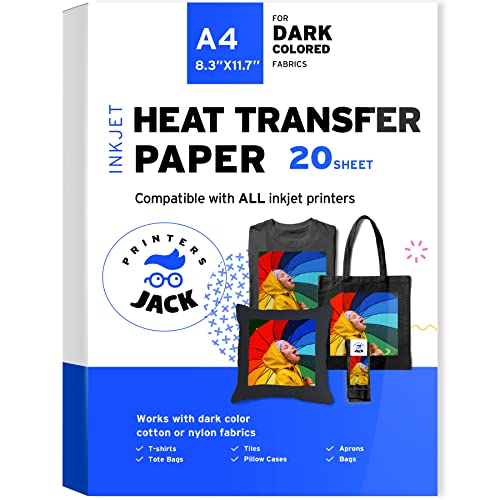
6. Printers Jack Iron-On Heat Transfer Paper for Dark Fabric 20 Sheets — Best Durability Pick for Dark T-Shirts
Printers Jack targets one of the most common pain points in DIY shirt decorating: keeping dark-fabric transfers looking sharp after repeated washing. The material is constructed to be both durable and stretchable, which matters more than you might think. When a shirt goes through the dryer repeatedly, a rigid transfer cracks and peels. A stretchable transfer moves with the fabric, which is why the Printers Jack is specifically engineered to withstand washer and dryer cycles without the cracking that frustrates buyers of cheaper dark-fabric papers.
The sheet size is 8.3" x 11.7", slightly different from the US letter standard but accommodating a bit more surface area per sheet. Each pack includes 20 sheets, which is a practical amount for small-batch custom orders or ongoing personal projects. Compatibility is broad: Epson, HP, Brother, Canon, and most other inkjet printers using pigment ink work with this paper. The pigment ink requirement is worth noting — dye-based ink, which some budget inkjet printers use, does not produce the same quality results with this material. If you are unsure what ink your printer uses, check the cartridge specifications. The paper also performs best on fabrics with at least 60% cotton content, which covers the vast majority of dark T-shirts, hoodies, and bags you would realistically want to decorate.
This is a dependable, no-frills product that does what it says. The design application instructions are clear, the material feeds cleanly through standard inkjet printers, and the finished transfers hold up well in practical wear. If you are running a small home-based shirt business or making custom gifts and dark fabrics make up most of your work, Printers Jack belongs in your supply rotation. For more on building out a home shirt printing operation, our guide on how to start a heat transfer business walks through the full setup process.
Pros:
- Specifically designed for dark fabrics — vibrant prints on dark and black shirts
- Stretchable, durable material resists cracking through washer and dryer cycles
- Wide printer compatibility: Epson, HP, Brother, Canon, and others
- 20 sheets — practical quantity for small business or ongoing use
Cons:
- Requires pigment ink — not compatible with dye-based inkjet printers
- Best results on fabrics with 60%+ cotton content
7. Cricut Infusible Ink Transfer Sheets Black 3-Pack — Best for Permanent, Pro-Quality Results
Cricut Infusible Ink takes a completely different approach from every other product on this list. Instead of a surface layer that adheres on top of your fabric, Infusible Ink actually fuses into the fibers of compatible blank garments — a process that is fundamentally similar to dye-sublimation printing at its core. The result is a transfer that does not sit on top of the shirt at all. There is no layer to flake, peel, crack, or wrinkle — ever. The design becomes part of the fabric itself, which is why Cricut markets this as pro-quality. That claim stands up.
This black colorway pack includes three 12" x 12" sheets of Infusible Ink along with a butcher paper sheet for pressing protection. You cut your design using a Cricut machine, apply the cut pieces to a compatible Cricut blank (T-shirts, coasters, tote bags, baby bodysuits), cover with the butcher paper, and press with a heat press or EasyPress. The color becomes permanently bonded to the fabric with no peeling under any washing condition. For black graphic designs on white or light Cricut blanks, the effect is stunning — clean lines, deep saturation, and a finish that looks the same on wash day 50 as it does on day one.
The main constraint is compatibility. Infusible Ink requires Cricut-compatible blanks — not just any white T-shirt from the craft store. The blanks are specifically treated to accept the ink transfer. If you try to use Infusible Ink on a regular shirt, you will get a faint, washed-out result. This is not a limitation to overlook; it genuinely shapes who this product is right for. If you work with Cricut blanks and want the most permanent, professional result possible, Infusible Ink is the top-of-category choice. For everyone else, one of the inkjet transfer papers above will serve better. You can browse more of our picks for this category at the printable vinyl for shirts review hub.
Pros:
- Design fuses into fabric — zero flaking, peeling, cracking, or wrinkling, ever
- Professional, gallery-quality finish that outlasts any adhesive-based transfer
- Includes butcher paper for pressing — ready to use out of the box
- 12" x 12" sheets accommodate larger design areas
Cons:
- Only works on Cricut-compatible blank garments — not regular T-shirts
- Three-sheet pack is a small quantity; not suited for high-volume production
What to Look For When Buying Printable Vinyl for Shirts
Fabric Color and Type: Dark vs. Light, Cotton vs. Polyester
This is the single most important factor to get right before you buy anything. Not all printable vinyl works on all fabrics. Products designed for light fabrics rely on the shirt's white or pale surface to show ink colors accurately — put one of those on a black shirt and the design disappears. Products designed for dark fabrics include an opaque white base layer that covers the dark background so your colors show correctly. Sublimation-based options like Siser EasySubli work differently again — they require either polyester content in the fabric or the EasySubli coating to bond properly. Before you choose, decide what percentage of your shirts are light versus dark, and whether they are primarily cotton, polyester, or blends. That one decision will eliminate half the products from consideration immediately.
Printer Compatibility: Inkjet vs. Sublimation
The type of printer you own directly determines which printable vinyl you can use. Standard inkjet printers (the kind most households already own — HP, Canon, Epson, Brother) are compatible with heat transfer papers like Jet Opaque, Printers Jack, Silhouette Heat-Print-DK, and Cricut's iron-on materials. Sublimation-based products like Siser EasySubli require a sublimation printer, which uses a separate type of ink entirely. Sublimation printers are commonly converted inkjet models (especially Epson EcoTank units) or purpose-built units from Sawgrass. If you do not already own one, the entry cost is a real consideration. On the flip side, if you do own a sublimation printer, EasySubli opens up fabric options no other product can match. Know your printer before you buy.
Washability and Long-Term Durability
How many wash cycles do you need your transfers to survive? For one-off custom gifts or occasional wear, most products on this list will be adequate. For shirts you intend to sell or items that will be washed weekly, durability gaps between products become very important. Sublimation-fused prints (EasySubli and Cricut Infusible Ink) are the most durable — the ink bonds to the fabric at a molecular level rather than sitting on top of it. Traditional inkjet transfer papers can crack and peel over time, especially when laundered in hot water or dried on high heat. If longevity matters for your use case, prioritize sublimation-based products or Cricut Infusible Ink, and always instruct end users to wash inside-out on cold and tumble dry on low.
Sheet Count, Size, and Cost Per Transfer
Evaluate the actual cost-per-shirt, not just the package price. A 50-pack of Siser EasySubli looks expensive at first glance, but the per-sheet cost drops dramatically compared to a 5-sheet Cricut pack. If you are making shirts in volume — even just a dozen per month — per-unit cost adds up fast. Sheet size matters too. Most products reviewed here use 8.5" x 11" or very close to it, which covers a standard adult chest print. Cricut Infusible Ink's 12" x 12" sheets are larger and better suited for oversized designs or tote bags. Think about the largest design you will regularly produce, and make sure the sheet size can accommodate it without forcing you to tile or scale down your artwork.
Frequently Asked Questions
What is the difference between printable HTV and heat transfer paper?
Printable HTV (heat transfer vinyl) has a plastic polymer carrier layer that bonds to the fabric surface when heat is applied, similar to how regular vinyl sticks to a shirt. Heat transfer paper, on the other hand, uses a coated paper substrate that releases the ink onto the fabric when pressed. Both produce full-color results from an inkjet printer, but HTV generally has a softer feel and better durability over time. Sublimation-based HTV like Siser EasySubli goes a step further by fusing ink directly into compatible fibers for maximum longevity.
Can I use printable vinyl for shirts with any inkjet printer?
Most inkjet-compatible transfer papers work with major brands including Epson, HP, Canon, and Brother. However, some products — like Printers Jack dark fabric paper — specifically require pigment-based ink rather than dye-based ink for best results. Check your printer's ink type before buying. Sublimation-based options like Siser EasySubli require a dedicated sublimation printer and will not work with standard inkjet cartridges at all.
How long do printable vinyl shirt transfers last?
Durability varies significantly by product type. Sublimation-fused transfers (EasySubli, Cricut Infusible Ink) are essentially permanent — they bond into the fabric and do not degrade with washing under normal conditions. Inkjet-based transfer papers typically last 20–50 wash cycles before showing visible wear, though careful cold-water washing and low-heat drying extends that significantly. You can read more about sublimation ink durability in our dedicated post on how long sublimation ink lasts.
Do I need a heat press or will an iron work?
An iron works for most products on this list, and all the manufacturers tested here list iron compatibility in their instructions. That said, a heat press gives you more consistent results because it applies even pressure and heat across the entire transfer at once. An iron has hot spots, and if you move it during pressing you risk shifting the design before it bonds. For one-off projects and occasional crafting, an iron is fine. For volume production or if you are selling shirts, a heat press is worth the investment for consistent, professional quality.
Can I print on dark shirts with regular printable vinyl?
Standard printable vinyl and light-fabric transfer papers are not designed for dark shirts — the ink colors will not show up because there is no opaque base to block the dark fabric underneath. You need products specifically engineered for dark fabrics, which include an opaque white base layer that covers the shirt color before your design prints on top. Products like Printers Jack Dark Fabric paper, 3G Jet Opaque, Silhouette Heat-Print-DK, and Siser EasySubli (via its unique sublimation process) all handle dark fabrics effectively.
Is printable vinyl for shirts a good option for starting a small business?
Yes — printable HTV and heat transfer paper are one of the lowest-barrier entry points into custom shirt decoration. You need a printer you likely already own, transfer material, an iron or basic heat press, and design software. The startup cost is a fraction of screen printing equipment. If you are thinking about turning shirt printing into a revenue stream, our guide on how to start a T-shirt printing business covers everything from equipment selection to pricing your work and finding your first customers.
Buy on Walmart
- Siser EasySubli Sublimation Heat Transfer Vinyl 8.4" x 11" - — Walmart Link
- Siser EasySubli HTV - Printable Sublimation Heat Transfer Vi — Walmart Link
- Silhouette America Silhouette Heat-Print-DK Printable Heat T — Walmart Link
- Cricut Heat Transfer Paper for Light T-Shirts (5 Sheets, 8.5 — Walmart Link
- Iron ON Heat Transfer Paper 3G Jet Opaque 8.5 x 11" Custom P — Walmart Link
- Printers Jack Iron-On Heat Transfer Paper for Dark Fabric 20 — Walmart Link
- Cricut® Infusible Ink® Transfer Sheets, Black (3 ct) - 12 x — Walmart Link
Buy on eBay
- Siser EasySubli Sublimation Heat Transfer Vinyl 8.4" x 11" - — eBay Link
- Siser EasySubli HTV - Printable Sublimation Heat Transfer Vi — eBay Link
- Silhouette America Silhouette Heat-Print-DK Printable Heat T — eBay Link
- Cricut Heat Transfer Paper for Light T-Shirts (5 Sheets, 8.5 — eBay Link
- Iron ON Heat Transfer Paper 3G Jet Opaque 8.5 x 11" Custom P — eBay Link
- Printers Jack Iron-On Heat Transfer Paper for Dark Fabric 20 — eBay Link
- Cricut® Infusible Ink® Transfer Sheets, Black (3 ct) - 12 x — eBay Link
Key Takeaways
- Siser EasySubli (50-pack) is the top overall pick for 2026 — it uniquely bridges the gap between sublimation quality and cotton/dark-fabric compatibility, making it the right choice for serious crafters and small business owners.
- If you work exclusively with an inkjet printer and dark shirts, Printers Jack Dark Fabric paper delivers the best wash durability and the widest printer compatibility at a practical price.
- Cricut Infusible Ink produces the most permanent transfer of any product reviewed — zero peeling or cracking ever — but only on Cricut-compatible blank garments, so it suits dedicated Cricut users best.
- For all-fabric versatility without specialty equipment, the 3G Jet Opaque 25-sheet pack is the best budget-friendly choice that works on both light and dark shirts straight from a standard inkjet printer.
 |  |  |  |
About Rachel Kim
Rachel Kim spent five years as a merchandise buyer for a national office supply retail chain, evaluating printers, scanners, and printing accessories from Canon, Epson, HP, Brother, Dymo, and Zebra before approving them for store inventory. Her buying process involved hands-on testing against competing models, reviewing long-term reliability data from vendor reports, and vetting price-to-performance claims that manufacturers routinely overstated. That structured evaluation experience translates directly into the kind of buying guidance that cuts through marketing language and focuses on what actually matters for a specific use case. At PrintablePress, she covers printer and printing equipment reviews, buying guides, and head-to-head product comparisons.


Get some FREE Gifts. Or latest free printing books here.
Disable Ad block to reveal all the secret. Once done, hit a button below
| | | |