Reviews ›
Best T-Shirt Printing Machines: Reviews, Buying Guide, and FAQs 2026
by Rachel Kim · March 28, 2022
You've got a shirt idea in your head — a custom design for a school fundraiser, a batch of branded tees for your small business, or maybe a one-off gift for a friend. You open your browser and immediately hit a wall: DTF, DTG, sublimation, heat press... which machine actually does what you need? The options are overwhelming, and the wrong choice means wasted money on a machine that doesn't fit your workflow.
In 2026, the t-shirt printing market has matured significantly. DTF (Direct to Film) has emerged as a serious contender against older DTG setups, sublimation remains the go-to for polyester-heavy projects, and heat presses have gotten smarter with touchscreen controls and auto-open mechanisms. Whether you're starting a custom apparel side hustle or scaling up an existing shop, this guide cuts through the noise and gives you straight answers. You can also browse our full product review library for comparisons across other craft and printing categories.
We tested and researched seven of the best t-shirt printing machines available right now, covering everything from entry-level heat presses to professional DTF rigs. Below you'll find detailed breakdowns, a head-to-head comparison, and a buying guide to match you with the right machine for your setup.

Contents
- Our Top Picks for 2026
- Full Product Breakdowns
- A3 DTF & DTG Multifunction Printer — Best Budget DTF/DTG Combo
- Sawgrass SG500 Sublimation Printer — Best Sublimation Printer for Small Businesses
- PUNEHOD R1390 DTF Printer — Best DTF Printer with Built-In Oven
- Cricut EasyPress 2 — Best Entry-Level Heat Press
- STAHLS' Hotronix Fusion IQ — Best Professional Heat Press
- PowerPress 15x15 Heat Press — Best Budget Industrial Heat Press
- Geo Knight DK20A — Best Auto-Open Heat Press for High Volume
- What to Look For When Buying
- Questions Answered
- Key Takeaways
Our Top Picks for 2026
- #PreviewProductRating
- Bestseller No. 1
 Rating:

- Bestseller No. 2
 Rating:
- Bestseller No. 3
 Rating:
 - Bestseller No. 4
 Rating:
- Bestseller No. 5
 Rating:
 - Bestseller No. 6
 Rating:
 - Bestseller No. 7
 Rating:
Full Product Breakdowns
1. A3 DTF & DTG Printer Multifunction Printing Machine — Best Budget DTF/DTG Combo
If you want a machine that bridges both DTF and DTG printing without paying a premium, this A3 multifunction flatbed printer is worth serious consideration. It's designed to handle a wide range of substrates — t-shirts, hoodies, hats, shoes, pants — and does so with impressive color fidelity. The pretreatment step that normally plagues DTG printing on dark or colored garments is eliminated here, which saves you time and reduces consumable costs in your workflow.
The hardware choices here are intentional and buyer-friendly. Unlike printers built around the Epson L1800 platform, this machine uses a motherboard and printhead that are widely available, easier to source, and cheaper to replace when the time comes. The standard white ink stirring system runs on automatic timers with intermittent stirring cycles, which dramatically reduces the risk of clogged heads — a perennial headache with white ink systems. You won't deal with the double-flash sensor errors or endless chip reset loops that haunt L1800-based setups.
For a small print shop or home operator looking to get into DTF without committing to a high-end dedicated machine, this printer punches well above its price point. Print quality is bright and accurate, and the compact A3 form factor fits comfortably in most home studio setups. It's not a production powerhouse, but for low-to-mid volume custom apparel work in 2026, it gets the job done reliably.
Pros:
- Eliminates pretreatment steps required by traditional DTG on colored garments
- Affordable, widely available replacement printhead and motherboard components
- Automatic white ink stirring reduces clogging significantly
- Handles diverse substrates including hats, shoes, and hoodies
Cons:
- Not suited for high-volume commercial production runs
- Setup and calibration require a learning curve for first-time DTF users
2. Sawgrass SG500 Sublimation Printer Bundle — Best Sublimation Printer for Small Businesses
Sawgrass built the SG500 specifically for sublimation — not as an inkjet printer with modified firmware, but as a purpose-designed sublimation system from the ground up. That distinction matters. The anti-clog technology is engineered for the chemistry of sublimation inks, not retrofitted onto a general-purpose architecture. When you're running a business that depends on consistent output and minimal downtime, that reliability advantage is worth paying for. If you're still deciding between sublimation brands, the Sawgrass vs. Epson sublimation comparison is a useful read before you commit.
The SubliJet UHD inkset included in this bundle is the real differentiator. Mixed in small batches for consistency, these CMYK inks produce vivid, sharp results on both hard and soft substrates. The SG500 handles media up to 8.5" x 14" standard, with the bypass tray extending that to 8.5" x 51" for banners and longer runs. That's real versatility for a desktop-class machine. The Wi-Fi connectivity keeps your workflow clean, and the compact footprint means it fits into home offices and small studio setups without dominating your desk.
This bundle includes TruePix paper and a full set of inks, so you're operational out of the box — no hunting down compatible consumables. It's ideal for custom t-shirts on polyester blanks, drinkware, signage, and promotional products. If sublimation is your primary printing method for 2026 and you want professional results without commercial-scale equipment, the SG500 is the benchmark. Pair it with quality sublimation inks — our sublimation ink reviews can help you choose the right refill option when you run out.
Pros:
- Purpose-built for sublimation — not a modified inkjet
- SubliJet UHD inks produce rich, consistent CMYK color on hard and soft substrates
- Bundle includes inks and TruePix paper — ready to print immediately
- Compact desktop footprint with Wi-Fi connectivity
- Bypass tray extends print length to 8.5" x 51"
Cons:
- Proprietary ink system — you're locked into Sawgrass consumables
- Limited to sublimation-compatible substrates (polyester and polymer-coated hard goods)
3. PUNEHOD R1390 DTF Printer with Oven — Best DTF Printer with Built-In Oven
The PUNEHOD R1390 takes a smart approach to the DTF workflow by bundling an oven directly with the printer — meaning you don't have to buy a separate powder curing unit or rig a makeshift solution. The 13" print width and compatibility with PET film rolls up to 100 meters give you genuine batch production capability for a machine in this class. The white ink circulation system is well-engineered, preventing the clogging issues that have historically made white ink DTF printers frustrating to maintain.
The detachable reel design is a thoughtful operational upgrade. Being able to load and swap PET film rolls without awkward manual threading keeps your production rhythm smooth, and the built-in film cutting device further streamlines the process. When you're running a custom order for 50 shirts, these small efficiency wins add up fast. Print quality across cotton, polyester, denim, canvas, and blended fabrics is consistent, with sharp edges and good color saturation — the hallmarks of a calibrated DTF system.
Where the R1390 sets itself apart from entry-level DTF options is in its focus on workflow integration. Everything from the automatic cleaning cycles to the reel management is designed for operators who need to sustain output over a full workday. If you're running a custom apparel side business or small print shop, this is a complete DTF solution that requires minimal external investment to get running. It's a significant step up from modified inkjet DTF setups in terms of reliability and daily usability.
Pros:
- Built-in oven eliminates the need for a separate powder curing unit
- White ink circulation system with automatic cleaning reduces clogging
- Detachable reel supports PET film rolls up to 100m for batch production
- 13" print width covers standard adult shirt designs comfortably
- Compatible with cotton, polyester, denim, canvas, and blended fabrics
Cons:
- Larger footprint than standalone DTF printers — requires dedicated workspace
- Higher upfront investment than entry-level DTF options
4. Cricut EasyPress 2 (SE) 12" x 10" — Best Entry-Level Heat Press
If you're new to heat transfer printing and want a reliable, foolproof entry point, the Cricut EasyPress 2 is the machine to start with. The 12" x 10" platen covers standard adult shirt designs comfortably, and the Cricut Heat Guide takes the guesswork out of time and temperature settings for every material combination you'll encounter. That matters more than it sounds — incorrect heat settings are the number one reason HTV peels after washing, and this machine basically solves that problem for you.
Cricut has built a reputation for making crafting technology accessible, and the EasyPress 2 lives up to that. It heats quickly, holds temperature consistently across the full plate surface, and produces vibrant, wash-durable transfers. Whether you're pressing heat transfer vinyl, sublimation transfers, or printable HTV onto t-shirts, sweatshirts, blankets, or pillows, the results are professional-looking without requiring you to calibrate pressure, set complex timers, or manage a bulky clamshell machine. It pairs naturally with the best printable HTV options currently on the market.
The EasyPress 2 is not a production machine. If you're running a batch of 30+ shirts a day, you'll want something higher-capacity. But for custom one-offs, small batches, craft projects, and anyone who's just getting started with garment decoration, this is an unbeatable combination of performance and ease of use. It's also genuinely portable, so you can take it to craft fairs or pop-ups without breaking your back.
Pros:
- Cricut Heat Guide provides precise time and temperature settings for every material
- Heats quickly and maintains consistent temperature across the full plate
- Lightweight and portable — easy to transport to events
- Produces vibrant, wash-durable results on a wide range of substrates
Cons:
- Not suited for high-volume or production-level batch work
- Smaller platen size limits oversized designs without repositioning
5. STAHLS' Hotronix Fusion IQ 16"x20" Swing & Draw Heat Press — Best Professional Heat Press
STAHLS' is a name that professional decorators have trusted for decades, and the Hotronix Fusion IQ represents the pinnacle of what a production heat press should be in 2026. The dual-function swing-and-draw mechanism is patented for a reason — it gives you the flexibility to work either as a traditional swing-away press or a pull-out drawer style, depending on your workspace configuration and the garment you're pressing. That adaptability alone makes it more practical than single-function presses at this price tier.
The touchscreen control system is the operational heart of this machine. You get unlimited preset programs, live time and temperature readouts (32°–430°F), and real-time pressure monitoring. When you're running a production run of 100 sublimation shirts or pressing DTF transfers onto a variety of garment types back-to-back, the ability to recall precise settings instantly isn't a luxury — it's a workflow requirement. Pressure consistency across the full 16" x 20" platen is class-leading, which translates directly to fewer reprints and wasted transfers.
The 16" x 20" interchangeable platen system is compatible with all STAHLS' Quick Change Platens, so you can adapt this press to sleeves, pockets, hats, and other specialty substrates without buying a separate machine. The non-stick ¾"-thick platen handles everything from HTV and sublimation to DTF and DTG. If you're serious about apparel decoration as a business and you're processing real daily volume, the Fusion IQ is the press to invest in. Read our full roundup of best heat press machines if you want to see how it compares across the full field.
Pros:
- Patented dual swing-and-draw mechanism adapts to your workspace and workflow
- Touchscreen with unlimited presets and live pressure/temperature readouts
- 16" x 20" interchangeable platen supports specialty substrates via Quick Change system
- Production-grade pressure consistency across the full platen surface
- Compatible with HTV, sublimation, DTF, and DTG transfers
Cons:
- Premium price point — significant investment for hobbyists or low-volume users
- Heavier and less portable than entry-level options
6. PowerPress 15x15 Industrial-Quality Digital Sublimation Heat Press — Best Budget Industrial Heat Press
The PowerPress 15x15 fills the gap between lightweight hobbyist presses and expensive professional units. At 1400W with a 15" x 15" Teflon-coated heating plate, this machine delivers industrial-grade heat transfer capability at a price that doesn't require a business loan. The digital control board handles temperatures from 32°F to 455°F with a timer range of 0–999 seconds — more than enough headroom for every sublimation, HTV, and DTF application you'll throw at it.
The removable silicone mat is a practical design decision that most users overlook until they've used cheaper presses with glued-down pads. Being able to pull the mat off for cleaning or swapping it out when it degrades keeps this machine in daily working condition without expensive service calls. The bottom handle is another real-world usability feature — when the platen is under high heat and the frame expands slightly, that handle gives you a safe, easy way to open the press without burning yourself or fighting the mechanism.
For a small custom apparel shop or serious home crafter who processes dozens of shirts weekly, this press delivers consistent pressure and heat distribution at its price point. It's not going to match the Fusion IQ in pressure precision or touchscreen sophistication, but for sublimation transfers and HTV work on standard shirt sizes, it's a dependable workhorse. If you're also doing sublimation printing, this pairs naturally with any of the dedicated sublimation printers covered in our best sublimation printers for t-shirts guide.
Pros:
- 15" x 15" Teflon-coated platen at an accessible price point
- 1400W power with a wide temperature range (32°–455°F)
- Removable, washable silicone mat for easy maintenance
- Bottom handle for safe operation under high heat
Cons:
- No swing-away or auto-open mechanism — manual clamshell operation only
- Pressure adjustment is manual and less precise than higher-end units
7. Geo Knight DK20A Auto-Open Heat Transfer Press 16" x 20" — Best Auto-Open Heat Press for High Volume
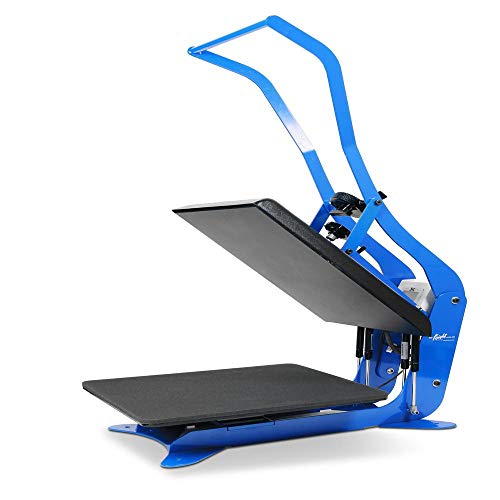
Geo Knight has been manufacturing heat presses in the United States for decades, and the DK20A is the clearest expression of that engineering pedigree. Every component is built to last — solid steel framework, SuperCoil-Microwinding heater technology, and self-lifting gas springs that open the press automatically at the end of every cycle. This auto-release pop-up mechanism isn't just a convenience feature; it protects your transfers and garments from overcooking when you're moving fast through a production run and can't always be standing right at the machine.
The temperature range is exceptional: 32°F to 600°F with ±2°F readout accuracy, with the option to display in Celsius or Fahrenheit. That upper range handles specialty applications that other presses simply can't reach. The digital pressure bar graph replaces the vague analog knobs found on cheaper presses, giving you quantifiable, repeatable pressure settings. The dual pre-press timer and automatic digital timer together give you precise control over every phase of the pressing cycle. All-thread table loading and interchangeable platens mean you can adapt this machine to different garment types without buying separate equipment.
At 83 lbs, the DK20A is described as "super-portable" for its class — which is accurate relative to industrial-grade alternatives, though you'll still want a permanent station for it. The 16" x 20" pressing surface covers full front chest designs on adults without repositioning. The "Hover" position — where the auto-release holds the platen slightly above the garment to cure materials without full pressure — is a genuinely useful feature for delicate transfers. If you're running a legitimate production operation and want a press that will outlast your business equipment by a generation, the Geo Knight DK20A is the machine to buy. According to the Wikipedia article on heat press technology, proper temperature and pressure calibration are critical factors in transfer durability — this machine delivers both with precision.
Pros:
- 100% Made in the U.S.A. — built for decades of production use
- Auto-release pop-up mechanism prevents over-pressing during high-volume runs
- Exceptional temperature range (32°–600°F) with ±2°F accuracy
- Digital pressure bar graph for repeatable, quantifiable pressure settings
- "Hover" position cures materials without full pressing pressure
- Interchangeable tables for versatile substrate applications
Cons:
- Higher price point — reflects professional-grade build quality
- 83 lbs requires a dedicated, permanent workspace
What to Look For When Buying a T-Shirt Printing Machine
Printing Technology: DTF, DTG, Sublimation, or Heat Press?
The printing technology determines what fabrics you can work with, what your workflow looks like, and what your output quality ceiling is. Here's a quick breakdown of what each approach does best:
- DTF (Direct to Film) — prints a design onto a PET film, applies hot-melt powder, cures it, then transfers to the garment with heat. Works on virtually any fabric including cotton, polyester, denim, and blends. No pretreatment required. Best for versatile, multi-fabric shops.
- DTG (Direct to Garment) — prints ink directly onto the fabric surface. Best on 100% cotton. Colored garments require pretreatment liquid. High detail but slower throughput for batch runs.
- Sublimation — transfers dye into the fabric fibers using heat. Produces the most vibrant, permanent color with zero feel on the garment. Only works on polyester (or polymer-coated hard goods). Not suitable for cotton.
- Heat Press + Transfer — applies pre-printed HTV, sublimation paper transfers, or DTF film to the garment. The press itself doesn't print — it's the final step in a multi-step workflow. Most flexible for small shops combining multiple print methods.
Know your primary fabric type before you buy. If you're printing on 100% cotton blanks, sublimation is off the table. If you want one machine to handle everything, DTF is your most versatile path in 2026.
Platen Size and Print Width
Platen size dictates the maximum design area you can apply in a single press. A 15" x 15" or 16" x 20" platen covers full front-chest adult designs without repositioning. Smaller platens (like the Cricut EasyPress 2 at 12" x 10") handle most standard designs but require repositioning for oversized prints or back panels.
For DTF and sublimation printers, print width is the equivalent spec. A 13" print width (like the PUNEHOD R1390) comfortably handles adult shirt-width designs. If you're printing jumbo back designs or wide-format banners, you'll need a wider format printer or print-and-tile approach.
White Ink Management
White ink is the most maintenance-intensive part of any DTF or DTG printer. It settles quickly, clogs printheads if left idle, and degrades print quality when poorly managed. When evaluating any white ink-capable printer, look specifically for:
- Automatic white ink circulation or stirring systems
- Scheduled automatic cleaning cycles
- Clear printhead maintenance access and affordable replacement heads
Both the A3 DTF/DTG Multifunction Printer and the PUNEHOD R1390 include white ink circulation as a core feature — not an add-on. If white ink management isn't addressed explicitly in the product specs, treat it as a red flag for long-term reliability.
Production Volume and Daily Throughput
Be honest about how many shirts per day you actually need to produce. Mismatching volume requirements to machine capability is the most common mistake buyers make:
- 1–20 shirts/day: Cricut EasyPress 2, PowerPress 15x15, Sawgrass SG500
- 20–100 shirts/day: PUNEHOD R1390 DTF, STAHLS' Hotronix Fusion IQ, A3 DTF/DTG Multifunction
- 100+ shirts/day: Geo Knight DK20A, STAHLS' Hotronix Fusion IQ (with efficient workflow)
Auto-open heat presses become essential above 50 pieces per day — manual clamshell operation at high volume creates operator fatigue and inconsistent results. The Geo Knight DK20A's auto-release mechanism is specifically designed to address this.
Questions Answered
What is the difference between DTF and DTG printing?
DTG (Direct to Garment) prints ink directly onto the fabric surface, requiring pretreatment on colored or dark garments and working best on 100% cotton. DTF (Direct to Film) prints onto a PET film first, applies adhesive powder, cures it, then presses the transfer onto the garment. DTF works on virtually any fabric without pretreatment, making it more versatile for multi-fabric production environments in 2026.
Can you use a heat press machine for sublimation printing?
Yes — a heat press is the final step in the sublimation workflow. You print your design onto sublimation paper using a sublimation printer, then use the heat press to transfer the dye into the fabric under the correct time, temperature, and pressure settings. The press itself doesn't do the printing; it activates the sublimation chemistry. You need both a sublimation printer (like the Sawgrass SG500) and a heat press to complete the workflow.
Does sublimation work on cotton t-shirts?
No. Sublimation requires polyester fibers (or polymer-coated hard substrates) to bond properly. On cotton, the dye has no chemical receptor to lock onto, resulting in faded, washed-out prints that won't survive laundering. For 100% cotton t-shirts, use DTF, DTG, or HTV heat transfer methods instead. Polyester blends with at least 65% polyester content will accept sublimation, but full polyester produces the most vibrant results.
How do I prevent my heat transfer vinyl from peeling after washing?
Peeling after washing is almost always caused by incorrect press settings — too low a temperature, insufficient pressure, or too short a press time. Use the material manufacturer's recommended settings as your starting point, not generic defaults. Allow the transfer to cool completely before peeling the carrier sheet. Wash finished garments inside-out in cold water and avoid high-heat drying. The Cricut Heat Guide is a reliable reference for HTV-specific settings if you're unsure.
What is the advantage of an auto-open heat press?
An auto-open press lifts the platen automatically when the timer expires, eliminating the risk of over-pressing if you step away or get distracted during a run. This is critical for high-volume production where the operator is loading garments faster than they can manually monitor each press cycle. The Geo Knight DK20A's auto-release pop-up mechanism also includes a "Hover" position that cures materials without full pressure — useful for delicate transfers that don't require aggressive pressing.
How much maintenance does a DTF printer require compared to a sublimation printer?
DTF printers require more active maintenance than sublimation printers, primarily due to white ink management. White ink settles and clogs printhead nozzles if the printer is idle for more than a day or two. Most modern DTF printers (including both options in this guide) include automatic circulation and cleaning cycles that handle this automatically. Sublimation printers like the Sawgrass SG500 are significantly lower maintenance — Sawgrass's anti-clog technology is designed to keep the system ready even after extended idle periods. If you're a part-time operator printing a few days per week, sublimation is the lower-friction option.
Buy on Walmart
- A3 DTF & DTG Printer Multifunction Printing Machine Automati — Walmart Link
- Sawgrass SG500 Sublimation Printer Bundle with Anti-Clog Tec — Walmart Link
- PUNEHOD R1390 DTF Printer with Oven, A3 Transfer Printer Mac — Walmart Link
- Cricut EasyPress 2 (SE) – 12 in x 10 in Heat Press - Heat Tr — Walmart Link
- STAHLS' Hotronix Fusion IQ 16"x20" Swing & Draw Heat Press: — Walmart Link
- PowerPress Industrial-Quality Digital Sublimation Heat Press — Walmart Link
- Geo Knight DK20A Auto-Open Heat Transfer Press - 16" x 20" — Walmart Link
Buy on eBay
- A3 DTF & DTG Printer Multifunction Printing Machine Automati — eBay Link
- Sawgrass SG500 Sublimation Printer Bundle with Anti-Clog Tec — eBay Link
- PUNEHOD R1390 DTF Printer with Oven, A3 Transfer Printer Mac — eBay Link
- Cricut EasyPress 2 (SE) – 12 in x 10 in Heat Press - Heat Tr — eBay Link
- STAHLS' Hotronix Fusion IQ 16"x20" Swing & Draw Heat Press: — eBay Link
- PowerPress Industrial-Quality Digital Sublimation Heat Press — eBay Link
- Geo Knight DK20A Auto-Open Heat Transfer Press - 16" x 20" — eBay Link
Key Takeaways
- For maximum fabric versatility in 2026, DTF printing — especially the PUNEHOD R1390 with its built-in oven — is the most capable all-around choice for custom apparel shops working with mixed fabric types.
- The Sawgrass SG500 is the definitive sublimation printer for small businesses producing on polyester blanks and hard substrates, thanks to its purpose-built architecture and professional-grade SubliJet UHD inks.
- Serious production operations processing 50+ garments daily need an auto-open press — the Geo Knight DK20A and STAHLS' Hotronix Fusion IQ both deliver that capability with the precision and durability to justify the investment.
- First-time heat press buyers should start with the Cricut EasyPress 2 — it removes the technical barriers of heat transfer printing and delivers wash-durable, professional-looking results from day one.
 |  |  |  |
About Rachel Kim
Rachel Kim spent five years as a merchandise buyer for a national office supply retail chain, evaluating printers, scanners, and printing accessories from Canon, Epson, HP, Brother, Dymo, and Zebra before approving them for store inventory. Her buying process involved hands-on testing against competing models, reviewing long-term reliability data from vendor reports, and vetting price-to-performance claims that manufacturers routinely overstated. That structured evaluation experience translates directly into the kind of buying guidance that cuts through marketing language and focuses on what actually matters for a specific use case. At PrintablePress, she covers printer and printing equipment reviews, buying guides, and head-to-head product comparisons.


Get some FREE Gifts. Or latest free printing books here.
Disable Ad block to reveal all the secret. Once done, hit a button below
| | | |