Reviews ›
Best Mug Press Machine: Reviews, Buying Guide and FAQs 2026
by Rachel Kim · April 03, 2022
Which mug press machine actually delivers professional results without a steep learning curve — and which ones are just glorified paperweights? If you've been asking yourself that question, you're in the right place. After evaluating six of the top models available in 2026, the Cricut Mug Press + 12 Blank Mugs bundle stands out as the best overall pick for most creators, thanks to its foolproof one-touch operation and dishwasher-safe results. But it's not the right machine for everyone, and the alternatives on this list cover scenarios Cricut simply can't.
Mug presses have exploded in popularity as the sublimation printing market has grown. Whether you're launching a custom drinkware business, personalizing gifts, or expanding your print-on-demand offerings, the machine you choose shapes your output quality, your workflow speed, and your bottom line. The category spans everything from single-use mug presses to versatile 8-in-1 machines that handle T-shirts, hats, and plates in addition to mugs and tumblers. Understanding what each machine does well — and where it cuts corners — saves you from an expensive mistake.
This guide covers six models across a range of price points and use cases. You'll find detailed reviews, a buying guide with the criteria that matter most, and answers to the questions buyers ask most often. If you're also curious about how sublimation stacks up against other decoration methods, our breakdown of screen printing vs. sublimation gives you the full picture before you commit. For now, let's get into the machines themselves. Browse more of our top picks across the printing category at the PrintablePress review hub.

Contents
Standout Models in 2026
- #PreviewProductRating
- Bestseller No. 1
 Rating:

- Bestseller No. 2
 Rating:
- Bestseller No. 3
 Rating:
 - Bestseller No. 4
 Rating:
 - Bestseller No. 5
 Rating:
- Bestseller No. 6
 Rating:
Detailed Product Reviews
1. Cricut Mug Press + 12 Blank Mugs (12oz Each) — Best for Beginners and Gift Makers
The Cricut Mug Press bundle is the most beginner-friendly option on this list, and it earns that label honestly. The one-touch operation removes the guesswork entirely — you load the mug, press the button, and the machine handles temperature, pressure, and timing automatically. The patent-pending zone heating system distributes heat evenly across the mug surface, which is the key to producing results that are peel-proof and genuinely dishwasher safe. That's a claim a lot of entry-level presses make but can't back up; Cricut can.
The bundle includes 12 blank 12oz ceramic mugs, which gives you an immediate runway to start creating without hunting down compatible blanks. The machine works with Cricut Infusible Ink Transfer Sheets, Pens, and Markers — all sold separately — which means you're locked into Cricut's ecosystem for consumables. That's a trade-off worth knowing upfront. It handles 11oz to 16oz mug blanks, covering the most common sizes, though it won't work with tumblers or flat substrates. If you're focused purely on mugs and want consistent results from day one, this is your machine.
Build quality is solid. The press feels premium in a way that cheaper alternatives don't, and the heating element holds temperature reliably across consecutive presses. For someone running a small gift business or getting started with sublimation drinkware, the Cricut Mug Press eliminates the trial-and-error phase that usually costs beginners both time and materials.
Pros:
- One-touch automatic operation — no manual temperature or pressure adjustments needed
- Zone heating produces even, peel-proof, dishwasher-safe transfers
- Bundle includes 12 blank ceramic mugs for immediate use
- Compatible with 11oz–16oz mug blanks
- Pro-level output accessible to absolute beginners
Cons:
- Locked into Cricut's Infusible Ink ecosystem for best results
- Mug-only — does not support tumblers, plates, or flat substrates
- Infusible Ink consumables are sold separately at a premium
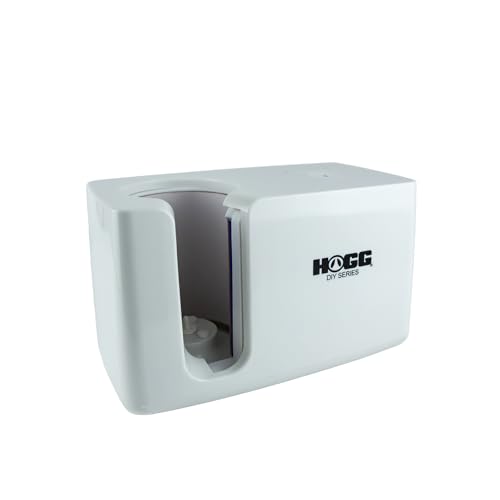
2. HOGG Auto Mug Press Machine Quick N' Easy Series — Best for High-Volume Production
HOGG has built a reputation in the sublimation community for machines that work at production pace, and the Quick N' Easy Auto Mug Press lives up to that. The automatic pressure sensing system is the standout feature — instead of manually dialing in pressure for each mug, the machine reads the substrate and adjusts. That means consistent results across a full production run without babysitting each press. If you're running an Etsy shop or filling bulk orders for corporate events, that consistency is worth its weight in savings.
The machine handles 11oz to 15oz mugs, cups, and tumblers, making it more versatile than the Cricut for drinkware variety. The temperature gauge runs from 356°F to 392°F, which covers the standard sublimation range for ceramic and coated metal. Setup is intuitive — set your temperature and time, load the mug, and let the automatic press do its job. The HOGG team specifically engineered this for speed, so cycle times are shorter than you'd get from an oven or a basic tumbler wrap press.
Where the HOGG differentiates itself from budget options is in build consistency. The heating element maintains temperature accurately through back-to-back cycles, which matters when you're pressing 20 mugs in a session. This isn't a hobby machine trying to sound professional — it's built for people who actually press volume. If you want to dig deeper into the mechanics of sublimation before you buy, our guide on how to use sublimation paper covers the process from start to finish.
Pros:
- Automatic pressure sensing eliminates manual adjustment between mugs
- Faster cycle times than oven or manual tumbler press methods
- Consistent results across high-volume production runs
- Handles mugs, cups, and tumblers up to 15oz
- Intuitive temperature and time controls
Cons:
- Upper size limit of 15oz excludes 20oz and larger tumblers
- Higher price point than entry-level options
3. ColorSub 3 in 1 40 OZ Tumbler Heat Press Machine — Best for Tumbler Variety
The ColorSub 3-in-1 is the machine you buy when your product catalog includes a wide range of tumbler sizes. Running at 110V and 750W, it comes with three heat press attachments: a 40oz cylindrical heater, a 40oz conical heater, and a 15oz attachment. That 40oz coverage is the headline feature — most entry-level mug presses top out at 15oz or 16oz, leaving large tumbler formats off the table entirely. The ColorSub handles the full-size Stanley-style tumblers and oversized water bottles that are currently driving massive demand in the custom drinkware market.
Temperature range is 0–400°F with a 0–999 second timer, giving you precise control over the press cycle. The split-set design for 40oz tumblers is worth noting: for full-wrap prints on larger formats, ColorSub recommends rotating the tumbler 180 degrees and pressing twice. That's an extra step, but it's the honest way to achieve full-wrap coverage on a large cylindrical surface. The attachments swap out cleanly, and the heating specifications are well-documented in the product materials.
The 15oz attachment covers the most common mug size, making this genuinely useful as a mug press in addition to a tumbler press. Build quality is competitive at the price point — aluminum construction with good heat distribution. If your business is growing toward larger formats and you don't want to buy a second machine when you add 40oz tumblers to your lineup, the ColorSub 3-in-1 gives you that flexibility now.
Pros:
- Covers 40oz cylindrical and conical tumblers — rare at this price point
- Three interchangeable attachments included (40oz cylindrical, 40oz conical, 15oz mug)
- Wide temperature range (0–400°F) with full timer control
- 750W heating element heats up quickly
- Aluminum construction with even heat distribution
Cons:
- Full-wrap 40oz coverage requires rotating and pressing twice
- Does not include 11oz attachment — smallest covered size is 15oz
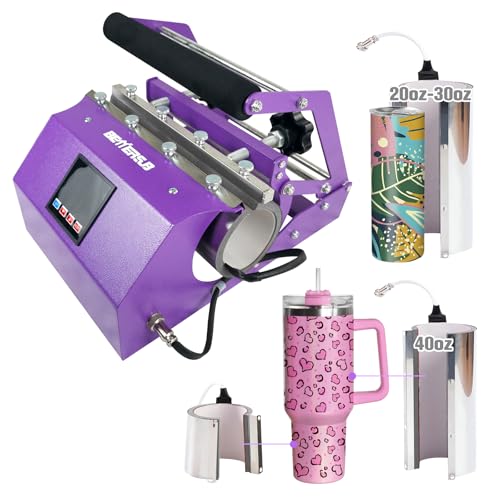
4. BetterSub 3in1 40 OZ Tumbler Mug Heat Press Machine — Best Budget 3-in-1 Option
The BetterSub 3-in-1 competes directly with the ColorSub in the multi-size tumbler space, but it carves out its niche with broader size coverage in the mid-range. The machine supports 40oz, 30oz, and 20oz tumblers via included attachments, plus 11oz, 15oz, and 16oz mugs. That 11oz–16oz mug range plus 20oz–40oz tumbler coverage in a single machine is genuinely comprehensive for a growing drinkware business. Rated at 500W and CE certified, it operates on 110V with a temperature ceiling of 482°F and a 0–999 second timer.
The LCD control panel is clean and readable, letting you set time and temperature precisely. The constant temperature function maintains heat between cycles without manual resets — practical when you're pressing back-to-back. Construction uses high-quality aluminum and silica gel for the mug attachments, which handles heat resistance well. One honest note from BetterSub: the temperature dips briefly when you load a cold tumbler into the machine — they flag this as normal, and it is. Any press sees some thermal load when you introduce a cold substrate; the machine recovers quickly.
At its price point, the BetterSub 3-in-1 delivers more size flexibility than most competitors. You're not getting the HOGG's automatic pressure sensing or the Cricut's ecosystem integration, but you're getting a machine that covers 11oz mugs through 40oz tumblers without buying add-ons. For a creator building out a catalog that includes both standard mugs and the oversized tumbler formats that dominate social media trends in 2026, this is a strong value play.
Pros:
- Covers 11oz–16oz mugs and 20oz–40oz tumblers with included attachments
- CE certified with 482°F temperature ceiling
- Clear LCD control panel with precise time and temperature settings
- Constant temperature function between cycles
- Aluminum and silica gel construction for durable heat resistance
Cons:
- Temperature drops briefly when loading cold substrates (expected, but worth noting)
- 500W output is lower than some competitors at this size range
5. VEVOR Tumbler Heat Press Machine 11–30oz — Best for Speed and Touchscreen Control
VEVOR is a brand that consistently punches above its price class in the equipment space, and this tumbler press reinforces that reputation. The touchscreen interface is the first thing you notice — it replaces the knob-and-dial controls you find on most competitors with a clean digital touchscreen for time and temperature input. One-minute press cycles set VEVOR apart from virtually every other machine on this list, making it the fastest option for high-turnover production environments. At a temperature range of 32°F–482°F and 0–999 second timer resolution, you have precise control over every variable.
The VEVOR handles 11oz through 30oz cups and tumblers, covering ceramic mugs, Mason jars, stainless steel bottles, and a variety of drinkware shapes. The bundled accessories — sublimation paper, heat-resistant tape, and gloves — let you start pressing the day it arrives. Heat-up is fast and even across the heating element, which reduces the pre-heat wait that slows down single-press sessions. The machine includes everything you need except your design files and blank substrates.
Where the VEVOR sits in the lineup: it's the right choice if speed and touchscreen precision matter more to you than 40oz tumbler coverage. The 30oz ceiling excludes the very largest tumblers, but it covers the most popular drinkware sizes in the custom market. If you're printing ceramic cups with sublimation specifically, our article on tips for printing on ceramic cups with sublimation walks through best practices that pair well with a press like this one.
Pros:
- 1-minute press cycle — fastest on this list
- Touchscreen interface for precise time and temperature input
- Handles 11oz–30oz cups, mugs, Mason jars, and stainless steel bottles
- Bundled with sublimation paper, tape, and gloves
- Fast, even heat-up across the heating element
Cons:
- 30oz maximum excludes 40oz tumblers
- Single-attachment design — not a multi-size kit like the ColorSub or BetterSub
6. Seeutek 8 in 1 Heat Press Machine 15x15 Inch — Best Multi-Surface All-in-One
Every other machine on this list is a drinkware specialist. The Seeutek 8-in-1 is something different — a full heat press platform that handles T-shirts, hats, plates, and mugs in addition to 20oz and 30oz tumblers. If you run a multi-product custom printing operation, the Seeutek replaces several machines at once. The 15x15 inch Teflon-coated heating plate is the core of the system, delivering double-tube heating for faster heat-up and more uniform temperature distribution than single-tube designs. That matters for T-shirts and vinyl transfers, where cold spots ruin otherwise good prints.
The 360-degree swing-away design keeps your hands clear of the heat plate during loading, which is a genuine safety advantage over clamshell designs when you're doing high-volume sessions. The slide-rail system makes swapping between the mug press, hat press, and plate press attachments fast and clean. Digital LCD control with 0–482°F temperature range and 0–999 second timer handles every substrate you're likely to encounter. The auto-stop heating and sound alarm prevent over-pressing — small features that prevent wasted blanks.
The trade-off is focus. The Seeutek is a generalist, not a drinkware specialist. If 90% of your work is mugs and tumblers, one of the dedicated presses above will serve you better. But if you're building a T-shirt and drinkware business simultaneously, or you want one machine that handles everything from vinyl HTV to sublimation mugs, the Seeutek delivers. Dye-sublimation printing works across a wide range of substrates, and having a press that can follow you across surfaces is genuinely useful as your catalog grows. If you're weighing a heat press against a dedicated screen setup, our comparison of screen printing vs. heat press lays out the full trade-offs.
Pros:
- True 8-in-1 versatility: T-shirts, mugs, hats, plates, and 20oz/30oz tumblers
- Double-tube 15x15 heating plate with even temperature distribution
- 360° swing-away design for safer loading and operation
- Slide-rail attachment system for fast swaps between press types
- Auto-stop heating and sound alarm prevent over-pressing
Cons:
- Tumbler attachments top out at 30oz — no 40oz support
- Larger footprint than dedicated mug presses
- Overkill if your focus is drinkware only
Choosing the Right Mug Press Machine: A Buying Guide
With six strong options across different use cases, the right machine depends entirely on what you're pressing, how much volume you're running, and what other substrates you might add to your lineup. Here are the criteria that separate a good purchase from a regrettable one.
Substrate Compatibility and Size Range
This is the first filter, and it eliminates a lot of options fast. Ask yourself: what sizes do you actually need to press today, and what sizes might you add in the next 12 months?
- 11oz–16oz ceramic mugs only: Cricut Mug Press is the cleanest solution
- 11oz–15oz mugs plus basic tumblers: HOGG Auto Mug Press covers this well
- 11oz–30oz range: VEVOR or BetterSub 3-in-1 depending on your size needs
- 40oz tumblers included: ColorSub 3-in-1 or BetterSub 3-in-1
- T-shirts, hats, and plates in addition to drinkware: Seeutek 8-in-1 is the only real option
Don't buy a 15oz-max machine if 20oz tumblers are 30% of your current orders. Size range is a constraint you can't work around without a second machine.
Pressure Control: Automatic vs. Manual
Automatic pressure sensing is a genuine advantage for volume production. The HOGG Auto Mug Press is the only machine on this list with true automatic pressure adjustment. Every other machine requires you to set or manually calibrate pressure for the substrate you're pressing. For beginners, manual pressure is manageable when you're pressing one or two mugs at a time. For production runs of 20+ mugs per session, automatic adjustment saves real time and prevents the consistency drift that happens when you're tired and rushing.
Manual pressure machines require you to understand how tight the wrap needs to be for different mug diameters and wall thicknesses. This isn't hard to learn, but it is a variable that affects output quality. If you're new to sublimation, start simple with the Cricut's one-touch system or invest in the HOGG's automation from the beginning.
Heating Performance: Wattage, Speed, and Evenness
Wattage tells you how quickly a machine can reach target temperature and how well it holds that temperature through consecutive cycles. On this list, the ColorSub leads at 750W, VEVOR and BetterSub handle their size ranges efficiently, and the Seeutek's double-tube design compensates for its larger heating plate. The Cricut's wattage isn't advertised prominently because it doesn't need to be — the one-touch system handles calibration automatically.
- Higher wattage = faster heat-up, better thermal recovery between presses
- Even heat distribution matters as much as raw wattage — hot spots ruin transfers
- VEVOR's 1-minute press cycle is a direct result of efficient heating design
- Double-tube heating (Seeutek) outperforms single-tube on large flat plates
Control Interface and Workflow Integration
The interface affects your daily workflow more than any spec sheet admits. Touchscreen controls (VEVOR) give the cleanest input experience. LCD digital panels (BetterSub, Seeutek) are accurate and readable. Temperature gauge dials (HOGG) are mechanical and reliable. Cricut's one-touch removes the control question entirely.
For sublimation specifically, you're targeting consistent temperatures in the 375°F–400°F range for most ceramic and coated metal substrates. Any machine on this list hits that range. The difference is in how precisely you can hold it there and how easy it is to adjust on the fly. If you're pressing multiple substrate types in a single session, a digital readout with precise input makes switching settings faster and less error-prone. Our guide on how to use sublimation paper covers the temperature and timing targets you'll want to nail down before your first press.
What People Ask
What is a mug press machine and how does it work?
A mug press machine is a specialized heat press designed to wrap heat and pressure around a cylindrical drinkware blank — typically a ceramic mug or stainless steel tumbler — to transfer sublimation ink from printed paper into the substrate's coating. The machine holds the mug inside a heated sleeve or clamp that maintains precise temperature and pressure across the curved surface for a set amount of time. When the cycle completes, the sublimation ink has permanently bonded with the polyester coating on the blank, producing a vibrant, dishwasher-safe design that won't peel or fade under normal use.
Can I use a regular heat press for mugs?
A standard flat heat press cannot press cylindrical mugs — the flat plate can't conform to a curved surface. You need either a dedicated mug press or a multi-attachment machine like the Seeutek 8-in-1 that includes a cylindrical mug attachment alongside its flat platen. Some crafters use an oven with a convection setting as a low-cost alternative, but oven results are inconsistent, slower, and harder to reproduce reliably compared to a proper mug press. For repeatable professional results, a dedicated press or a machine with a mug attachment is the right tool.
What size mug does a mug press work with?
Most dedicated mug presses support 11oz to 16oz ceramic mugs, which covers the most common sizes in the custom drinkware market. Machines with tumbler attachments extend that range — the VEVOR handles up to 30oz, while the ColorSub and BetterSub 3-in-1 models reach 40oz. Always check the diameter specifications alongside the ounce rating, because different brands make tumblers with slightly different diameters at the same stated volume. The machine's heating sleeve or attachment needs to make full contact with the mug's surface to produce an even transfer.
Are mug press transfers dishwasher safe?
Properly executed sublimation transfers on coated ceramic mugs are dishwasher safe. The key phrase is "properly executed" — the transfer must reach the correct temperature and hold it for the right duration so the sublimation ink fully bonds with the substrate's polyester coating. Under-pressed mugs will fade in the dishwasher quickly. The Cricut Mug Press specifically engineers its zone heating to produce dishwasher-safe results consistently. For other machines, following the recommended time and temperature settings for your specific blank is what ensures durability. Top-rack dishwasher use extends the life of any sublimated drinkware compared to bottom-rack exposure.
What's the difference between a mug press and a tumbler press?
A mug press is designed for short, squat cylindrical shapes — standard ceramic coffee mugs with consistent diameters from top to bottom. A tumbler press handles taller, sometimes tapered cylindrical formats like skinny tumblers, 20oz and 30oz stainless tumblers, and insulated cups. Some tumblers are conical (wider at the top than the bottom), which requires a conical attachment rather than a straight cylindrical one. Machines like the ColorSub and BetterSub 3-in-1 include both cylindrical and conical 40oz attachments to handle both shapes. If you're building a drinkware catalog that includes both mugs and tumblers, prioritize a machine with the right attachment set for your full lineup.
How long does a mug press cycle take?
Press cycle times vary by machine and substrate. The VEVOR leads with a 1-minute cycle time for most standard mugs. Other machines in this roundup typically run 3 to 6 minutes per press, depending on temperature settings and mug wall thickness. Add pre-heat time — most machines reach working temperature in 3 to 5 minutes — and you're looking at total cycle times ranging from 4 to 12 minutes per mug. For production runs, machines with faster cycle times and good thermal recovery between presses significantly increase your output per hour. If speed is your priority, the VEVOR's 1-minute cycle gives it a clear advantage over the field.
Buy on Walmart
- Cricut Mug Press + 12 Blank Mugs (12oz Each) — Walmart Link
- HOGG Auto Mug Press Machine - Quick N' Easy Series, Sublimat — Walmart Link
- ColorSub 3 in 1 40 OZ Tumbler Heat Press Machine 11 OZ 15 OZ — Walmart Link
- BetterSub 3in1 40 OZ Tumbler Mug Heat Press Machine 30 OZ 20 — Walmart Link
- VEVOR Tumbler Heat Press Machine, 11-30oz Mug Press, Heat Up — Walmart Link
- Seeutek 8 in 1 Heat Press Machine 15x15 Inch, Swing Away Dig — Walmart Link
Buy on eBay
- Cricut Mug Press + 12 Blank Mugs (12oz Each) — eBay Link
- HOGG Auto Mug Press Machine - Quick N' Easy Series, Sublimat — eBay Link
- ColorSub 3 in 1 40 OZ Tumbler Heat Press Machine 11 OZ 15 OZ — eBay Link
- BetterSub 3in1 40 OZ Tumbler Mug Heat Press Machine 30 OZ 20 — eBay Link
- VEVOR Tumbler Heat Press Machine, 11-30oz Mug Press, Heat Up — eBay Link
- Seeutek 8 in 1 Heat Press Machine 15x15 Inch, Swing Away Dig — eBay Link
Key Takeaways
- The Cricut Mug Press + 12 Blank Mugs bundle is the best overall pick in 2026 for beginners and gift makers who want consistent, dishwasher-safe results without manual calibration.
- If you press high volume or need automatic pressure control, the HOGG Auto Mug Press delivers production-grade consistency that manual-pressure machines can't match at scale.
- For a drinkware catalog that includes 40oz tumblers, the ColorSub or BetterSub 3-in-1 machines give you multi-size coverage without buying a second press as your lineup expands.
- The Seeutek 8-in-1 is the right investment if you run a mixed print shop — it handles T-shirts, hats, plates, and drinkware from a single machine with a 15x15 inch flat platen and swap-out attachments.
 |  |  |  |
About Rachel Kim
Rachel Kim spent five years as a merchandise buyer for a national office supply retail chain, evaluating printers, scanners, and printing accessories from Canon, Epson, HP, Brother, Dymo, and Zebra before approving them for store inventory. Her buying process involved hands-on testing against competing models, reviewing long-term reliability data from vendor reports, and vetting price-to-performance claims that manufacturers routinely overstated. That structured evaluation experience translates directly into the kind of buying guidance that cuts through marketing language and focuses on what actually matters for a specific use case. At PrintablePress, she covers printer and printing equipment reviews, buying guides, and head-to-head product comparisons.


Get some FREE Gifts. Or latest free printing books here.
Disable Ad block to reveal all the secret. Once done, hit a button below
| | | |