Reviews ›
Best Printers for Checks: Buying Guide, Reviews & FAQs 2026
by Rachel Kim · April 25, 2022
If you need to print checks in-house, the Troy 3001DW MICR Printer is the single best option on the market — it's purpose-built for secure check printing with certified MICR toner and wireless connectivity. But not every business needs a dedicated MICR machine, and the right printer for your situation depends on volume, budget, and whether you're running a small office or managing payroll for a growing team.
Printing checks yourself is one of the smartest moves you can make for your business. It eliminates the risk of preprinted check theft, reduces overhead from check stock management, and gives you full control over the payment process at the point of issue. In 2026, with fraud losses continuing to climb, in-house check printing isn't just convenient — it's a legitimate security upgrade. According to the Federal Reserve's payments system documentation, MICR encoding remains the backbone of paper check processing in the U.S. banking system.
Whether you're a solo accountant, a small business owner cutting vendor payments, or an office manager handling payroll, this guide covers every top contender. We've reviewed seven printers across a wide range of use cases — from purpose-built MICR machines to versatile laser workhorses that can handle checks alongside everyday documents. You'll also want to check out our broader printer reviews for comparisons across other categories. Let's get into it.
Contents
- Our Top Picks for 2026
- Full Product Breakdowns
- Troy 3001DW MICR Printer — Best Dedicated Check Printer
- HP LaserJet Pro M404dn — Best for Business Versatility
- HP LaserJet M209dw — Best Budget Pick for Small Teams
- HP LaserJet Pro MFP M428fdw — Best All-in-One
- MICR Toner International Laser 4001ne — Best Bundle Value
- Lexmark MS431DN — Best for High-Volume Output
- Brother HL-L2460DW — Best Compact Home Office Printer
- How to Pick the Best Check Printer
- Common Questions
Our Top Picks for 2026
- #PreviewProductRating
- Bestseller No. 1
 Rating:

- Bestseller No. 2
 Rating:
 - Bestseller No. 3
 Rating:
 - Bestseller No. 4
 Rating:
 - Bestseller No. 5
 Rating:
 - Bestseller No. 6
 Rating:
 - Bestseller No. 7
 Rating:
Full Product Breakdowns

1. Troy 3001DW MICR Printer — Best Dedicated Check Printer
The Troy 3001DW is the gold standard for businesses that print checks regularly. This machine was engineered from the ground up for check printing — it's not a general-purpose laser printer with MICR toner bolted on, it's a purpose-built security printing solution that meets banking industry standards for MICR line encoding. You get wireless connectivity, a 250-sheet capacity, and speeds of up to 35 pages per minute, making it fast enough for small to mid-sized teams without any compromise on print quality.
What sets the Troy 3001DW apart is its proprietary MICR toner. Troy's patented magnetic toner uses high-adhesion formulation and passes rigorous quality testing to guarantee a strong, readable MICR signal that banks accept without issue. This matters more than most buyers realize — off-brand MICR toner or retrofitted cartridges can produce signal strength that fails automated reader-sorter machines, leading to returned checks and bank fees. With Troy, that risk disappears entirely. The printer also prints the full check payload at the point of issue: MICR line, payee, amount, date, and memo — everything your check needs to be complete and legitimate.
From a workflow perspective, the Troy 3001DW eliminates the need to manage preprinted check stock across multiple accounts. You stock one type of blank MICR check paper and program each account's routing and account numbers through your check printing software. This is the approach that enterprise-level finance departments use, and the Troy brings it within reach for small businesses. If check fraud prevention and banking compliance are your top priorities in 2026, this is the printer you buy.
Pros:
- Purpose-built for MICR check printing with HP OEM MICR toner — the only such option on the market
- Wireless connectivity plus 250-sheet tray, suitable for small teams
- Eliminates preprinted check stock theft risk by printing at point of issue
- Supports multiple account routing on a single blank stock
- 35 ppm speed keeps up with regular business volume
Cons:
- Premium price point — overkill if you only print checks occasionally
- Replacement MICR toner is more expensive than standard cartridges
2. HP LaserJet Pro M404dn — Best for Business Versatility
The HP LaserJet Pro M404dn is a workhorse business printer that handles check printing alongside all your day-to-day document needs. This renewed unit offers exceptional value — you get a fast, reliable monochrome laser printer with built-in Ethernet, automatic duplex printing, and speeds up to 40 pages per minute, all at a fraction of the new-unit price. For businesses that print checks regularly but also need a capable general-purpose printer, the M404dn does double duty without breaking a sweat.
Security is a serious consideration with the M404dn. HP's embedded security suite includes instant threat notifications and optional PIN/pull printing, which requires the user to authenticate at the printer before a job releases. This matters when you're printing checks — you don't want sensitive financial documents sitting unattended in the output tray. The M404dn's security features are enterprise-grade for a mid-range machine, and the Ethernet connection means you can integrate it directly into your business network without relying on Wi-Fi stability.
For check printing specifically, you'll pair this printer with third-party MICR toner and compatible blank check stock. The M404dn is a well-documented platform with widely available MICR toner options from reputable suppliers. It won't match the Troy 3001DW's dedicated MICR certification, but for businesses with moderate check volumes and tighter budgets, it's a compelling and proven combination. If you run a small business and want a printer that earns its keep every day, read our roundup of the best printers for small businesses to see how the M404dn compares in that broader context.
Pros:
- 40 ppm is genuinely fast for a monochrome laser in this price range
- Built-in Ethernet for reliable wired network integration
- HP security suite with PIN printing keeps check output secure
- Automatic duplex printing standard
- Renewed pricing offers excellent value
Cons:
- No wireless connectivity — Ethernet or USB only
- MICR toner must be sourced separately from third-party suppliers
3. HP LaserJet M209dw — Best Budget Pick for Small Teams
The HP LaserJet M209dw is the most accessible entry point on this list. It's a compact, wireless monochrome laser printer that connects easily, prints quickly, and costs considerably less than the dedicated MICR options above. For freelancers, home office users, or very small teams that print checks occasionally — not daily — this printer does the job without overspending. At up to 30 pages per minute single-sided and 19 ppm duplex, it's the fastest two-sided printer in its class, which is a genuine differentiator at this price point.
Setup is simple. The M209dw connects via Wi-Fi, and HP's Smart app makes mobile printing straightforward whether you're on Android or iOS. The Instant Ink subscription compatibility is a bonus for keeping running costs predictable. For check printing, you'll use this with compatible MICR toner (sourced separately) and blank check stock — a common setup for small businesses that only need to cut checks a few times per month. The 250-sheet tray is adequate for occasional use, though heavy users will find themselves refilling it more often than they'd like.
This printer is ideal for teams of one to five people. It's not built for high-volume environments, and it lacks the advanced security features of the M404dn or the certified MICR output of the Troy 3001DW. But if your check printing needs are modest and budget is your primary constraint, the M209dw handles it cleanly. Pair it with good blank check stock and a reliable MICR toner source, and you have a functional check printing setup for well under the cost of dedicated alternatives.
Pros:
- Wireless connectivity with simple HP Smart app setup
- Fastest two-sided printing in its class at 19 ppm duplex
- Compact footprint — fits tight home office or small office desks
- Instant Ink eligible for predictable toner costs
- Affordable entry price
Cons:
- 250-sheet tray limits high-volume runs
- No advanced security features like PIN printing
- MICR toner not included or certified — third-party required
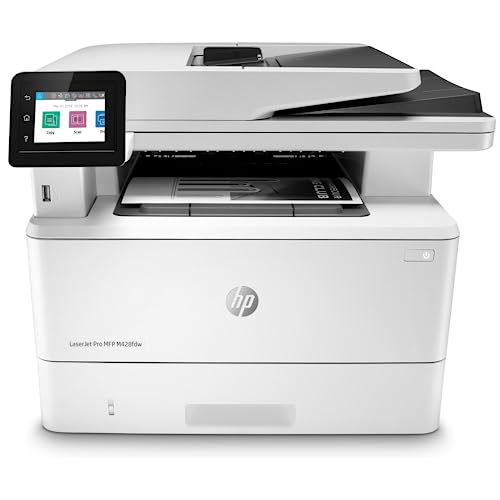
4. HP LaserJet Pro MFP M428fdw — Best All-in-One for Checks
If you need more than just printing, the HP LaserJet Pro MFP M428fdw delivers. This all-in-one machine prints, scans, copies, and faxes — making it the right choice for businesses that want a complete document management station alongside check printing capability. It's wireless, built-in Ethernet-enabled, and supports automatic 2-sided printing, all wrapped in a unit that connects with Alexa for hands-free operation. HP Wolf Pro Security is the standout feature here — it provides protection at the hardware, firmware, and OS level, which is exactly what you want when your printer handles financial documents.
The M428fdw's security posture is notable. Wolf Pro Security monitors in real-time and automatically recovers from attacks, which is far beyond what most business printers offer. The customizable control panel lets you save complex workflows and trigger them with a single touch — useful when you're printing checks as part of a larger accounts payable process that also involves scanning receipts or copying vendor invoices. Alexa integration is a minor bonus, but the core productivity features are genuinely useful for an office environment.
For check printing, this machine follows the same path as the M404dn — you source MICR toner separately and use it with blank check stock. The added scanner means you can also digitize check records immediately after printing, which is a workflow efficiency most businesses overlook. If you're running a small to medium office and want one machine that handles all your document needs while also supporting check printing, the M428fdw is the most versatile pick on this list. It's a more expensive option, but it replaces several standalone devices.
Pros:
- Full all-in-one: print, scan, copy, fax in one unit
- HP Wolf Pro Security — hardware-to-OS-level protection
- Wireless plus Ethernet for flexible connectivity
- Customizable one-touch workflows for complex office tasks
- Alexa integration for hands-free control
Cons:
- Higher price than print-only alternatives
- MICR toner not bundled — additional purchase required
5. MICR Toner International Laser 4001ne — Best Bundle Value
The MICR Toner International Laser 4001ne bundle takes a different approach from every other option on this list — it ships with a genuine MICR toner cartridge already loaded in the printer. You open the box, plug it in, and you're ready to print checks. No separate toner hunt, no compatibility guesswork, no setup anxiety. The included starter cartridge yields up to 2,900 pages, which covers substantial check volume for small to mid-sized businesses right out of the gate.
MTI specializes in MICR printing, and their toner is manufactured by expert technicians using superior magnetic toner formulation with guaranteed bank acceptance. This is the key differentiator — the "guaranteed bank acceptance" claim means MTI stands behind their MICR signal strength. When a check bounces at a reader-sorter machine because the MICR line was unreadable, the cost — in fees, reprocessing, and vendor relationships — adds up fast. Using a certified MICR bundle like this one eliminates that failure mode entirely.
The printer itself is a reliable HP LaserJet platform (the 4001ne series), which means you benefit from HP's well-established build quality and driver ecosystem. If you print checks regularly and want the simplest possible setup with no ambiguity about MICR compliance, this bundle delivers. It's also the right choice if you're transitioning away from a check printing service and want to bring the function in-house without a complicated procurement process. For anyone unsure about sourcing MICR toner separately, this is the stress-free answer.
Pros:
- Printer ships with certified MICR toner cartridge pre-installed
- 2,900-page starter cartridge provides immediate value
- Guaranteed bank acceptance on MICR signal output
- Simplified setup — no separate toner sourcing required
- Built on reliable HP LaserJet platform
Cons:
- Replacement MTI MICR toner cartridges cost more than standard HP toner
- No wireless — wired connection only
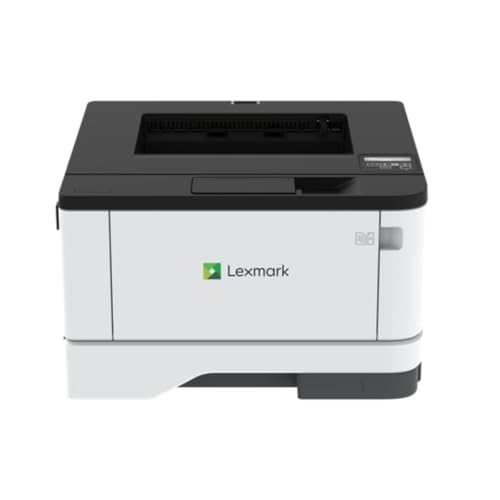
6. Lexmark MS431DN — Best for High-Volume Output
The Lexmark MS431DN earns its place on this list through sheer throughput capability. At 42 pages per minute with 2400 dpi print resolution, it's the fastest printer here on a per-page basis, and it connects via Gigabit Ethernet for stable, high-speed network integration. The automatic duplex printing and 100-sheet input standard tray are complemented by Lexmark's reputation for building durable workhorses that hold up under sustained daily use in office environments.
For check printing, the MS431DN works with third-party MICR toner from compatible suppliers. Lexmark's platform is well-supported by the MICR aftermarket, so sourcing quality MICR toner is straightforward. The 2400 dpi resolution is also a benefit here — higher resolution means sharper, more consistent MICR font rendering, which contributes to stronger, more readable magnetic signals at the bank reader. You won't get the out-of-box MICR certification of the Troy or MTI bundle, but you get a faster machine with serious longevity.
Where the MS431DN excels is in environments that print at volume — think accounting firms, payroll departments, or multi-location small businesses where check printing runs happen in batches. The Gigabit Ethernet ensures the network connection never becomes a bottleneck, and Lexmark's build quality means this printer handles sustained print runs without the overheating and jam issues that plague lighter-duty machines. If check printing is one piece of a larger high-volume document workflow, the Lexmark MS431DN belongs at the top of your shortlist.
Pros:
- 42 ppm — fastest printer on this list
- 2400 dpi for sharp, high-quality MICR font rendering
- Gigabit Ethernet for reliable high-speed network integration
- Automatic duplex standard
- Lexmark build quality handles sustained high-volume runs
Cons:
- No wireless connectivity
- MICR toner must be sourced separately
- 100-sheet standard input tray is low — you'll need add-on trays for volume work
7. Brother HL-L2460DW — Best Compact Home Office Printer
The Brother HL-L2460DW closes out this list as the top pick for home office users and freelancers who need occasional check printing alongside regular documents. It's compact, affordable, and comes loaded with connectivity options — dual-band wireless (2.4GHz/5GHz), Ethernet, and USB — giving you flexibility regardless of your setup. At 36 ppm with automatic duplex printing, it's fast enough for any home or small office environment, and the Brother Mobile Connect app makes remote management and mobile printing genuinely easy.
Brother has built a strong reputation for reliability in the home and small office segment, and the HL-L2460DW carries that tradition forward. The Alexa integration is a convenience feature, but the real draw is the combination of solid print quality, compact size, and affordable running costs. The Refresh subscription trial for toner adds another layer of cost predictability. For check printing, you'll pair this with compatible third-party MICR toner — Brother's platform is widely supported by MICR toner vendors, so you have options.
This isn't a high-volume machine. If you're printing checks daily or in batches, step up to the Troy 3001DW or the MTI bundle. But for a freelancer who pays vendors monthly, or a home-based business cutting a handful of checks per week, the Brother HL-L2460DW is more than capable. It prints clearly, connects reliably, and takes up minimal desk space — which matters in a home office setup. If you're comparing it to other occasional-use options, our guide to the best printers for occasional use covers the trade-offs in detail.
Pros:
- Dual-band wireless, Ethernet, and USB — maximum connectivity flexibility
- 36 ppm with automatic duplex printing
- Compact footprint ideal for home offices
- Brother Mobile Connect app for remote management and mobile printing
- Alexa-compatible for hands-free control
Cons:
- Not suited for high-volume check printing environments
- MICR toner sourced separately — no bundled MICR option
How to Pick the Best Printer for Checks
Understand MICR and Why It Matters
MICR stands for Magnetic Ink Character Recognition. The line of numbers along the bottom of every check — routing number, account number, check number — is printed in a specific font (E-13B in the U.S.) using magnetic toner that bank reader-sorter machines detect. Without a readable MICR line, your check can be rejected, returned, or require manual processing that triggers additional fees.
Not every laser printer can print valid MICR lines. Standard toner lacks the magnetic properties that reader-sorter machines detect. You need either a dedicated MICR printer with certified MICR toner (like the Troy 3001DW or the MTI bundle) or a compatible laser printer paired with third-party MICR toner from a reputable supplier. The printer platform matters too — the laser engine needs to fuse the toner consistently to ensure magnetic particle density stays within banking specs across the entire print run.
In 2026, the consequences of weak MICR signals are real. Banks charge returned check fees, your vendors get delayed payments, and your credibility takes a hit. Don't cut corners on MICR toner to save a few dollars per cartridge. If you're unfamiliar with laser printing fundamentals more broadly, our guide to the best LED printers provides useful context on how laser and LED print engines compare.
Match the Printer to Your Volume
Check printing volume is the single most important factor in choosing your printer. Here's a practical breakdown:
- Under 50 checks per month: The Brother HL-L2460DW or HP M209dw handles this comfortably. You don't need a dedicated MICR machine.
- 50–200 checks per month: The HP M404dn, HP M428fdw, or MTI 4001ne bundle is the right range. You need reliable MICR output and a robust paper path.
- 200+ checks per month: The Troy 3001DW or Lexmark MS431DN. At this volume, dedicated MICR certification and high-yield toner cartridges pay for themselves quickly.
Paper tray capacity also scales with volume needs. A 100-sheet tray means frequent refills during batch runs. If you're cutting payroll checks for 80 employees every two weeks, a 250-sheet or larger tray is a practical necessity, not a luxury.
Security Features for Financial Documents
A printer that handles checks is a financial document machine. Treat it like one. PIN/pull printing — where the print job only releases when you authenticate at the printer — prevents checks from sitting unattended in the output tray. This matters especially in shared office environments where multiple people have physical access to the printer.
HP Wolf Pro Security on the M428fdw and the PIN printing option on the M404dn are both meaningful security upgrades. If you're in a shared office or open workspace, prioritize printers with authentication features. For home offices with sole access to the printer, this concern is lower priority, but it's worth knowing what you're giving up when you choose a budget option without these features.
Connectivity and Software Compatibility
Most modern check printing software — Quickbooks, CheckPrinting.net, VersaCheck, and similar tools — outputs to any standard printer via the Windows or Mac print driver. You're not locked into specific hardware by your software. That said, wired Ethernet connections are more reliable than Wi-Fi for financial printing tasks where you need consistent output quality. If your printer is in a location with marginal Wi-Fi coverage, run an Ethernet cable.
Mobile printing capability matters less for checks than for general documents, but if you need to approve and print checks on short notice from a phone or tablet, the Brother HL-L2460DW and HP M209dw both handle this cleanly through their respective apps. For offices with complex document workflows, the all-in-one approach of the HP M428fdw — scan, copy, and fax alongside printing — reduces the number of separate devices you need to manage.
Common Questions
Can any laser printer print checks?
Technically, any laser printer can print the visual portion of a check, but only printers using MICR toner can produce the magnetic ink character recognition line that banks require for automated processing. If you use standard toner, the check may be readable by humans but will fail reader-sorter machines at the bank, potentially triggering returned check fees or manual processing delays. Always use verified MICR toner when printing checks.
Do I need special paper to print checks?
Yes. Checks must be printed on MICR-compatible blank check stock, which is specifically designed to accept MICR toner properly and includes security features like watermarks, microprinting, and void pantographs. Standard printer paper will not work for legitimate check printing. Blank check stock is available from bank-approved suppliers and is sold by the box in standard 8.5x11 sheets that perforate into individual checks.
Is it legal to print your own checks?
Yes, printing your own checks is completely legal in the United States. Businesses have printed checks in-house for decades, and the practice is explicitly supported by the banking system through MICR standards. What matters is that your checks meet banking specifications — correct paper stock, proper MICR line encoding, and accurate account information. Many accounting software platforms include check printing templates that are pre-formatted to banking standards.
What is the difference between MICR toner and regular toner?
MICR toner contains iron oxide particles that give it magnetic properties. When bank reader-sorter machines scan the bottom of a check, they read the magnetic signal produced by these particles to identify routing and account numbers at high speed. Regular toner lacks iron oxide and produces no detectable magnetic signal, making it unsuitable for the MICR line. The visual output looks identical, but only MICR toner passes bank validation.
How much does it cost to print checks in-house versus ordering preprinted checks?
In-house check printing typically costs between $0.05 and $0.15 per check when you factor in MICR toner, blank check stock, and printer amortization. Ordering preprinted checks from a bank or check supplier typically costs $0.25 to $0.75 per check or more. For businesses printing more than 100 checks per month, in-house printing pays for the printer investment within one to two years. The security benefits — eliminating preprinted check theft risk — add further value beyond the direct cost savings.
Can inkjet printers print checks?
No. Inkjet printers cannot print valid MICR lines because inkjet ink does not contain the iron oxide particles required for magnetic signal detection. MICR printing requires laser or LED print technology to fuse magnetic toner particles to the paper at sufficient density. If you attempt to use an inkjet printer for checks, the MICR line will fail bank processing. Always use a laser printer with certified MICR toner for check printing.
Buy on Walmart
- Troy 3001DW MICR Printer, Check Printing, Wireless, Built fo — Walmart Link
- HP LaserJet Pro M404dn Monochrome Laser Printer with Built-i — Walmart Link
- HP LaserJet M209dw Wireless Printer, Print, Fast speeds, Eas — Walmart Link
- HP LaserJet Pro MFP M428fdw Wireless Monochrome All-in-One P — Walmart Link
- MICR Toner International Laser 4001ne MICR Printer Bundle wi — Walmart Link
- Lexmark MS431DN Laser Printer - Monochrome - 42 ppm Mono - 2 — Walmart Link
- Brother HL-L2460DW Wireless Compact Monochrome Laser Printer — Walmart Link
Buy on eBay
- Troy 3001DW MICR Printer, Check Printing, Wireless, Built fo — eBay Link
- HP LaserJet Pro M404dn Monochrome Laser Printer with Built-i — eBay Link
- HP LaserJet M209dw Wireless Printer, Print, Fast speeds, Eas — eBay Link
- HP LaserJet Pro MFP M428fdw Wireless Monochrome All-in-One P — eBay Link
- MICR Toner International Laser 4001ne MICR Printer Bundle wi — eBay Link
- Lexmark MS431DN Laser Printer - Monochrome - 42 ppm Mono - 2 — eBay Link
- Brother HL-L2460DW Wireless Compact Monochrome Laser Printer — eBay Link
Buy a printer that takes check security as seriously as your bank does — because when a MICR line fails, the cost is never just the check.
 |  |  |  |
About Rachel Kim
Rachel Kim spent five years as a merchandise buyer for a national office supply retail chain, evaluating printers, scanners, and printing accessories from Canon, Epson, HP, Brother, Dymo, and Zebra before approving them for store inventory. Her buying process involved hands-on testing against competing models, reviewing long-term reliability data from vendor reports, and vetting price-to-performance claims that manufacturers routinely overstated. That structured evaluation experience translates directly into the kind of buying guidance that cuts through marketing language and focuses on what actually matters for a specific use case. At PrintablePress, she covers printer and printing equipment reviews, buying guides, and head-to-head product comparisons.


Get some FREE Gifts. Or latest free printing books here.
Disable Ad block to reveal all the secret. Once done, hit a button below
| | | |