Reviews ›
Best Label Printer for Shopify
by Rachel Kim · March 27, 2022
Which label printer actually works seamlessly with Shopify in 2026 — and which ones will have you wrestling with drivers at 11 PM when you have 200 orders to ship? If you've been running a Shopify store for more than a few weeks, you already know that printing labels on a regular inkjet or laser printer is slow, expensive, and frustrating. The right thermal label printer changes everything. Our top pick after extensive research is the Rollo Wireless Shipping Label Printer — it connects to virtually every device without drivers, prints a label per second, and pairs directly with Shopify's shipping workflow. But the best printer for your setup depends on your volume, connectivity needs, and budget, so read on before you buy.

Direct thermal printing has become the standard for ecommerce sellers — and for good reason. These printers require no ink, no toner, and no cartridge replacements. You load a roll of thermal label stock, connect to Shopify, and print. Labels come out crisp enough to scan at every point in the carrier's journey, which is non-negotiable when you're shipping via USPS, UPS, or FedEx. If you're still printing on regular paper and taping it to boxes, you're losing time and money on every single order. Whether you're shipping 10 packages a week or 500, moving to a dedicated label printer is one of the best operational upgrades you can make for your Shopify store.
We've evaluated seven of the most popular thermal label printers available in 2026, focusing on Shopify compatibility, connection reliability, print speed, and long-term value. This guide covers everything from budget-friendly USB options to professional-grade wireless models. If you want a broader look at desktop printing options for your business, our guide to the best duplex printers and our best color printer for small business roundup are also worth bookmarking. Now, let's get into the printers.
Contents
- Best Choices for 2026
- Product Reviews
- Rollo Wireless Shipping Label Printer — Best Overall
- DYMO LabelWriter 4XL — Best for Multi-Platform Sellers
- MUNBYN RealWriter 941 — Best Budget Pick
- Phomemo Bluetooth Label Printer — Best for Mobile Printing
- DYMO LabelWriter 550 Turbo — Best for Shared Office Use
- Zebra ZD421 — Best for High-Volume Operations
- Arkscan 2054A — Best for Fanfold Labels
- How to Pick the Best Label Printer for Shopify
- What People Ask
Best Choices for 2026
- #PreviewProductRating
- Bestseller No. 1
 Rating:

- Bestseller No. 2
 Rating:
- Bestseller No. 3
 Rating:
 - Bestseller No. 4
 Rating:
 - Bestseller No. 5
 Rating:
- Bestseller No. 6
 Rating:
 - Bestseller No. 7
 Rating:
Product Reviews
1. Rollo Wireless Shipping Label Printer — Best Overall
The Rollo Wireless is the label printer that Shopify sellers keep recommending to each other — and in 2026, it remains the benchmark for good reason. Setup takes about two minutes. You connect it to your Wi-Fi network, and from that point on, any device on that network can send print jobs directly to it. iPhones and iPads connect via AirPrint with zero configuration. Android phones, Windows PCs, Chromebooks, and Linux machines connect through the standard Wi-Fi interface without needing to install a single driver. For multi-device households or small team operations, this flexibility is genuinely valuable. You print from your phone when you're packing orders in the garage, and your partner prints from the laptop at the desk — same printer, no conflict.
Performance is exactly what you want in a shipping operation. The 203 DPI print head produces labels that scan cleanly on the first try, every time. Print speed hits 150mm/s, which translates to one 4x6 label per second. If you're processing a morning rush of 80 orders, you're done in under two minutes. The Rollo Ship Manager app — included at no extra cost — gives you access to discounted shipping rates from USPS, UPS, and others, so you're not just buying a printer, you're buying into an ecosystem that competes directly with ShipStation or ShippingEasy at a lower ongoing cost. This is a meaningful advantage if you're running a lean Shopify operation.
The build quality is solid and compact. The Rollo Wireless doesn't feel like a toy, and the label roll loads smoothly with a guide system that keeps your labels aligned. It handles standard 4x6 thermal rolls without any fuss. You don't need specialty labels — any compatible 4x6 direct thermal roll works. The wireless stability is reliable on 2.4GHz networks, and the USB fallback means you're never without a connection even if your Wi-Fi goes down.
Pros:
- Truly driver-free wireless printing across all major platforms including iPhone via AirPrint
- 150mm/s print speed handles high order volumes without bottlenecks
- Rollo Ship Manager app adds discounted shipping rates at no additional cost
- USB fallback ensures you're never stuck without connectivity
Cons:
- Higher upfront price than entry-level USB-only competitors
- 203 DPI is sufficient for shipping labels but not for detailed product labels or fine barcodes
2. DYMO LabelWriter 4XL — Best for Multi-Platform Sellers
The DYMO LabelWriter 4XL has been a favorite among ecommerce sellers for years, and it earns its reputation through sheer reliability and platform compatibility. If you sell across Shopify, eBay, Etsy, and Amazon simultaneously — which many sellers do in 2026 — this printer handles all of them without any friction. DYMO's software integrates directly into the shipping workflows of every major platform, which means less manual downloading and reformatting of label files. You click print, and the label comes out correctly sized every time.
The 4XL prints standard 4x6 shipping labels, but it's equally at home with warehouse labels, barcode labels, and bulk mailing labels. This versatility matters if your Shopify store also handles wholesale or fulfillment work. Direct thermal technology means no ink purchases — ever. DYMO labels are widely available in bulk, and the per-label cost is low enough that it stops being a concern after the first month. The build is sturdy and the printer is compact enough to sit comfortably on a crowded packing table.
The main limitation is connectivity — the 4XL connects via USB only, which means it's tied to a single computer. If you're running a one-person operation with a dedicated packing station, that's not an issue. If you need multiple people to print from different devices, you'll want to look at the Rollo Wireless or the DYMO 550 Turbo instead. That said, the 4XL's print quality and platform support are hard to argue with at its price point.
Pros:
- Direct integration with Shopify, Amazon, eBay, Etsy, ShipStation, and more
- Handles 4x6 labels plus warehouse and barcode formats
- No ink or toner costs — ever
Cons:
- USB only — no wireless connectivity
- DYMO-branded labels cost more per roll than generic thermal stock
3. MUNBYN RealWriter 941 — Best Budget Pick
The MUNBYN RealWriter 941 is the printer you buy when you're serious about your Shopify store but not ready to spend top dollar on a label printer. Setup lives up to MUNBYN's claim — you're printing labels within a minute of unboxing. The printer installs as a standard thermal printer on both Windows and macOS, so any application that can print can send to it. There's no proprietary software requirement, no account creation, no subscription. You plug in the USB cable, and it works.
One of the more practical features is Auto Label Detection. The RealWriter 941 reads your label stock and automatically adjusts its settings to match. You don't calibrate manually or fiddle with paper size settings in your OS. Load the roll, close the cover, and it figures out the rest. This matters more than it sounds when you're switching between different label formats for shipping labels versus product labels. The 203 DPI resolution is standard for this category and produces clean, scannable barcodes that USPS, FedEx, and UPS carriers handle without issue.
Shopify compatibility is solid — the RealWriter 941 is recognized by Shopify's label download system and prints the PDF or ZPL labels without reformatting. MUNBYN also officially supports Etsy, eBay, Amazon, Poshmark, ShipStation, Shippo, and a long list of other platforms, so this isn't a one-trick Shopify printer. The Bluetooth variant (USB+Bluetooth model) adds wireless convenience if you need to print from a phone occasionally, though the USB-only version is cheaper and works just as well for desk setups.
Pros:
- Fast, simple setup — recognized as a standard thermal printer on Windows and macOS
- Auto Label Detection eliminates manual calibration
- Compatible with Shopify, Etsy, eBay, Amazon, and most major shipping platforms
- Available in USB-only or USB+Bluetooth configurations
Cons:
- No Wi-Fi — Bluetooth range is limited compared to wireless competitors
- Build feels lighter than DYMO or Rollo at this price tier
4. Phomemo Bluetooth Thermal Label Printer — Best for Mobile Printing
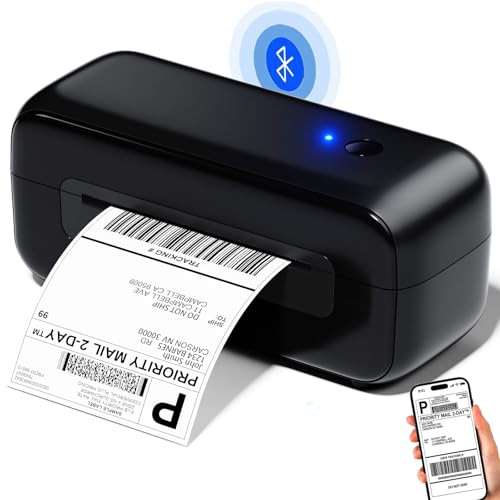
The Phomemo Bluetooth label printer is designed specifically for sellers who run their Shopify operations from a phone. If you're managing orders from an iPhone or Android device and printing labels in a garage, at a market, or anywhere without a dedicated workstation, the Phomemo's wireless Bluetooth connection gives you a genuinely portable printing setup. Pair it with your phone once, and from that point forward, labels print in seconds from your Shopify mobile app or any shipping app on your device.
The upgraded ceramic semiconductor print head is the technical highlight here. Ceramic heads run cooler than standard metal print heads, which extends the life of the printer in high-volume scenarios and produces consistently sharp output over time. At 152mm/s, it prints 72 labels per minute — fast enough that it won't be the bottleneck in any realistic Shopify fulfillment workflow. The printer handles label widths from 1 inch all the way to 4.6 inches, which means you can use it for everything from small address labels to full 4x6 shipping labels without reconfiguring anything.
Auto Label Detection is included here as well — the Phomemo uses an intelligent paper return function to position labels correctly and reduce waste. You won't find yourself throwing away misfed labels or manually advancing the roll. Platform support covers the usual Shopify, USPS, UPS, Etsy, eBay, Amazon, Poshmark, ShipStation, and Shippo. The Bluetooth-only limitation means this isn't the right choice for a shared office environment, but for the solo Shopify seller running a lean operation, it's a capable and affordable tool.
Pros:
- Bluetooth connectivity makes it genuinely mobile — pairs with iPhone and Android
- Ceramic print head for longer lifespan and consistent output quality
- 72 labels per minute — fast for a Bluetooth thermal printer
- Auto Label Detection reduces label waste
Cons:
- Bluetooth only — no Wi-Fi or LAN option for shared office environments
- Bluetooth range is limited; walls and distance cause connection drops
5. DYMO LabelWriter 550 Turbo — Best for Shared Office Use
The DYMO LabelWriter 550 Turbo is what you buy when your Shopify business has grown past the one-person stage and you need a label printer that multiple team members can access simultaneously. LAN network connectivity is the key differentiator — this printer sits on your office network and accepts print jobs from any workstation connected to it. No USB cable routing, no dedicated printing computer, no queue management headaches. Everyone on the team can send a label from their own machine and pick it up from the same printer.
Automatic Label Recognition is another standout feature. Load a roll of DYMO labels, and the printer instantly reads the label type, size, and quantity remaining. There are no manual settings to adjust when you swap label stock. This eliminates a category of printing errors that plague less sophisticated printers — misfeeds, wrong size output, manual calibration failures. When you're running a fulfillment operation and every label needs to be right the first time, this automatic recognition system pays for itself in saved time and reduced mistakes.
Print speed on the 550 Turbo is fast, and the output quality is excellent. DYMO's print heads have always been reliable, and the 550 Turbo maintains that reputation. The trade-off is cost — this is a premium printer, and DYMO's label rolls are more expensive per unit than generic thermal stock. If you're budget-conscious, factor ongoing label costs into your total cost of ownership calculation. But for a growing Shopify brand with a small team sharing one printer, the 550 Turbo's LAN connectivity and automatic recognition justify the premium.
Pros:
- LAN network connectivity — multiple team members can print from their own workstations
- Automatic Label Recognition eliminates manual configuration when swapping label rolls
- USB connectivity also available for single-workstation use
- High-speed output with professional DYMO print quality
Cons:
- Premium price point — higher upfront cost than most competitors
- DYMO label rolls cost more per unit than generic thermal stock
6. Zebra ZD421 — Best for High-Volume Operations
The Zebra ZD421 is in a different category from the other printers on this list — and it's priced accordingly. Zebra is the brand that warehouse operations, logistics companies, and enterprise fulfillment centers rely on globally. Thermal printing technology at the enterprise level is Zebra's core competency, and the ZD421 brings that reliability to a more accessible form factor without sacrificing the build quality that professional operations demand. If your Shopify store is shipping hundreds of orders per day and you need a printer that runs 8 hours straight without a hiccup, this is your machine.
The LCD display sets the ZD421 apart from every other printer on this list. You get real-time status information on the printer itself — without opening software on your computer. Label count, print status, error messages — all visible at a glance. The 203 DPI direct thermal output is clean and highly readable, and Zebra's print heads are engineered for duty cycles far beyond what any consumer or prosumer printer is rated for. USB connectivity is included in the base model, with expansion options for Bluetooth, Wi-Fi, and Ethernet depending on configuration.
The ZD421 is overkill for a Shopify seller shipping 50 packages a week. But if you're scaling fast, running a 3PL, or fulfilling for multiple stores simultaneously, this printer will outlast and outperform anything else on this list. It's an investment with a long payback period — Zebra printers routinely last five to ten years in demanding environments. For the right seller at the right volume level, that durability calculation tilts firmly in its favor.
Pros:
- Enterprise-grade build quality — designed for continuous high-volume operation
- LCD display provides real-time status without opening software
- Expandable connectivity — USB base with optional Bluetooth, Wi-Fi, and Ethernet
- Zebra's print heads are rated for significantly longer duty cycles than consumer alternatives
Cons:
- Significantly higher price than every other printer in this roundup
- Overkill for low-to-medium volume Shopify sellers — not cost-effective below ~200 labels/day
7. Arkscan 2054A — Best for Fanfold Labels
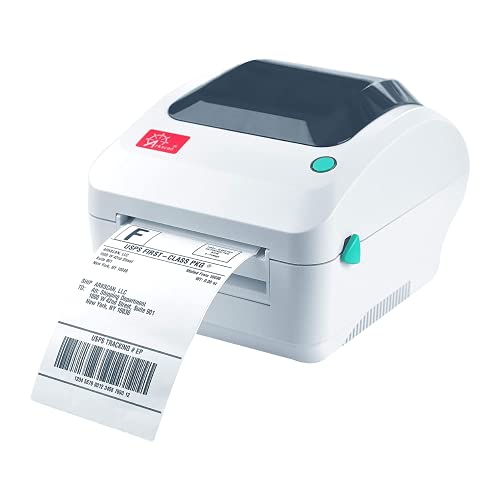
The Arkscan 2054A earns its spot on this list because it solves a specific problem that the other printers on this list don't: fanfold label support. If you buy your thermal labels in fanfold stacks rather than rolls — which is common when you're ordering in bulk from certain suppliers — the 2054A accepts fanfold paper loaded from the back of the printer. This gives you the flexibility to run either format without buying a different printer for each configuration. For sellers who have already standardized on fanfold stock, this flexibility alone is worth considering.
The label size range is also notably wide. The 2054A handles minimum widths of 0.75 inches and maximum widths of 4.25 inches, with label lengths up to 90 inches. That range covers standard 4x6 shipping labels, product barcode labels, FBA labels for Amazon fulfillment, and specialized formats that narrower printers can't accommodate. Platform support is comprehensive — Shopify, Amazon (including FBA and FNSKU), eBay, Etsy, PayPal, ShipStation, Stamps, UPS, USPS, FedEx, DHL, Poshmark, Pirateship, and more. Print speed runs at 5 inches per second, which is solid for its class.
The included BarTender UltraLite software (Windows only) is a practical bonus. If you need to design and print custom product labels, warehouse labels, or barcodes — not just carrier shipping labels — this software gives you a capable design tool without a separate purchase. For sellers who need a dedicated barcode printer for warehouse operations and a shipping label printer in one unit, the 2054A handles both jobs without compromise. Also check out our best label maker for home use guide if you need lighter-duty labeling alongside your shipping setup.
Pros:
- Accepts both roll and fanfold labels — unique flexibility in this price range
- Wide label size range: 0.75" to 4.25" width, up to 90" length
- BarTender UltraLite included for custom label design (Windows)
- Compatible with Amazon FBA, FNSKU, and virtually every shipping platform
Cons:
- USB only — no wireless connectivity option
- BarTender UltraLite is Windows-only; Mac users get less software value
How to Pick the Best Label Printer for Shopify
Connectivity: Wireless vs. USB vs. LAN
Connectivity is the first decision you need to make — and it should be driven by your workflow, not by price alone. If you have a single dedicated packing station where one computer handles all your Shopify shipping, USB is perfectly adequate. The DYMO 4XL and Arkscan 2054A both deliver reliable USB performance without the overhead of network configuration. If you need to print from your phone, a tablet, or multiple devices in the same space, you need Wi-Fi (Rollo Wireless) or at minimum Bluetooth (Phomemo, MUNBYN Bluetooth variant). If you have a small team sharing one printer across multiple workstations, LAN connectivity — as offered by the DYMO 550 Turbo — is the cleanest solution. Don't buy a USB-only printer and then regret it when your business adds a second person to the packing process.
Print Speed and Volume Requirements
Print speed matters at scale. A 150mm/s printer like the Rollo Wireless prints one 4x6 label per second. A 5-inch-per-second printer like the Arkscan runs slightly slower. For most Shopify sellers shipping fewer than 200 orders per day, the speed difference between these printers is academic — you won't feel it. Where speed becomes critical is in batch operations: if you're processing 500 orders in a two-hour window, every second per label adds up. At that volume, the Rollo Wireless and Phomemo's 72-label-per-minute rate keep pace with your packing speed. The Zebra ZD421 is engineered for duty cycles far beyond that — it's built for operations where the printer runs all day, every day, without rest.
Label Compatibility and Format Flexibility
Every printer on this list prints standard 4x6 shipping labels, but your needs may go beyond that. If you print product labels, barcode labels, or FBA/FNSKU labels for Amazon alongside your Shopify shipping labels, you want a printer that handles variable label sizes. The Arkscan 2054A and DYMO 4XL both support a range of formats. The DYMO 550 Turbo's Automatic Label Recognition makes switching between formats seamless. Fanfold label users have essentially one option in this roundup — the Arkscan — which is worth noting if your bulk label purchasing already uses that format. Most sellers standardize on rolls of 4x6 thermal labels, which every printer here handles without issue.
Total Cost of Ownership: Upfront Price vs. Label Costs
The sticker price of a label printer is only part of the story. DYMO printers require DYMO-branded label rolls, which cost more per unit than generic thermal stock. Rollo, MUNBYN, Arkscan, and Phomemo all work with generic 4x6 thermal labels, which you can buy in bulk for significantly less. If you're printing 100 labels a day, the per-label cost difference compounds quickly over a year. Factor your monthly label volume into your buying decision. A cheaper printer that locks you into expensive proprietary labels can cost more in total over two years than a more expensive printer with open label compatibility. The Zebra ZD421's higher upfront price is offset by its longevity — it's not uncommon for a Zebra printer to run for five or more years in demanding environments.
What People Ask
Do I need a special label printer to print Shopify shipping labels?
You don't technically need a dedicated label printer — Shopify lets you print labels on a regular laser or inkjet printer on standard paper. But a thermal label printer is faster, cheaper per label (no ink), and produces adhesive-backed 4x6 labels ready to apply directly to packages. For any seller shipping more than a handful of orders per week in 2026, a thermal label printer is worth the investment.
What size labels does Shopify use?
Shopify's standard shipping label format is 4 inches by 6 inches (4x6). This is the industry standard format used by USPS, UPS, FedEx, and DHL. All seven printers in this guide print 4x6 labels. Some printers also support smaller formats for product labels or barcodes.
Can I use any brand of thermal labels, or do I need the printer manufacturer's labels?
Most thermal label printers — including the Rollo, MUNBYN, Phomemo, Arkscan, and Zebra — work with any compatible generic thermal label stock. DYMO printers are the exception: DYMO recommends and is optimized for DYMO-branded labels, and using generic labels can sometimes cause feed issues or void warranty coverage. If label cost is a priority, choose a printer that accepts generic stock.
Which Shopify label printer works with iPhone and iPad?
The Rollo Wireless is the standout choice for iPhone and iPad printing — it supports Apple AirPrint natively, so your iOS device connects to it without any app or driver installation. The Phomemo Bluetooth printer also connects to iPhones via Bluetooth. The other printers on this list are primarily designed for computer-based printing, though some Bluetooth variants work with mobile apps.
How long do thermal labels last before the print fades?
Standard direct thermal labels are rated to remain readable for approximately one to two years under normal storage conditions. Heat, sunlight, and friction accelerate fading. For shipping labels that spend days in transit, this durability is more than adequate — carriers scan labels immediately and the label rarely needs to remain readable beyond delivery. If you need long-term barcode durability (for inventory or product labeling), thermal transfer labels and a thermal transfer printer are more appropriate than direct thermal.
Can I print Shopify labels wirelessly from my phone without a computer?
Yes — with the right printer. The Rollo Wireless connects via AirPrint for iPhone and iPad users, and via Wi-Fi for Android phones. The Phomemo Bluetooth printer pairs directly with Android and iOS devices via Bluetooth. Both allow you to print Shopify shipping labels directly from the Shopify mobile app or a compatible shipping app without a computer in the workflow.
Buy on Walmart
- Rollo Wireless Shipping Label Printer - Wi-Fi Thermal Label — Walmart Link
- DYMO LabelWriter 4XL Shipping Label Printer, Prints 4x6 Extr — Walmart Link
- MUNBYN Shipping Label Printer RealWriter 941, 4x6 Thermal La — Walmart Link
- Phomemo Bluetooth Thermal Label Printer - 4x6 Shipping Label — Walmart Link
- DYMO LabelWriter 550 Turbo Label Printer, High-Speed Direct — Walmart Link
- Zebra ZD421 Direct Thermal Label USB Printer 203 DPI ZD4A042 — Walmart Link
- Arkscan 2054A Shipping Label Printer for Windows Mac Chromeb — Walmart Link
Buy on eBay
- Rollo Wireless Shipping Label Printer - Wi-Fi Thermal Label — eBay Link
- DYMO LabelWriter 4XL Shipping Label Printer, Prints 4x6 Extr — eBay Link
- MUNBYN Shipping Label Printer RealWriter 941, 4x6 Thermal La — eBay Link
- Phomemo Bluetooth Thermal Label Printer - 4x6 Shipping Label — eBay Link
- DYMO LabelWriter 550 Turbo Label Printer, High-Speed Direct — eBay Link
- Zebra ZD421 Direct Thermal Label USB Printer 203 DPI ZD4A042 — eBay Link
- Arkscan 2054A Shipping Label Printer for Windows Mac Chromeb — eBay Link
Buy the printer that fits your actual volume and workflow today — not the one you think you might need in some hypothetical future where your Shopify store is ten times bigger.
 |  |  |  |
About Rachel Kim
Rachel Kim spent five years as a merchandise buyer for a national office supply retail chain, evaluating printers, scanners, and printing accessories from Canon, Epson, HP, Brother, Dymo, and Zebra before approving them for store inventory. Her buying process involved hands-on testing against competing models, reviewing long-term reliability data from vendor reports, and vetting price-to-performance claims that manufacturers routinely overstated. That structured evaluation experience translates directly into the kind of buying guidance that cuts through marketing language and focuses on what actually matters for a specific use case. At PrintablePress, she covers printer and printing equipment reviews, buying guides, and head-to-head product comparisons.


Get some FREE Gifts. Or latest free printing books here.
Disable Ad block to reveal all the secret. Once done, hit a button below
| | | |