Reviews ›
Best Paper Cutter: Reviews, Buying Guide, and FAQs 2026
by Rachel Kim · April 04, 2022
The Dahle 550 Professional Rotary Trimmer is our top pick for 2026 — its self-sharpening dual-direction blade and automatic clamp deliver professional-grade cuts that hold up through heavy daily use. But the right paper cutter for you depends on how many sheets you're trimming, what materials you're working with, and how much workspace you have available.
Paper cutters are one of those tools you don't think about until you need one — and then you realize just how frustrating a bad one is. Ragged edges, uneven cuts, and blades that dull after a month aren't acceptable when you're preparing presentations, crafting projects, or running a small print operation. Whether you're working with standard copy paper, cardstock, or photos, having a reliable trimmer changes the entire workflow. If you're also setting up a print station from scratch, pairing your cutter with the best printer for small business makes for a complete production setup that handles everything from output to finishing.
In this guide, we've reviewed seven of the best paper cutters available in 2026 — covering rotary trimmers, guillotine trimmers, and everything in between. We've evaluated each one on cutting precision, sheet capacity, build quality, and long-term value so you can make a confident choice. We also cover what card stock paper is and how different cutters handle heavier stock, which matters if your projects go beyond standard 20-lb copy paper.
Contents
- Standout Models in 2026
- Product Reviews
- Dahle 550 Professional Rotary Trimmer — Best Overall
- Swingline ClassicCut Lite 9312 — Best Budget Pick
- X-ACTO Heavy Duty Wood Guillotine Trimmer — Best Heavy-Duty
- Fiskars Precision Paper Trimmer — Best for Crafters
- Dahle 508 Personal Rotary Trimmer — Best for Home Use
- Dahle Vantage 50 Rotary Trimmer — Best Compact
- Swingline Ingento 1142 — Best High-Volume Guillotine
- How to Pick the Best Paper Cutter
- What People Ask
- Next Steps
Standout Models in 2026
- #PreviewProductRating
- Bestseller No. 1
 Rating:

- Bestseller No. 2
 Rating:
 - Bestseller No. 3
 Rating:
 - Bestseller No. 4
 Rating:
 - Bestseller No. 5
 Rating:
 - Bestseller No. 6
 Rating:
 - Bestseller No. 7
 Rating:
Product Reviews
1. Dahle 550 Professional Rotary Trimmer — Best Overall
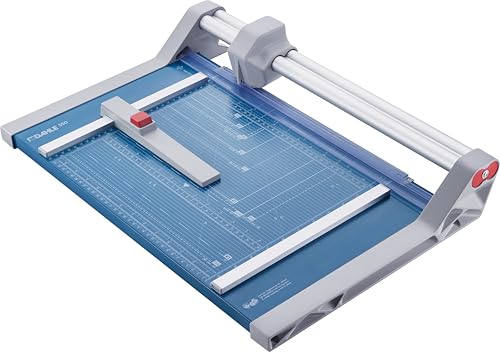
The Dahle 550 sits at the top of this list for good reason. German engineering shows in every detail — the dual-barrel guide bar isn't just a marketing term, it's a genuine structural advantage that keeps your cuts straight across the full 14-inch cutting length, even when you're working near the edges of the trimmer. At 20-sheet capacity, this handles the kind of volume that would wear out a lesser machine in weeks. You're getting a trimmer designed for real workloads, not occasional light duty.
What separates the Dahle 550 from cheaper rotary trimmers is the self-sharpening blade that cuts in both directions. You get a clean slice on the push and on the pull, which cuts your trimming time nearly in half compared to single-direction models. The automatic clamp is spring-loaded and grips your paper the moment you lower the blade arm — no slipping, no repositioning mid-cut. For anyone trimming photos, cardstock invitations, or presentation materials on a regular basis, this level of precision pays off quickly.
Build quality is premium throughout. The base is solid and heavy enough to stay put without requiring clamping to a desk. The dual guide bar keeps the cutting head from any wobble that plagues single-rail designs. If you run a small office, a print shop, or handle any volume of document finishing, the Dahle 550 is the cutter you buy once and use for years. It's priced above budget options but delivers measurable performance gains that justify every dollar.
Pros:
- Self-sharpening blade cuts cleanly in both directions
- Dual-barrel guide bar eliminates wobble and drift
- Automatic clamp holds up to 20 sheets securely
- German engineering with long-term durability
Cons:
- Higher price point than most home-use options
- Heavier and bulkier than compact models
2. Swingline ClassicCut Lite 9312 — Best Budget Pick
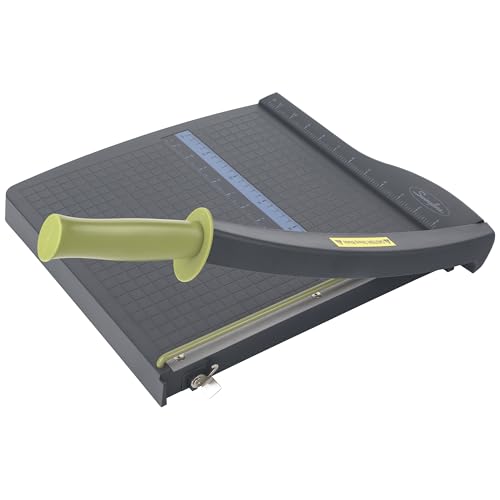
The Swingline 9312 is the paper cutter you recommend to someone who needs clean cuts without spending much. It's a no-frills guillotine trimmer with a 12-inch cutting length, a sharp blade out of the box, and an alignment grid that actually helps you line up cuts consistently. The plastic base keeps it lightweight — you can toss this in a bag for a classroom or move it between desks without thinking twice about it. It doesn't try to be more than it is, and that's its strength.
At 10-sheet capacity with 20-lb paper, this trimmer handles everyday tasks cleanly: trimming photos, cutting coupons, preparing handouts, and general paper work. It won't bog down on standard copy paper, and the guillotine blade delivers a crisp edge that competes with pricier models for light-volume tasks. The alignment grid is printed directly on the base and stays legible over time — no peeling stickers or faded markings to deal with.
Where the 9312 shows its limits is in heavy-duty applications. Cardstock above 65-lb weight or stacks beyond 8-10 sheets can cause some blade drag. The plastic construction also means you'll want to be deliberate rather than forceful with your cuts. But if your needs are modest — home use, a student workspace, or occasional office trimming — this is a capable and affordable choice. It's also compact enough to fit in a desk drawer, which is a real practical advantage.
Pros:
- Affordable entry-level price
- Lightweight and portable design
- Clean guillotine blade with accurate alignment grid
- Good for photos, paper, and everyday trimming
Cons:
- Plastic base feels less sturdy under heavy use
- Struggles with cardstock and thicker materials
3. X-ACTO Heavy Duty Wood Guillotine Trimmer — Best Heavy-Duty
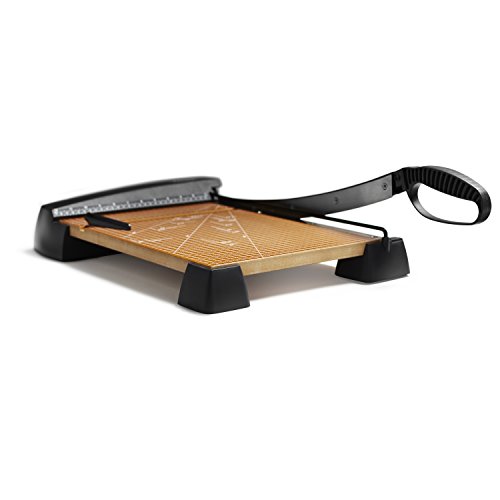
X-ACTO built its name on precision cutting tools, and the Heavy Duty Wood Guillotine Trimmer lives up to that legacy. The solid wood base is the first thing you notice — it's real maple, not a veneer or composite, and it provides a stable cutting platform that doesn't flex or shift under pressure. Rubber feet keep it locked on your desk even when you're cutting through thick stacks. This is a trimmer that commands respect in a craft room or art department.
With a 15-sheet capacity and a 15-inch cutting surface, the X-ACTO handles heavier workloads than most home trimmers in its price range. The oversized rubber grip on the blade arm gives you real control over your cuts — you can modulate pressure and speed in ways that thin metal handles don't allow. Whether you're cutting matboard for framing, thick cardstock for invitations, or layered photo paper, the blade comes down with authority and consistency.
The blade is replaceable, which matters for long-term value. When it dulls — and it will eventually — you swap it out rather than replacing the entire unit. The alignment markings on the wood base are clear and accurate, and the cutting arm locks safely in the raised position when not in use. This isn't a trimmer for someone who occasionally cuts a few sheets; it's for makers, teachers, and professionals who need a workhorse that earns its desk space every day.
Pros:
- Solid maple base provides exceptional stability
- Cuts up to 15 sheets in a single pass
- Oversized rubber grip for precise blade control
- Replaceable blade for long-term use
Cons:
- Heavier than plastic-base alternatives
- Open guillotine blade requires careful handling
4. Fiskars Precision Paper Trimmer — Best for Crafters
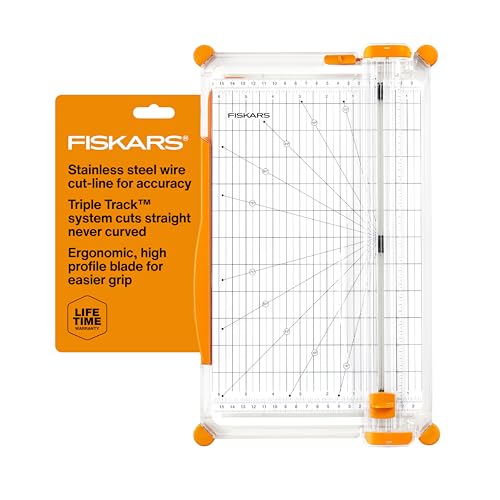
Fiskars designed the Precision Paper Trimmer specifically for crafters who demand accuracy on every cut, and the engineering backs that up. The SureCut Technology uses a stainless steel wire cut-line indicator so you always see exactly where the blade will travel before you commit to the cut — no guessing, no test cuts wasted. That alone makes it one of the most reliable tools for scrapbooking, card making, and any project where a millimeter of drift ruins the final result.
The TripleTrack system interlocks the blade and rail so tightly that curved or wobbly cuts become essentially impossible. Once you've used a trimmer with this level of rail precision, going back to single-rail designs feels immediately sloppy. The blade arm extends to 15.6 inches and accepts interchangeable blade cassettes, so you can switch between straight cuts and decorative edge styles without buying a separate tool. That versatility matters when your projects vary week to week.
If you work extensively with graph paper, printable templates, or precision craft layouts, the Fiskars delivers the kind of repeatable accuracy that lets you batch-cut dozens of identical pieces without fatigue or drift. The blade housing keeps fingers away from the cutting edge, which is a real safety advantage in shared workspaces or classrooms. The easy-swap blade cassette system also means you're never forced to use a dull blade — fresh cuts are always one quick swap away.
Pros:
- SureCut wire indicator shows exact cut line
- TripleTrack system prevents wobbly or curved cuts
- Interchangeable blade cassettes for versatile edge styles
- Enclosed blade housing for safer operation
Cons:
- Lower sheet capacity than professional models
- Replacement blade cassettes are an ongoing cost

5. Dahle 508 Personal Rotary Trimmer — Best for Home Use
The Dahle 508 brings German precision to personal and home use without the bulk or price of the professional 550. What stands out immediately is the 18-inch cutting length — longer than most home trimmers — which makes it genuinely useful for trimming tabloid-size paper, posters, and wide-format printouts without repositioning. The 5-sheet capacity keeps it honest about its role as a personal tool, but within that limit it performs excellently.
Safety is handled well here. The ground steel blade is fully enclosed in a protective blade housing, so you never have direct contact with the cutting edge during normal use. For anyone who shares workspace with kids or students, that enclosed design is worth paying attention to. The automatic clamp engages as you pull the blade arm, holding your paper flat and preventing the kind of creep that produces angled cuts when sheets shift mid-trim.
The self-sharpening mechanism means the blade performs consistently over years of use without needing professional maintenance. Rotary blades in general produce cleaner edges than guillotine blades on thin paper and photos, and the 508 is no exception — photo edges come out smooth enough that no finishing is required. If you're a student, home crafter, or light home-office user who wants Dahle quality at a more approachable price, the 508 is the logical choice.
Pros:
- 18-inch cutting length handles wide-format materials
- Enclosed blade housing for safe everyday use
- Self-sharpening rotary blade for consistent long-term performance
- Compact enough for home desk use
Cons:
- Only 5-sheet capacity — not suitable for batch trimming
- Not designed for heavy cardstock or matboard
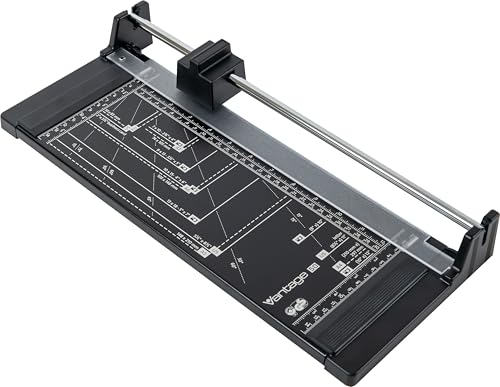
6. Dahle Vantage 50 Rotary Trimmer — Best Compact
The Dahle Vantage 50 is the entry point to the Dahle rotary lineup, and it delivers the brand's signature precision in a compact, portable form. The 12-inch cutting length covers letter-size paper perfectly, and the 5-sheet capacity is exactly right for the trimmer's size class. What you're getting here is Dahle's core DNA — self-sharpening blade, automatic clamp, enclosed blade housing — in a footprint that fits in a small home office, a student's desk, or a travel bag.
The steel blade enclosed in protective housing is the same safety-forward design you find on the more expensive Dahle models. The automatic clamp activates as you position the cutting head, so your paper stays locked in place throughout the cut. This matters more than people realize — even a slight paper shift during a rotary cut produces a visible angled edge on photos or cardstock. The Vantage 50 eliminates that problem reliably.
Compared to the Dahle 508, you're giving up 6 inches of cutting length and getting a slightly more compact unit. For most letter and A4 document trimming, the 12-inch length is more than adequate. The self-sharpening mechanism keeps performance consistent without any maintenance beyond occasional cleaning. If you don't need the extended reach of the 508 but still want Dahle's build quality at the most accessible price point in the lineup, the Vantage 50 is an easy recommendation.
Pros:
- Compact size ideal for small desks and travel
- Enclosed blade housing with Dahle's safety standard
- Self-sharpening blade for consistent long-term cuts
- Automatic clamp prevents paper shift
Cons:
- 12-inch length limits use with larger paper sizes
- 5-sheet capacity means slower throughput for batches
7. Swingline Ingento 1142 — Best High-Volume Guillotine
The Swingline Ingento 1142 is the guillotine trimmer for shared workspaces that see real daily volume. Built on a solid maple base with a die-cast metal arm, this is not a tool that flexes under pressure or shifts when you're pushing through thick stacks. The 15-sheet capacity and 15-inch cutting length put it squarely in professional territory, and the self-sharpening steel blade stays sharp through extended use without requiring any maintenance intervention.
Where the Ingento distinguishes itself is in material range. It handles everything from delicate tissue paper to heavy matboard in a single tool — that versatility is rare in this price class. The non-slip rubber feet on the solid maple base keep it anchored even during aggressive cuts, and the large cutting surface gives you comfortable room to align and position your work accurately before the blade drops. For art rooms, print stations, and high-use office environments, this is the guillotine to have.
The die-cast metal arm is noticeably stiffer than stamped-steel alternatives, which translates directly to straighter cuts. You'll feel the difference after your first session with it — the blade travels in a true vertical plane without any of the arc or wobble that affects cheaper guillotine arms. The blade locks in the raised position when you're not cutting, which is a non-negotiable safety feature in any shared workspace. Browse the full range of tools and guides at our product review section if you're outfitting a complete workspace.
Pros:
- Solid maple base and die-cast metal arm for maximum stability
- Cuts up to 15 sheets including heavy matboard and tissue
- Self-sharpening steel blade with long service life
- Safety blade lock when not in use
Cons:
- Exposed guillotine blade requires care in shared settings
- Large footprint — needs dedicated desk space
How to Pick the Best Paper Cutter
Choosing the right paper cutter in 2026 comes down to matching the tool's core specifications to your actual workflow. Don't buy for hypothetical heavy use if you're trimming a few sheets a week — and don't cheap out if you're running a daily print operation. Here are the factors that matter most.
Cutter Type: Rotary vs. Guillotine
The two dominant designs each have real tradeoffs. Rotary trimmers use a circular blade that rolls along a rail, producing extremely clean edges on photos, glossy paper, and thin materials. The blade is always enclosed, making them safer for shared or home use. Guillotine trimmers use a hinged arm with a straight blade — they're faster for thick stacks and tougher materials, but the open blade requires deliberate care. If you're primarily cutting photos, cardstock cards, or craft materials, rotary is the better choice. If you're cutting through thick stacks of documents, matboard, or mixed media, guillotine handles that work more efficiently. Paper cutters have evolved significantly over the decades, but these two fundamental designs remain dominant for good reason.
Sheet Capacity and Cutting Length
Sheet capacity is often overstated on budget models — the rating assumes perfect 20-lb copy paper under ideal conditions. A trimmer rated for 10 sheets may struggle at 8 sheets with heavier stock. When you're evaluating capacity, think about your actual paper weight, not just the sheet count. Cutting length is more straightforward: you need at least as much length as your longest document edge. Standard letter paper is 11 inches, so a 12-inch trimmer covers it comfortably. Tabloid, legal, and A3 formats need 15 inches or more. Match your cutting length to your largest frequent format, not just the most common one — trimming oversize paper on an undersize trimmer produces inconsistent results every time.
Blade Quality and Longevity
Self-sharpening blades — standard on the Dahle lineup — maintain their edge through bidirectional cutting action, meaning the blade sharpens itself against its housing as it works. This extends useful life significantly compared to fixed blades that simply dull over time. For guillotine trimmers, replaceable blades are the practical equivalent — you swap the blade rather than replacing the entire unit. When evaluating a cutter's total cost of ownership, factor in blade replacement frequency and cost. A trimmer that costs more upfront but has a self-sharpening or easily replaceable blade almost always delivers better long-term value than a cheap model that needs full replacement when the blade gives out.
Base Material and Stability
The cutting base determines how stable the tool is during use, which directly affects cut accuracy. Solid wood bases — maple in particular — provide excellent mass and grip. They don't flex under pressure, and rubber-footed models stay anchored without any additional clamping. Plastic bases save weight and cost but introduce flex that becomes more noticeable as sheet count increases. For anyone doing precision work — trimming photos for albums, cutting cards for events, or preparing presentation materials — a stable base is not an optional luxury. It's the difference between cuts that line up perfectly and ones that require a second pass.
What People Ask
What is the difference between a rotary trimmer and a guillotine paper cutter?
A rotary trimmer uses a circular rolling blade that travels along a guide rail, producing clean edges on thin materials and photos while keeping the blade enclosed for safety. A guillotine cutter uses a hinged arm with a straight blade that drops through the paper in a single motion — better for thick stacks and heavy materials, but with an exposed blade that requires careful handling. Your choice depends on the materials you cut most often and whether safety in a shared space is a priority.
How many sheets can a typical home paper cutter handle?
Most home-use trimmers handle 5 to 10 sheets of standard 20-lb copy paper per cut. The Dahle 550 reaches 20 sheets, while models like the Dahle 508 and Vantage 50 are rated for 5. Keep in mind that heavier paper — cardstock, photo paper, or 28-lb bond — reduces effective capacity by 30 to 50 percent compared to the rated spec. Always test with your actual materials rather than relying solely on the manufacturer's sheet count.
Are self-sharpening paper cutters worth the extra cost?
Yes, especially if you use the trimmer regularly. Self-sharpening blades maintain their edge over years of use without any action on your part — the sharpening happens automatically as the blade travels in both directions. On non-self-sharpening models, blade replacement is an ongoing cost and a maintenance task that many users skip until cut quality has already deteriorated significantly. For daily or weekly use, self-sharpening blades return their premium cost within the first year.
Can paper cutters cut cardstock?
Most of the models in this guide handle cardstock up to 65-lb or 80-lb weight without difficulty. The X-ACTO Heavy Duty Wood Guillotine and the Swingline Ingento 1142 are specifically designed for heavy materials including matboard. Rotary trimmers handle lighter cardstock well but can struggle with heavy chipboard or multi-layer materials. If cardstock cutting is a significant part of your workflow, check the manufacturer's maximum material weight spec in addition to the sheet count rating.
What paper cutter is best for photo trimming?
Rotary trimmers produce the cleanest edges on photos because the rolling blade minimizes surface contact and eliminates the compression that guillotine arms can cause on glossy coatings. The Dahle 550, Dahle 508, and Fiskars Precision Trimmer are all strong choices for photo work. The Fiskars SureCut wire indicator is particularly useful for trimming prints to exact dimensions without test cuts. For high-volume photo trimming in a print or lab environment, the Dahle 550's 20-sheet capacity and bidirectional blade give it the clear edge.
How do I keep my paper cutter cutting straight?
First, make sure your cutting guide and alignment markings are correctly calibrated — use a reliable ruler to verify before your first use. Always position paper against both the side guide and the back guide before cutting. For rotary trimmers, check that the blade housing slides smoothly along the rail without wobble — if it does wobble, the rail may need tightening. Clean the blade and rail periodically to remove paper dust and adhesive residue. On guillotine models, a worn or loose blade arm pivot is the most common cause of drift — inspect the pivot point and tighten if needed.
Buy on Walmart
- Dahle 550 Professional Rotary Trimmer, 14" Cut Length, 20 Sh — Walmart Link
- Swingline Paper Cutter, Guillotine Trimmer, 12" Cut Length, — Walmart Link
- X-ACTO Heavy Duty Wood Guillotine Paper Trimmer, 15" Cutting — Walmart Link
- Fiskars Precision Paper Trimmer, Easy and Accurate Crafting — Walmart Link
- Dahle 508 Personal Rotary Trimmer, 18" Cut Length, 5 Sheet C — Walmart Link
- Dahle Vantage 50 Rotary Trimmer, 12" Cut Length, 5 Sheet Cap — Walmart Link
- Swingline Paper Trimmer, Guillotine Paper Cutter, 15" Cut Le — Walmart Link
Buy on eBay
- Dahle 550 Professional Rotary Trimmer, 14" Cut Length, 20 Sh — eBay Link
- Swingline Paper Cutter, Guillotine Trimmer, 12" Cut Length, — eBay Link
- X-ACTO Heavy Duty Wood Guillotine Paper Trimmer, 15" Cutting — eBay Link
- Fiskars Precision Paper Trimmer, Easy and Accurate Crafting — eBay Link
- Dahle 508 Personal Rotary Trimmer, 18" Cut Length, 5 Sheet C — eBay Link
- Dahle Vantage 50 Rotary Trimmer, 12" Cut Length, 5 Sheet Cap — eBay Link
- Swingline Paper Trimmer, Guillotine Paper Cutter, 15" Cut Le — eBay Link
Next Steps
- Check the current price on your top pick — prices on the Dahle 550 and Swingline Ingento fluctuate frequently, and a discount can shift the value calculation in your favor.
- Measure your most common paper size before ordering — confirm the trimmer's cutting length covers it with at least an inch to spare for alignment.
- Test with your actual paper weight — if you regularly cut cardstock or photo paper, order one sheet-capacity step above your expected need to account for the material weight reduction.
- If you're pairing your cutter with a printer, review the best scanner for multiple pages to complete your document processing station.
- Compare your shortlisted models side by side using the comparison table above, then click through to Amazon to confirm the current in-stock status before committing.
 |  |  |  |
About Rachel Kim
Rachel Kim spent five years as a merchandise buyer for a national office supply retail chain, evaluating printers, scanners, and printing accessories from Canon, Epson, HP, Brother, Dymo, and Zebra before approving them for store inventory. Her buying process involved hands-on testing against competing models, reviewing long-term reliability data from vendor reports, and vetting price-to-performance claims that manufacturers routinely overstated. That structured evaluation experience translates directly into the kind of buying guidance that cuts through marketing language and focuses on what actually matters for a specific use case. At PrintablePress, she covers printer and printing equipment reviews, buying guides, and head-to-head product comparisons.


Get some FREE Gifts. Or latest free printing books here.
Disable Ad block to reveal all the secret. Once done, hit a button below
| | | |