How Thick Is Printer Paper
by Karen Jones · April 17, 2022
Standard printer paper is 0.05 to 0.1 millimeters thick — roughly 0.002 to 0.004 inches, depending on the paper's weight class and grade. That narrow range affects print quality, machine compatibility, and finished project durability in ways most users don't consider until something goes wrong. Understanding how thick is printer paper matters whether the goal is sharp office documents, vibrant photo prints, or craft projects that hold up to real handling. The printer guides section covers compatible paper specs for dozens of printer models across every major printing category.

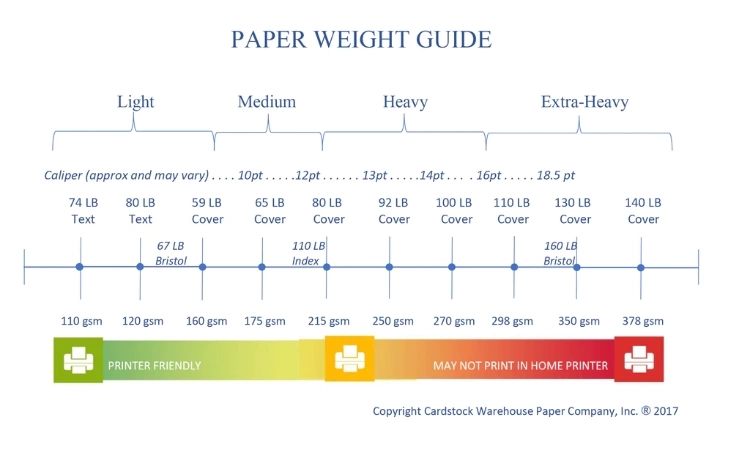
Paper thickness is measured in several ways, and the terminology can be genuinely confusing. GSM (grams per square meter) is the most universal metric — a higher GSM means denser, heavier, and generally thicker paper. In the United States, paper weight is also expressed in pounds (lb), which refers to the weight of 500 sheets of the parent sheet size for a given paper category. Because different categories — bond, text, cover — use different parent sheet dimensions, a "20 lb bond" and a "20 lb cover" are not the same thickness at all. Caliper measurement in millimeters or thousandths of an inch provides the most direct physical thickness reading and is often the critical spec for cutting machines, laminators, and specialty printing equipment.
Most standard copy paper falls between 75 and 90 GSM, with 20 lb bond (75 GSM) and 24 lb bond (90 GSM) being the most common in home and office environments. Specialty papers for inkjet, laser, photo, and cardstock applications fall well outside that range in both directions. Knowing where a given paper sits in the thickness spectrum — and why that matters for a specific task — helps users avoid costly misprints, equipment damage, and frustrating results on everything from routine documents to professional-grade craft projects.
Contents
- Choosing Paper Thickness: When It Makes a Difference
- Advantages and Trade-Offs of Different Paper Weights
- Best Practices for Matching Paper Thickness to the Job
- Common Paper Thickness Mistakes and How to Avoid Them
- Paper Thickness in Real Print Projects
- Building a Long-Term Paper Strategy
- Practical Tips for Getting the Most from Any Paper Weight
- Common Myths About Printer Paper Thickness, Debunked
- Next Steps
Choosing Paper Thickness: When It Makes a Difference
Not every print job requires careful deliberation over GSM ratings. Standard 20 lb bond paper handles most everyday tasks reliably. But there are specific situations where getting the paper thickness right is the difference between a professional result and a wasted print run — and knowing which category a job falls into saves both time and material costs.
Projects That Demand Precise Thickness
Certain applications have narrow tolerance windows where paper weight directly determines success or failure:
- Photo printing: Inkjet photo printers are designed for papers in the 200–300 GSM range. Thinner papers cause ink bleed-through and weak color saturation that photo stock prevents.
- Double-sided printing: Paper under 90 GSM frequently shows show-through, where text from one side bleeds visibly to the other — readable only if held up to light, but distracting in professional contexts.
- Heat press and sublimation transfers: Sublimation paper is engineered at around 100–120 GSM specifically to release dye under heat without warping, sticking, or scorching. Standard copy paper produces inconsistent dye transfer and can damage the press surface. For anyone building a sublimation workflow, understanding how the best Epson printers for sublimation handle specialized paper is foundational to good results.
- Cardstock and craft cutting: Cricut and vinyl cutting machines require materials within specific thickness ranges. Too thick and the blade won't penetrate cleanly; too thin and the material tears or shifts during the cut pass.
- Business cards and invitations: These typically require 300–350 GSM for the rigid, substantial feel that recipients associate with professional quality.
Tasks Where Standard Paper Works Fine
For everyday documents — internal reports, draft prints, reference sheets, and general correspondence — standard 75–90 GSM paper is entirely adequate. Multi-function office printers are calibrated precisely for this range, and running heavier stock through machines not rated for it risks paper jams, roller wear, and voided warranties.
Most laser printers handle up to 163 GSM comfortably, while inkjet models vary more widely. Checking the printer's media specifications before switching paper weights avoids most compatibility surprises. The printer manual is the authoritative source — manufacturer websites also publish media spec sheets for most current models.
Advantages and Trade-Offs of Different Paper Weights
Understanding the range of available paper weights — and what each one realistically delivers — helps users make informed decisions rather than defaulting to whatever is on the shelf. Both lighter and heavier papers have legitimate roles in a well-managed print setup.
Benefits of Heavier Paper
Heavier paper (90 GSM and above) offers several clear advantages over standard stock:
- Better ink and toner adhesion with less bleed-through on both sides
- More durable finished products — less prone to tearing, dog-earing, or crumpling
- More professional appearance for client-facing materials
- Required for certain finishing processes like lamination, embossing, and die-cutting
- Holds color more accurately, particularly for saturated graphics and photographs
For craft applications — particularly those involving precision trimming with a paper cutter — heavier cardstock is often essential for clean edges and structural integrity in the finished piece.
Drawbacks to Consider
Heavier paper comes with real trade-offs that influence purchasing decisions:
- Higher cost per sheet — sometimes significantly so for specialty stocks
- Not compatible with all printers, particularly older or entry-level machines
- Slower print speeds in many machines as feed mechanisms adjust
- Adds bulk and weight to finished documents when mailing or transporting
- Requires more careful storage to prevent moisture absorption and warping
The table below summarizes common paper weight categories, their approximate thickness, and the applications each handles best:
| Paper Type | US Weight (lb) | GSM | Approx. Thickness | Common Uses |
|---|---|---|---|---|
| Lightweight Copy | 16 lb bond | 60 GSM | 0.05 mm | Draft prints, fax, high-volume internal use |
| Standard Copy Paper | 20 lb bond | 75 GSM | 0.05–0.07 mm | Everyday office printing, general documents |
| Premium Copy / Bond | 24 lb bond | 90 GSM | 0.07–0.09 mm | Presentations, proposals, double-sided prints |
| Inkjet Photo Paper | — | 200–280 GSM | 0.19–0.27 mm | Photos, high-resolution graphics |
| Light Cardstock | 65 lb cover | 176 GSM | 0.17 mm | Postcards, folded cards, light crafts |
| Heavy Cardstock | 110 lb cover | 300 GSM | 0.28 mm | Business cards, premium invitations |
| Sublimation Paper | — | 100–120 GSM | 0.10–0.12 mm | Heat press and dye-sublimation transfers |

Best Practices for Matching Paper Thickness to the Job
Selecting the right paper thickness is part technical spec-matching and part practical experience. Following a few consistent guidelines eliminates most paper-related print problems before they start — and makes it easier to replicate good results across different projects.
Matching GSM to Printer Type
Different printer technologies handle paper differently. According to standardized paper grammage definitions, most office-grade printers are optimized for 75–90 GSM stock. Going outside that range requires checking the printer's rated media capacity carefully.
- Laser printers: Generally handle 60–163 GSM. Heavier stock risks fuser roller damage and inconsistent toner adhesion.
- Inkjet printers: More flexible — many handle up to 300 GSM using a straight-through rear feed path rather than the standard curved path.
- Thermal printers: Use proprietary roll stock where caliper matters more than GSM, since the paper must contact the heating element at precise pressure.
- Wide-format printers: Designed for specialty media including vinyl, canvas, banner stock, and backlit film — each with its own caliper specifications.
Understanding the printer type in use is foundational. The types of printers guide breaks down the mechanics of each category and the media specs each technology handles best.
Reading Manufacturer Specifications
Every printer ships with a media specification document — often buried in the user manual or available as a downloadable PDF from the manufacturer's support page. This document lists minimum and maximum paper weight in both GSM and lb, maximum physical thickness in millimeters or points, and acceptable media types including coated, uncoated, glossy, and matte surfaces.
Matching paper to these specs preserves print quality and protects the machine's internal rollers, feed mechanisms, and fuser assembly from premature wear. When introducing an unfamiliar paper to any printer, running a small test batch before loading a full ream is the most reliable method for catching feed and alignment issues before they consume an entire supply of expensive media.
Pro tip: When switching to a new paper weight, run a 10-sheet test before loading the full ream — this catches feed issues and alignment problems before they waste an entire print job and potentially strain the machine's intake rollers.
Common Paper Thickness Mistakes and How to Avoid Them
Even experienced users make preventable errors when working with paper weight. Most of these mistakes fall into predictable patterns that are straightforward to avoid once recognized.
Overloading the Paper Tray
Heavier paper occupies more physical space per sheet. A tray designed for 500 sheets of 75 GSM stock may safely hold only 250 sheets of 120 GSM paper at the same fill level. Overloading causes feed failures, multi-sheet picks where the printer grabs two or three sheets simultaneously, and misalignment that produces skewed or cropped prints.
The capacity line marked inside most paper trays is calibrated for standard 20 lb bond paper. When using heavier stock, staying meaningfully below that line — not just at it — is the safer approach. Many printer manuals include weight-adjusted tray capacity tables that specify the correct fill level for different paper grades.
Ignoring Printer Compatibility
Feeding paper that exceeds a printer's rated thickness is the most common cause of internal roller damage, and the damage often accumulates gradually rather than causing a single obvious failure. Specific patterns to watch for include:
- Running heavy cardstock through a machine rated only for bond paper weights
- Using the wrong feed path — many printers have a straight-through rear path for thick media, and skipping this step causes jams in the curved standard path
- Attempting to print on paper engineered for a different print technology — such as thermal paper fed through a laser printer
- Confusing paper weight systems: US lb ratings and GSM values don't convert on a 1:1 basis, and 20 lb bond is a very different product from 20 lb cover stock
For users working across multiple printer types — laser, inkjet, or LED — each machine has distinct tolerances. The cardstock guide explains how cover-weight papers differ from bond and text stocks in composition and behavior, which helps considerably when sourcing paper for multi-machine environments where different paper grades are in regular use.
Paper Thickness in Real Print Projects
Abstract specs become considerably clearer when mapped to actual projects. How thick is printer paper stops being a theoretical question when the right answer determines whether a finished piece meets professional standards or goes in the recycling bin.
Home Office and School Use
For everyday documents — term papers, invoices, spreadsheets, internal memos — 20 lb bond (75 GSM) is the standard and entirely adequate default. It feeds reliably through virtually any printer, costs less per sheet than premium alternatives, and handles both text and moderate graphics without issue.
Stepping up to 24 lb bond (90 GSM) makes a measurable difference for specific use cases:
- Presentations and proposals: Thicker paper feels more substantial in the hand, which influences how clients and recipients perceive the content before reading a word.
- Double-sided documents: Reduced show-through makes two-sided prints genuinely easier to read without the distraction of text bleeding through from the reverse side.
- Color-heavy printing: Heavier paper handles ink more evenly, producing more accurate color reproduction and less cockling (the wave-like warping that occurs when thin paper absorbs too much ink).
Crafts, Vinyl, and Specialty Printing
Craft and specialty applications push paper thickness decisions into far more specific territory than office printing. Sublimation printing requires papers engineered specifically for dye transfer under heat and pressure — standard copy paper simply doesn't release the dye cleanly, and it can scorch or bond to the press surface. Dedicated sublimation paper at 100–120 GSM is the functional baseline for consistent transfers.
For Cricut print-then-cut projects, 65–80 lb cover cardstock gives the blade a clean cutting path without tearing. Thinner paper tends to shift or shred during the cut; thicker material can strain smaller blade assemblies and produce ragged edges on intricate designs.
Screen printing and heat press transfer work uses transfer papers with specific caliper tolerances — too thick and applied pressure distributes unevenly across the platen, creating blotchy or patchy transfer results. Vinyl cutting doesn't involve paper in the conventional printing sense, but the carrier sheet backing thickness affects how media feeds through cutting machines, following the same fundamental logic as printer paper selection.
Building a Long-Term Paper Strategy
Managing paper for ongoing print operations — whether a home office, a small crafting business, or a school — benefits from a consistent, forward-thinking approach rather than reactive ad hoc purchasing. Having the right stock available before a project starts prevents the costly disruption of mid-project supply problems.
Stocking a Versatile Paper Inventory
A well-organized paper inventory covers three core categories at minimum:
- Standard bond (75–90 GSM): The high-volume workhorse. Buy in bulk — case quantities offer the best per-sheet cost and this paper is used constantly.
- Presentation or premium bond (90–120 GSM): For client-facing materials, résumés, and double-sided work. Keep a smaller stock on hand — one or two reams at a time is usually sufficient for moderate use.
- Specialty stock (cardstock, photo paper, sublimation paper): Purchase in quantities matched to actual project frequency. These papers have more limited shelf lives once opened — moisture, dust, and temperature fluctuations affect coating integrity and feed performance over time.
Organizing by paper type with clear labeling on storage prevents costly mix-ups, particularly in environments where multiple printer models with different paper tolerances are in regular use. Keeping different paper grades physically separated avoids the frustrating scenario of loading the wrong stock for a critical job.
Budgeting for the Right Paper Stock
Paper cost scales directly with weight and surface treatment. Standard 20 lb bond is among the most affordable print media available. Moving to 28 lb or 32 lb bond roughly doubles the per-sheet cost. Cardstock, photo paper, and sublimation-specific papers cost significantly more per sheet, and some specialty coated stocks are priced at a premium that makes waste particularly expensive.
The practical approach is to use the lightest paper that genuinely meets each project's quality requirements. Not every print job needs premium stock, and indiscriminate use of heavy paper inflates supply costs without improving outcomes in applications where standard paper is adequate.
Mixing paper grades strategically — standard for drafts, internal documents, and proofing; premium for final outputs — keeps costs manageable without compromising quality where it counts. Long-term, tracking paper consumption by type helps identify patterns that might justify buying in larger quantities or sourcing from a wholesale supplier.
Practical Tips for Getting the Most from Any Paper Weight
Small adjustments in how paper is selected, handled, stored, and tested can meaningfully improve print outcomes regardless of what GSM or lb rating is being used. Most of these practices require minimal effort but prevent common and frustrating failures.
Testing Before Committing to a Bulk Order
Before purchasing a full ream or case of an unfamiliar paper, running a single-sheet or small batch test through the intended printer catches most compatibility issues before they become expensive. Key things to evaluate during a test run:
- Feed behavior: Does the sheet advance smoothly and straight, without hesitation, skewing, or jamming at the intake rollers?
- Print quality: Is ink or toner laying down evenly across the surface without smearing, beading, or uneven absorption?
- Exit condition: Does the sheet exit flat, or does it curl, cockle, or warp significantly after printing?
- Show-through: For double-sided applications, is ink or toner visible from the reverse side under normal reading conditions?
Catching these issues with a 10-sheet test rather than discovering them mid-way through a 500-sheet print run is the most direct way to protect both materials and time. Many paper suppliers provide sample packs specifically for this purpose.
Storage and Handling
Paper absorbs moisture from the surrounding environment, which affects its caliper — the physical thickness — and its feed behavior. A ream that sat open in a humid environment for a week may have absorbed enough moisture to affect how reliably it feeds through fine-tolerance printers.
Best practices for paper storage that most users overlook:
- Keep paper in its original sealed packaging until use — the wrapper is a moisture barrier, not just packaging
- Store flat on shelves rather than on edge to prevent gravitational warping across the stack
- Maintain storage areas at moderate humidity — ideally 35–55% relative humidity — and away from exterior walls in climates with significant seasonal humidity variation
- Fan paper gently before loading to separate sheets and reduce static charge that causes multi-picks
These habits matter most for specialty papers. Photo paper and sublimation paper are particularly sensitive to humidity — stored improperly, coatings can delaminate or become tacky, and sheets may feed inconsistently. Handling photo-grade stock with clean, dry hands also prevents skin oils from transferring to the coated surface, where they appear as fingerprint-shaped blotches in the finished print.
Common Myths About Printer Paper Thickness, Debunked
Misconceptions about paper weight circulate widely, even in professional print environments. Addressing these directly helps users base purchasing and printing decisions on accurate information rather than assumptions that can lead to wasted material and equipment problems.
Myth vs. Reality Breakdown
Myth: Heavier paper always produces better prints.
Reality: Print quality depends on the match between paper and printer technology, not simply on GSM number. A 300 GSM cardstock run through a printer rated for 160 GSM maximum won't produce better prints — it will produce jams and potentially damage the machine's feed path and rollers. Heavier paper produces superior results only when the printer is specifically rated to handle it and the paper's coating or surface is matched to the print technology in use.
Myth: All paper labeled "20 lb" is the same thickness.
Reality: Paper weight categories — bond, text, cover — each use different parent sheet sizes for the lb rating. As a result, 20 lb bond, 20 lb text, and 20 lb cover are three meaningfully different thicknesses. Bond paper is the lightest of the three at any given lb number. This is one of the most common sources of ordering confusion and frequently results in users receiving paper that behaves very differently from what they expected.
Myth: Higher GSM paper absorbs ink better and is therefore always preferable for inkjet printing.
Reality: Ink absorption and spread behavior depend primarily on surface coating and treatment, not GSM alone. An uncoated 200 GSM paper may produce substantially worse inkjet results than a coated 90 GSM sheet, because it's the coating — not the mass — that controls how ink spreads, dries, and bonds to the surface. Inkjet paper is engineered specifically for controlled ink spread; high GSM without appropriate coating can cause ink to bleed and spread unpredictably.
What the Numbers Actually Tell You
GSM describes mass per unit area. Lb ratings describe parent-sheet weight. Both correlate with thickness but neither directly measures it. Caliper — expressed in millimeters or points (thousandths of an inch) — is the direct physical thickness measurement, and it's the spec that matters most for compatibility with cutting machines, laminators, heat presses, and printers with strict media thickness limits.
When precision matters — as in heat press transfers, die-cutting, or lamination — looking at the caliper spec rather than the GSM gives the most reliable answer to whether a paper will physically fit and feed correctly through a given machine or process. Most premium and specialty paper brands publish caliper data alongside GSM on their product pages; for standard office papers, manufacturers typically publish this in their media compatibility guides.
Next Steps
- Check the media specification sheet for every printer currently in use — note the minimum and maximum GSM ratings and any straight-through feed path requirements for heavy stock.
- Audit the current paper supply and identify which grades are being used for which tasks — then confirm those matches are actually correct for the printer and project type.
- Run a test print with any specialty paper (photo, cardstock, sublimation) before committing to a bulk purchase or a large print job — evaluate feed, print quality, and exit condition.
- Review paper storage conditions: ensure remaining stock is sealed, stored flat, and kept away from high-humidity areas, particularly for photo and sublimation papers.
- Establish a simple inventory with three paper categories — standard bond, premium bond, and specialty stock — and set reorder quantities that prevent mid-project shortages without overstocking papers with shorter shelf lives.
 |  |  |  |

About Karen Jones
Karen Jones spent seven years as an office manager at a mid-sized financial services firm in Atlanta, where she was responsible for a fleet of more than forty inkjet and laser printers spread across three floors, managed ink and toner procurement contracts, and handled first-line troubleshooting for connectivity failures, paper jams, and driver conflicts before escalating to IT. That daily exposure to printers from Canon, Epson, HP, and Brother under real office conditions gave her a practical command of setup, maintenance, and common failure modes that spec sheets never capture. At PrintablePress, she covers printer how-to guides, setup and troubleshooting tips, and practical advice for home and office printer users.


Get some FREE Gifts. Or latest free printing books here.
Disable Ad block to reveal all the secret. Once done, hit a button below
| | | |